1. Executive Summary
Most of the conversation about governing enterprise AI focuses on what happens when a workflow runs: validating outputs, constraining actions, logging every decision. That work matters, and appRules has invested deeply in it through GuardRailed Execution. But execution guardrails share one limitation: they catch problems that have already been built into a workflow.
The cheapest, safest error is the one that can never be authored. GuardRailed Design is the principle that every step of building an AI workflow — choosing data, writing a prompt, defining a condition, configuring an action — should be channeled through guided choices drawn from what is actually valid, rather than typed freely and checked later. And every sensitive record created along the way can be locked, so only the right people can see or change it.
If it can't be valid, it can't be built.
This paper explains why a carefully channeled design experience delivers more value to enterprises than natural language for everything, how appRules applies the principle across its platform, and how GuardRailed Design and GuardRailed Execution together protect data integrity across the entire lifecycle of an AI workflow.
2. The Promise of Natural Language for Everything
The appeal is easy to understand. Describe what you want in a sentence, and an AI assistant generates the workflow, the prompt, the mappings, and the logic. For demonstrations, prototypes, and personal productivity, it is genuinely impressive — and it lowers the barrier to getting started.
Natural language is also exceptionally good at one thing: expressing intent. People think in goals — "flag high-risk applications," "route invoices that need approval" — not in field names and operators. Any modern platform should let them express intent that way, and appRules does.
The question is not whether natural language belongs in enterprise AI. It is whether natural language should be the only way every detail of a production workflow gets specified — down to which field is read, which value is valid, and which action is taken.
3. Where It Breaks in the Enterprise
When every detail is generated from free-form language, a new class of problems appears — problems that are subtle precisely because the output looks right.
🎭 Plausible but Invalid
A generated configuration can reference a field that sounds right but doesn't exist, or set a picklist value that was never a legitimate option. It reads correctly — and fails, or worse, silently writes bad data.
🔁 Not Reproducible
The same request, phrased slightly differently or run on a different day, can produce a different workflow. Enterprises need a design to mean the same thing every time it's read.
🔍 Review Burden Moves, It Doesn't Disappear
Someone still has to verify every generated mapping, filter, and action against the real systems. The work shifts from building to auditing — often by the same scarce experts.
📜 Hard to Audit
Regulated industries must show why a workflow behaves the way it does. "The assistant generated it" is not an answer an auditor accepts.
None of these problems shows up in a demo. All of them show up in production — against real CRM, ERP, and HR systems, at scale, with real consequences.
4. Integrity Is Won at Design Time
Software engineering learned this lesson long ago. A typed language rejects an invalid assignment the moment it is written, instead of crashing in production. The earlier an error is caught, the cheaper it is to fix — and the fewer people it ever reaches.
The same principle applies to AI workflows. Execution guardrails are essential, but they detect problems after they exist. Design guardrails prevent them from existing at all:
- A field that can only be selected from the live schema can never be misspelled or invented.
- A value that can only be chosen from a live picklist can never be invalid.
- An action that can only be configured through typed properties can never receive the wrong kind of input.
- A condition that is defined once and reused can never drift into three slightly different versions across three workflows.
Design guardrails stop errors from being built. Execution guardrails catch the rest.
5. Natural Language for Intent, Guided Design for Integrity
GuardRailed Design is not a rejection of natural language. It is a deliberate division of labor: let language do what it does best, and let structure do what it does best.
💬 Natural Language — for Intent
Where flexibility and nuance add value.
- The instructions inside a SmartPrompt
- Natural-language conditions in AI Powered Decision Tables
- Invoking governed workflows from AI clients through the appRules MCP Server
- The reasoning an AI returns with its decisions
🧭 Guided Design — for Integrity
Where precision and validity are non-negotiable.
- Which entities, fields, and records are used
- Which values are valid for each field
- Which conditions gate execution, and how they're evaluated
- Which actions run, with which typed inputs
The result is a workflow where the AI contributes judgment, and the platform guarantees that everything around that judgment is structurally sound.
6. The GuardRailed Design Toolkit
In appRules, practically every step on the way to a prompt — and every step after it — is guided by dialogs driven by the platform's living metadata model. Here is how that looks in practice.
Choose From What Actually Exists
appRules inventories every connected data source — entities, columns, foreign keys, primary keys, and picklists with their valid entries. The designer uses that model to power field pickers, query building, and inline validation, so a builder only ever sees real, current fields and relationships.
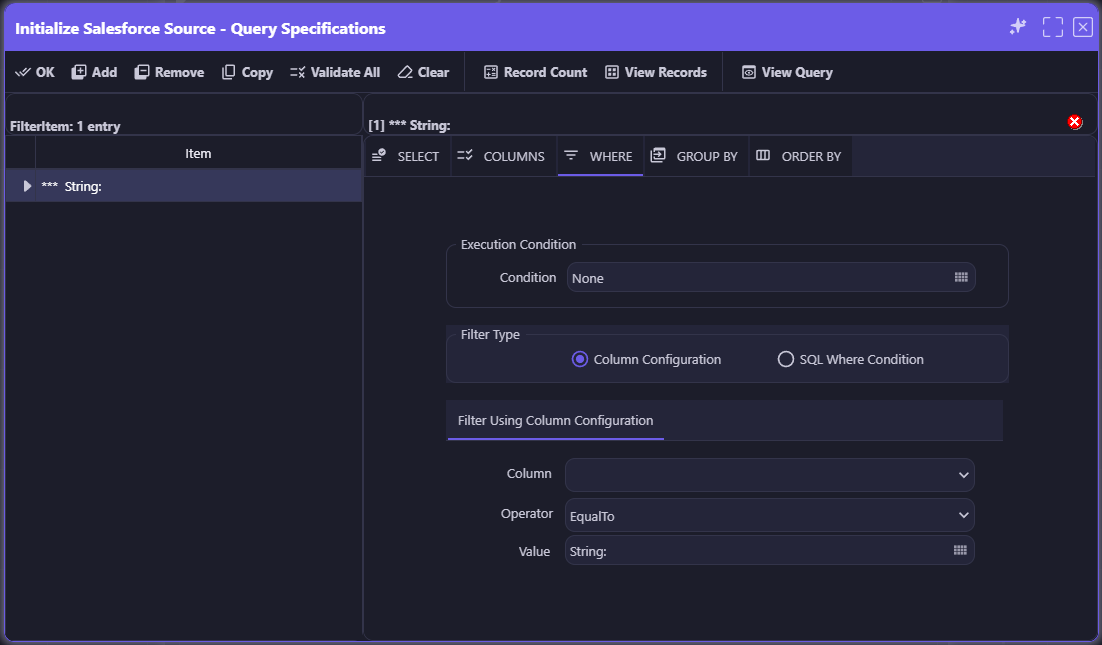
Filters are built by choosing a column, an operator, and a value — not by typing a query. Every column offered is one that really exists in the source.
Controlled Vocabularies, Not Free Text
Every picklist and its valid entries are captured from the live source and kept current with Refresh Metadata. When a field is defined with a picklist, builders must choose from it — conditions, validations, and AI-driven classifications can only select values that are genuinely valid for the field, so an invalid value is never introduced in the first place.
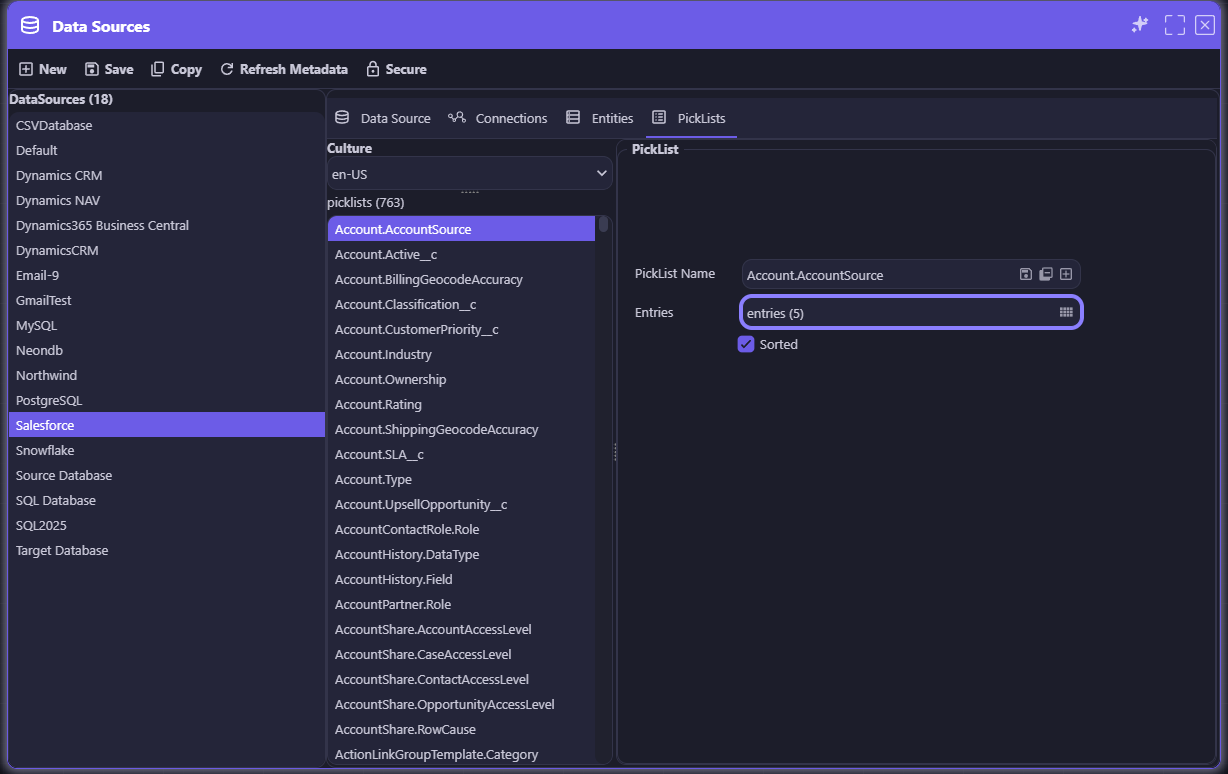
763 Salesforce picklists, each with its allowed entries and sort order resolved — ready to populate a dropdown without a single manual lookup.
Every Field Mapped, Every Type Visible
Field mapping is where data integrity is most often lost — through silent truncation, type mismatches, or fields left out by accident. In the Mapping Activity, both the source value and the target field are picked from the metadata model, and every row shows the source type and size beside the target's output type — so a mismatch is visible while the mapping is being built, not discovered when data is clipped in production.
Each field is either mapped or explicitly excluded, never forgotten. Auto Map matches fields by name and by field alias against the real fields in the metadata model — fast, but grounded in what actually exists. Validate All checks every row in full, including type compatibility. And proven mappings can be saved as templates and reused, or copied from another activity, so the same data is mapped the same way everywhere.
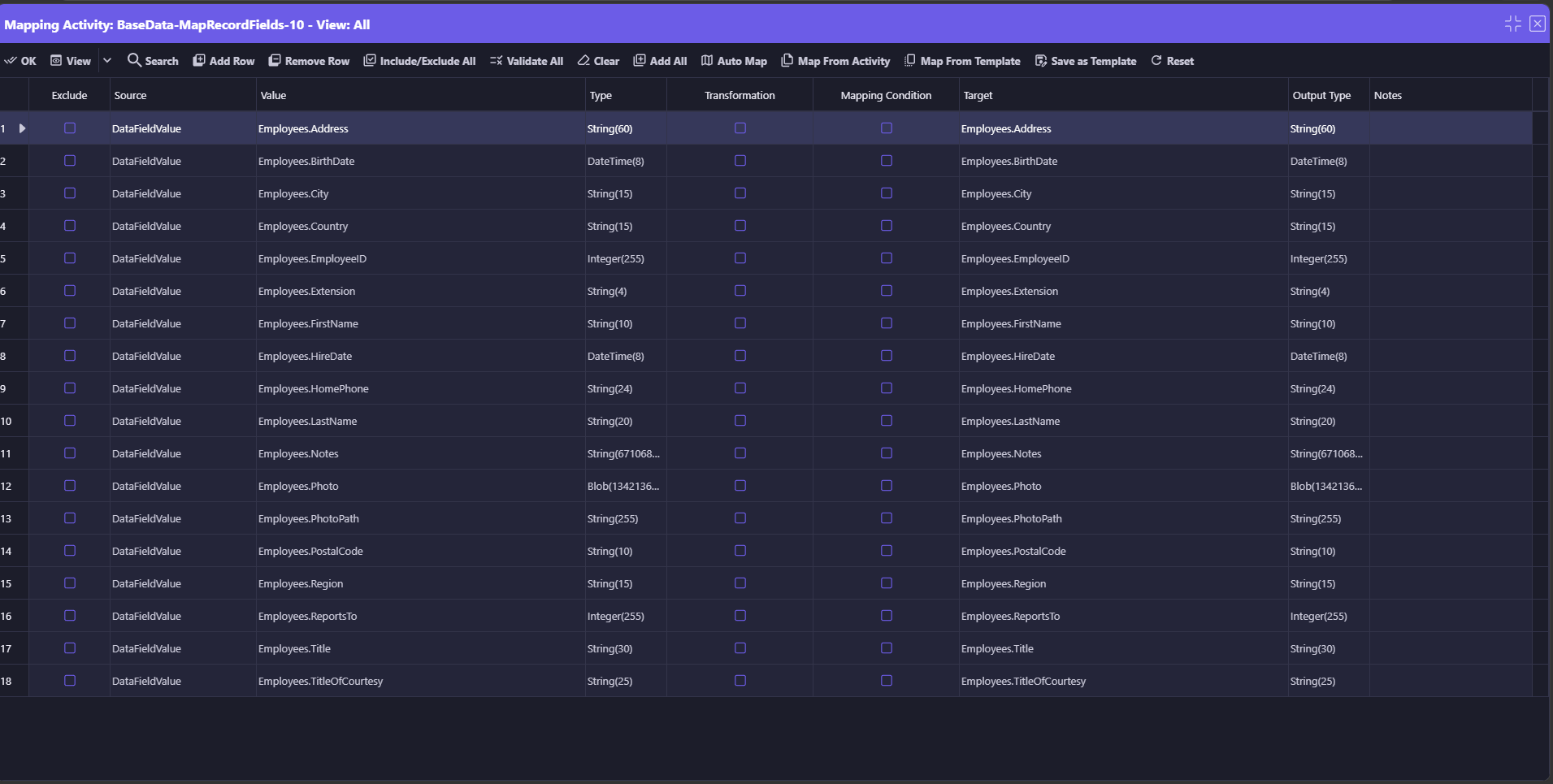
The Mapping Activity: every source field beside its target, with source type and target output type side by side — String(60) to String(60), DateTime(8) to DateTime(8) — plus Validate All, Auto Map, and reusable mapping templates.
Field-level logic stays just as channeled. Each row can optionally carry a Transformation, a Mapping Condition, or both — a straight field-to-field copy needs neither. A Transformation is a set of actions applied to the field, selected by name rather than written inline: built-in actions such as Capitalize, ConvertHtmlToPlainText, or RemoveAllWhitespace, or user-defined actions created for your own business rules. A Mapping Condition is any predefined Condition from the Conditions Matrix, evaluated to decide whether the row should be mapped at all. When used, both are flagged on the row itself, and a Notes column records why — so the entire mapping can be read and reviewed in one screen.
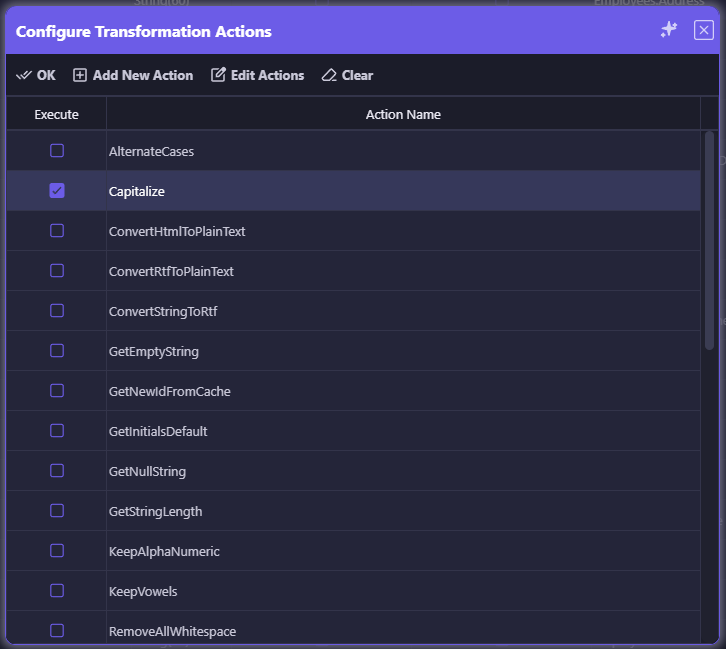
Configure Transformation Actions: optional field transformations are selected by name from built-in and user-defined actions — here, Capitalize — rather than written inline.
Context Picked for Integrity
Prompts are where free-form text is most tempting — and where a mistyped variable does the most damage, because the AI will happily answer a question built on missing or wrong context. In the SmartPrompt Builder, the Context Picker lets builders select and configure dynamic context variables without writing code. Builders can still type a variable when that's faster — but picking it guarantees it maps to a real source, and Partial Preview confirms that any typed variable resolves correctly before the AI is ever called.

The Context Picker: the instructions are natural language; the context they draw on can be picked from real sources.
Typed Actions From a Validated Library
Instead of generating arbitrary code, builders select actions from a categorized library of validated operations and configure each through typed properties. Every parameter has a defined type and purpose, so the action can't be given the wrong kind of input.

Configuring an action: select it from a categorized tree, name the instance, and fill in typed properties — here, the AMORDEGRC depreciation function's Basis, Cost, Rate, and Date parameters.
Conditions Defined Once, Reused Everywhere
Business logic is captured as named, reusable conditions in a single Conditions Matrix. When an AskAI activity needs an Execution Condition, the Select Condition dialog offers those same definitions — with explicit options to re-evaluate, reuse an existing result, or negate it. One definition means one meaning, everywhere it's used.
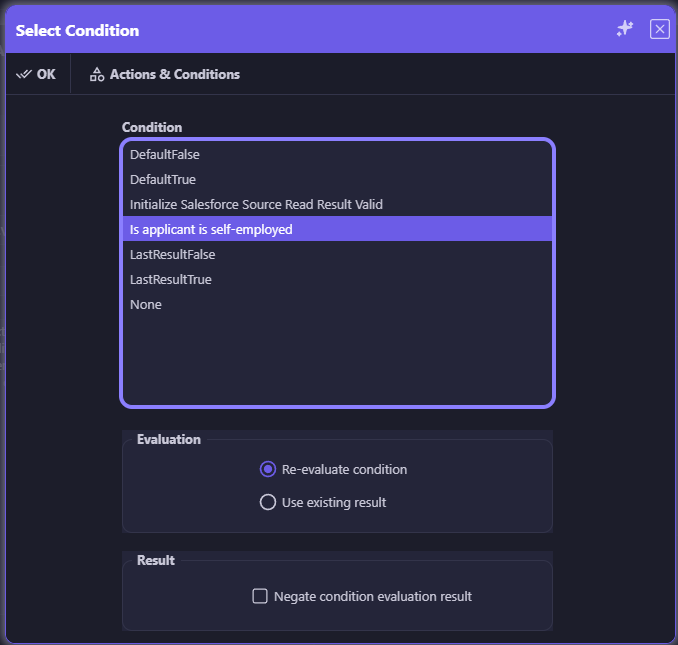
The Select Condition dialog draws from the same reusable Conditions Matrix used across appRules.
Structured AI Composition
Even multi-step AI reasoning is channeled. An AskAI Action Chain lays out each step — pre-condition, prompt, post-condition, action — as a row in one readable table, rather than as logic buried in generated code. Business stakeholders and auditors can read exactly what the chain will do.

An AskAI Action Chain: every step of a multi-turn AI process, visible and governed in one table.
Validate Before You Spend a Token
Before any AI call is made, Partial Preview merges real context variables into the prompt template with the AI never called — catching mapping errors and malformed context at zero cost. Builders confirm exactly what the AI will see before it sees anything.
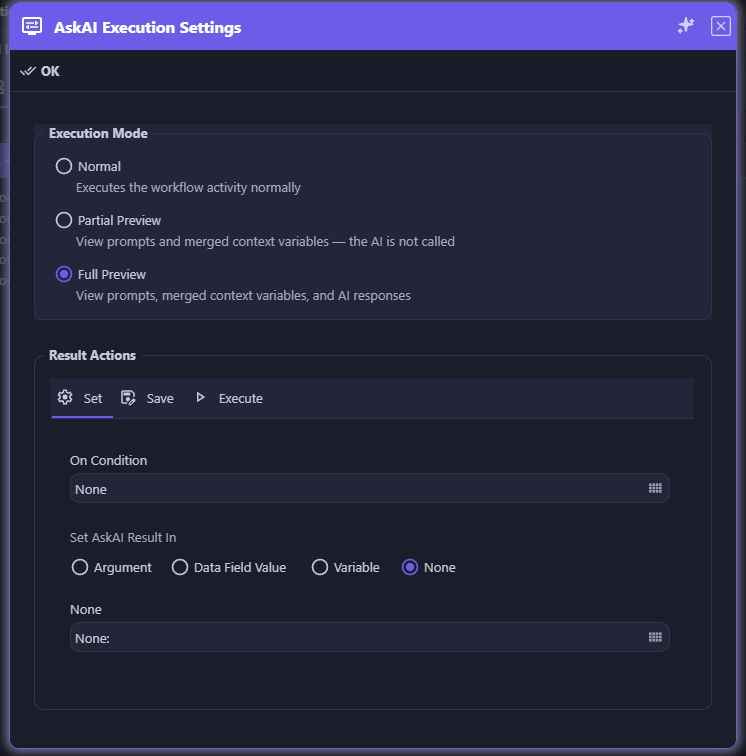
Normal, Partial Preview, and Full Preview execution modes — validation is built into the design loop.
Sensitive Records Protected While You Build
Design-time integrity also means control over who can see and change what's been built. Any sensitive record — a data source connection, an AI asset, an action or condition, a workflow activity — can be locked with the same Secure button. Once secured, viewing or editing it requires the right credential; everyone else, including other authenticated users, simply doesn't see it. A tested condition or an approved connection can't be quietly altered by someone who shouldn't touch it.
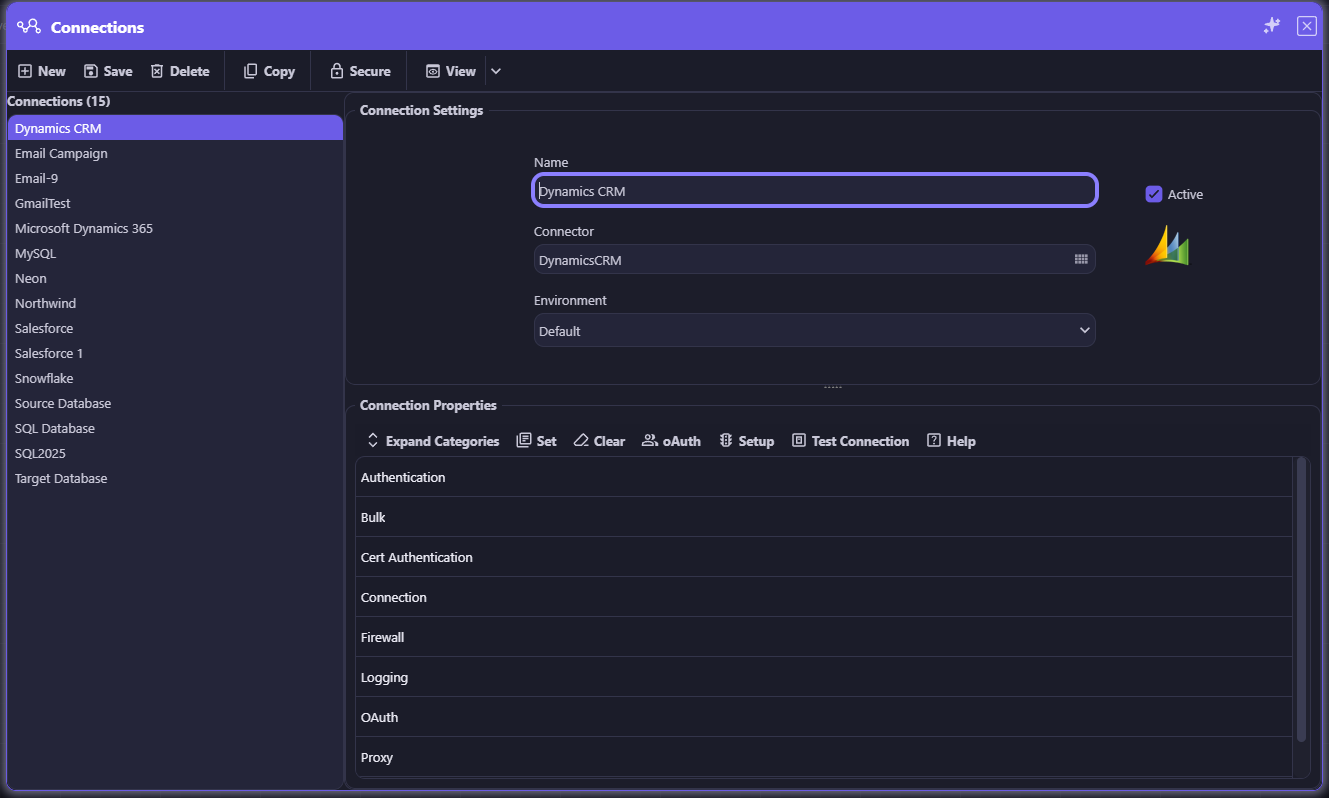
The same Secure button appears on data source connections, AI assets, actions and conditions, workflow activities, and more — one control for every sensitive record.
Validate the Whole Workflow
Validation starts long before a workflow is finished. While configuring a workflow activity, each property is automatically validated, so a problem surfaces the moment it's introduced, not when the workflow runs.
At any time, the Validate Workflow command can be used to validate the entire workflow — and whenever a workflow is run, it is automatically validated before it starts. Validation inspects every activity and reports the result in one place. A summary shows what the workflow contains — activities, skipped activities, sources, targets, conditions, actions, arguments, and errors — followed by a message for every activity. Each problem is pinned to the exact activity and property where it occurs, with a message ID and a plain-language explanation, and the workflow is clearly marked valid or invalid.
In the example below, validation finds that an AskAI activity is missing its AI Instructions and its Prompt. Instead of the gap surfacing mid-run — or worse, an AI call going out with no instructions — the builder sees exactly what to fix and where.
Validation informs without getting in the way of active development. When an interactive run fails its automatic validation, the builder can override the result and run it anyway — a deliberate, informed decision rather than an accidental one. Unattended runs are a different matter: the scheduler will not run an invalid workflow, so nothing reaches scheduled production until it passes validation. And every run, interactive or scheduled, remains subject to GuardRailed Execution.
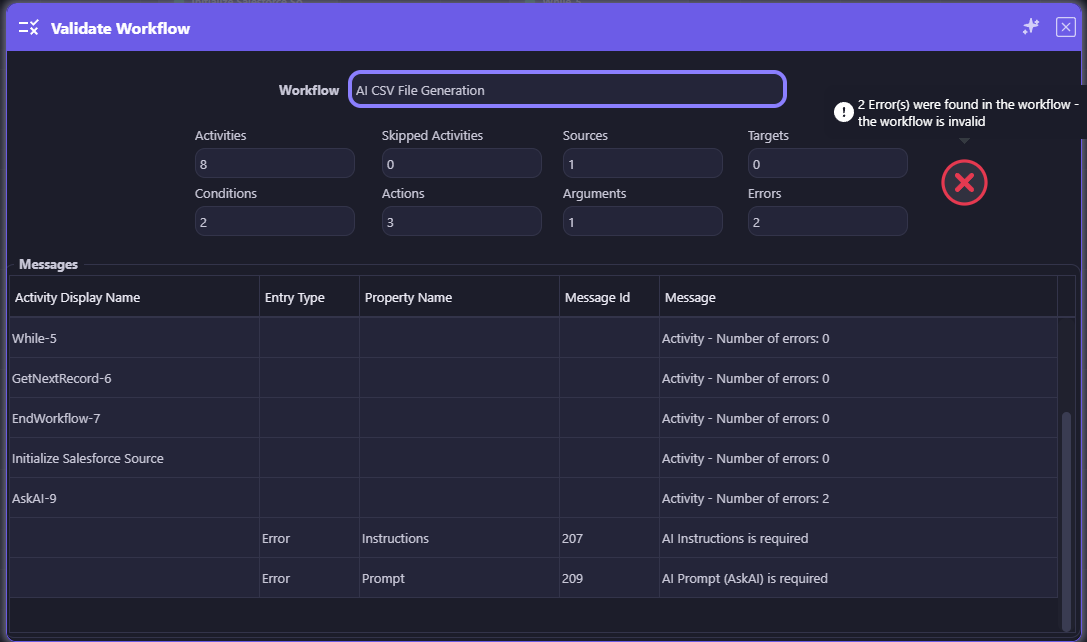
Validate Workflow: 2 errors found and the workflow marked invalid — each error pinned to its activity (AskAI-9), its property (Instructions, Prompt), and a message ID.
7. Guardrails Across the Whole Lifecycle
GuardRailed Design does not replace GuardRailed Execution — it completes it. Together they protect a workflow from the moment it is drafted to the moment it acts.
1. GuardRailed Design
Fields, values, context, conditions, and actions are chosen from what is valid. Invalid choices are never offered, gaps are flagged before anything runs, and the scheduler won't run an invalid workflow.
2. Validated Preview
Partial Preview and Full Preview confirm the assembled prompt, context, and response before anything runs in production.
3. GuardRailed Execution
Field validation, controlled vocabularies, validated actions, and post-conditions check every step at runtime.
| Guardrail | At Design Time | At Execution |
|---|---|---|
| Fields | Selected from the live metadata model — never typed or invented | Typed, required, and range-checked on every read and write |
| Values | Chosen from live picklists and lookups | Controlled vocabularies reject free-form values |
| Field Mapping | Source and target picked from the metadata model, types shown side by side; Auto Map by name and alias; Validate All checks every row | Optional Mapping Conditions decide whether a row is mapped; optional transformation actions, built-in or user-defined, are applied |
| Prompt Context | Variables picked with the Context Picker or typed, then verified with Partial Preview | Context arguments typed and validated before injection |
| Conditions | Defined once in the Conditions Matrix and reused by name | Evaluated to a precise True or False result, fully logged |
| Actions | Selected from a validated library with typed properties | Executed only from the tested library, gated by post-conditions |
| Access | Sensitive records locked with the Secure button; viewing or editing requires the right credential | The GuardRailing security layer controls access to data sources and AI providers |
| AI Composition | Multi-step logic laid out in readable Action Chain and Decision Table structures | Each step's result, tokens, and outcome captured in Logs & Statistics |
8. Business Impact
🛡️ Data Integrity by Construction
Whole categories of errors — invented fields, invalid values, mistyped variables — are prevented or caught before a workflow ever runs, instead of discovered in production.
⚡ Faster, Safer Delivery
Builders spend their time on business logic, not on verifying generated configurations line by line against the real systems.
👥 Broader, Safer Participation
Business and IT teams can build governed AI automation without deep knowledge of every schema — the guided dialogs carry that knowledge for them.
📋 Audit-Ready Designs
Every workflow is built from named, inspectable choices. Its behavior can be explained, reviewed, and signed off — and it means the same thing every time it's read.
9. Conclusion
Natural language has transformed how people express what they want from AI, and it belongs in every modern platform. But in enterprise applications — where workflows read and write systems of record, run at scale, and must stand up to audit — the details cannot be left to free-form generation.
appRules takes a deliberately channeled approach. Natural language captures intent. Guided, metadata-driven dialogs capture everything else — and they only offer what is valid. Combined with GuardRailed Execution, the result is governance across the whole lifecycle: integrity designed in, verified before it runs, and enforced while it runs.
Natural language for intent. Guided design for integrity.