1. Executive Summary
Every automated process is, at its core, a long series of decisions: whether to run a step, which records to read, whether to set a value, which branch to take, whether to act on what an AI just said. In most platforms, those decisions are scattered across branches, filters, scripts, and prompts — written differently each time, and almost impossible to review as a whole.
appRules takes a different approach. Before practically anything happens in appRules, an optional Condition can decide whether it should. Conditions are named, reusable tests that evaluate to True or False. They are built from a library of 127 ready-made conditions — or from AI judgment itself — and the same Condition can govern an activity, an action, a query filter, a loop, a mapping row, or a decision table. At the end of every run, the logs show exactly how often each Condition was evaluated and how it came out.
Before anything happens in appRules, a Condition can optionally decide whether it should.
This paper explains what an appRules Condition is, everywhere Conditions apply, how they are defined once and reused, how they let deterministic rules and AI judgment work side by side, and why the evidence they produce makes AI automation governable.
2. The Problem: Decision Logic Everywhere — and Nowhere
Decision logic is the part of automation that matters most to governance, and it is usually the hardest to see.
Scattered
The same business rule — "is this a new customer?" — is rewritten in a filter here, a branch there, and a prompt somewhere else.
Inconsistent
Each copy drifts. One version checks for missing data and another doesn't, and no one notices until the outcomes differ.
Invisible
Logic buried in code or prompts can't be reviewed by the business owners who are accountable for it.
Unmeasured
When a run finishes, there's no record of which rules fired, which never did, and which failed — so problems hide until they surface as bad data.
Adding AI makes this worse. When an AI model's output can trigger actions, the logic that decides whether it may do so becomes the most important logic in the system.
3. What Is an appRules Condition?
A Condition in appRules is a named, reusable test that evaluates to True or False. You configure it once, give it a meaningful name — NewCustomer, SaleAmountGreaterThan5000 — and use it anywhere a decision is made.
Conditions are built from a library of 127 ready-made conditions, each configured through guided dialogs rather than written as code:
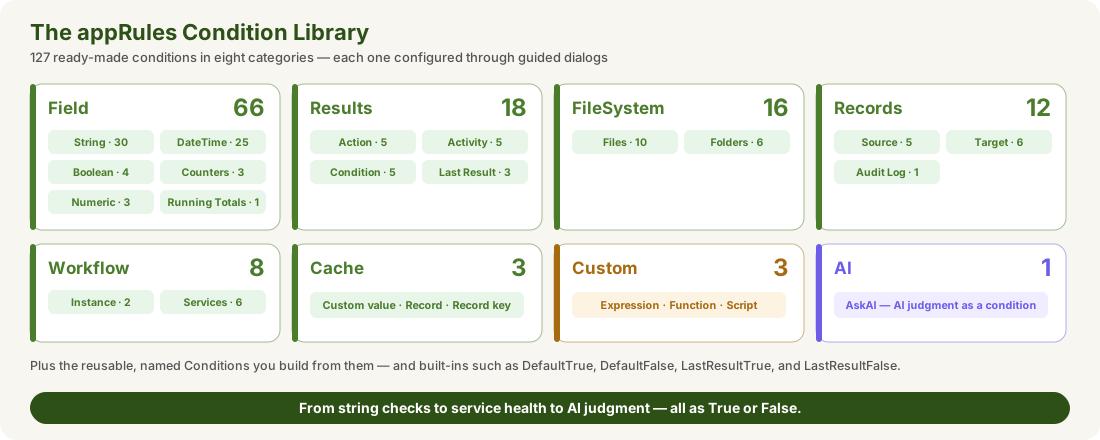
- Field conditions test values — from string checks such as IsEmailAddress, IsInPickList, and IsRegexMatch, to date logic such as IsDateInFiscalYearQuarter and IsDateOverdueForAging.
- Records conditions test what happened to data — whether a source record exists, or how many target records were inserted, updated, or skipped.
- Results conditions test the outcome of earlier Actions, activities, and Conditions — including their error and success counts.
- FileSystem and Workflow conditions test the environment — file sizes and names, elapsed time, CPU and disk utilization, and whether a host, service, or URL is available.
- Cache conditions test whether a value or record is already known.
- Custom conditions — Expression, Function, and Script — cover anything else, including calls into your own .NET code.
- AI — the AskAI condition — lets an AI model make the True or False judgment, governed like every other Condition.
Every Condition can be negated, and wherever one is used you choose whether to re-evaluate it or reuse its existing result — so the same test isn't repeated unnecessarily. Built-in Conditions such as DefaultTrue, DefaultFalse, LastResultTrue, and LastResultFalse cover common needs out of the box.
4. Everything Can Be Conditioned
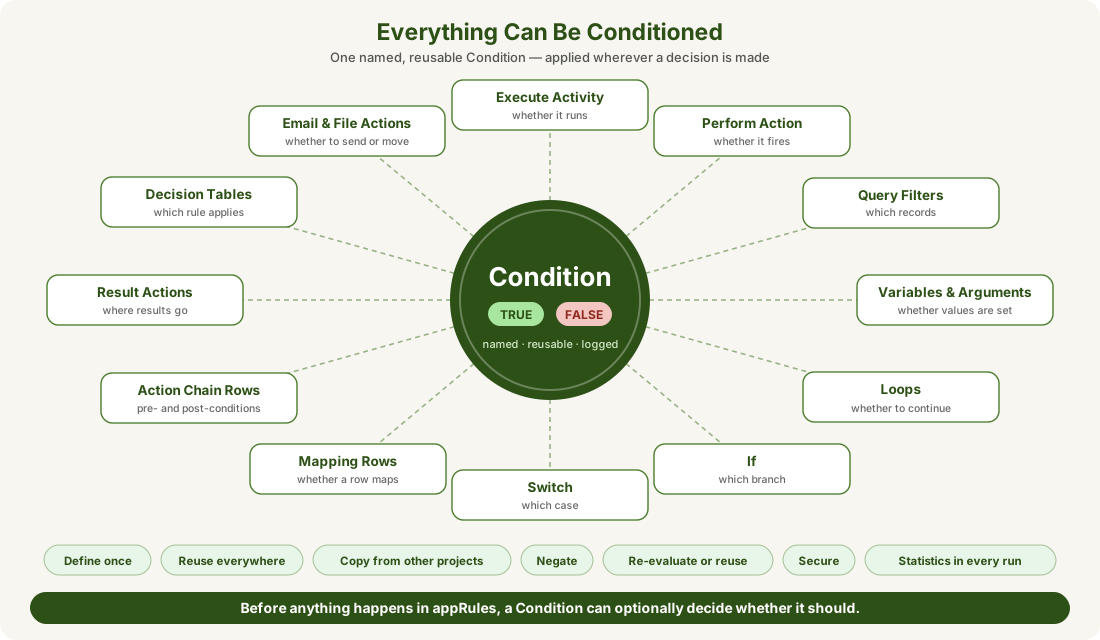
What makes Conditions a backbone rather than a feature is how far they reach. The same named Condition can govern any of these decisions:
| Where | What the Condition Decides |
|---|---|
| Executing a workflow activity | Whether the activity runs at all — the optional Execution Condition every activity can carry |
| Performing an Action | Whether an Action fires, so operations happen only when they should |
| Query filters | Whether a filter applies, controlling which records a query reads |
| Setting variables and arguments | Whether a value is set, so state changes only under the right circumstances |
| Loops | Whether a loop continues, so iteration over records or items stops exactly when it should |
| If and Switch activities | Which branch or case a workflow follows |
| Mapping rows | Whether an individual field mapping is applied to a record |
| AskAI Action Chain rows | The Pre-Condition that gates each AI call and the Post-Condition that evaluates its result |
| Result Actions | Whether an AI result is stored in an argument, data field, or variable |
| Decision Tables | Which rule applies — every row of a decision table is a set of Conditions |
| Email and file actions | Whether to send a message, or copy, move, or delete a file |
Because the same mechanism is used everywhere, a reviewer learns it once and can read the decision logic of any workflow — and a rule changed in one place changes everywhere it's used in the project.
5. Define Once, Use Everywhere
One Matrix, One Meaning
Conditions live in a single Conditions Matrix. Every activity, action, filter, and decision table that needs "is this a new customer?" uses the same NewCustomer Condition — so the rule means the same thing everywhere.
Combine Into Business Rules
In the Business Rules module, the EvaluateConditions activity evaluates a list of Conditions together under an evaluation option — such as AllTrue — then performs one set of Actions if they evaluate to True and another (ELSE) if they evaluate to False. ExecuteRuleSet goes further, organizing named rules, each with its own Condition and Then/Else Actions. Complex rules are assembled from simple, tested parts rather than written from scratch.
Copy From Other Projects
Proven Conditions can be copied in from another project database and workflow, so rules that work in one application are reused in the next instead of being rebuilt.
Protected Like Everything Else
Conditions can be locked with the Secure button, so a tested rule can't be quietly changed by someone who shouldn't touch it.
6. Rules and AI Judgment, Side by Side
Most of the time, a deterministic rule is exactly what a decision needs: the same input always produces the same answer, and anyone can verify it. But some decisions call for judgment — is this support email urgent? does this contract clause look unusual? For those, the AskAI condition lets an AI model make the True or False call.
Use a deterministic Condition when…
- The rule can be stated precisely
- The same input must always give the same answer
- The decision is regulated or audited closely
- Speed and cost matter at very high volume
Use the AskAI condition when…
- The decision depends on meaning, tone, or context
- The data is unstructured — text, email, documents
- A rule would need endless exceptions
- A deterministic Condition can gate when it's called
Crucially, the AI condition is governed exactly like every other Condition. It has a name, it returns True or False, it can be negated, it can be gated by deterministic Conditions that decide when it's worth calling, and every evaluation is counted in the run logs. AI supplies the judgment; the Condition framework keeps it inside the rules. That is the principle at the heart of Contain the Model.
7. Evidence in Every Run
At the end of every workflow run, the logs record a Condition Results entry for each Condition used: how many times it was executed, how many times it came out True, and how many times False. Like the rest of the run statistics, the results can be saved to CSV.
Consider a decision table that sets customer discounts. After one run, the Condition Results might look like this:
| Condition | Total Executed | # True | # False |
|---|---|---|---|
| NewCustomer | 1 | 1 | 0 |
| PriorOrdersLessThan10 | 1 | 1 | 0 |
| ProductCategoryTemplate | 2 | 1 | 1 |
| SaleAmountBetween1000And5000 | 1 | 1 | 0 |
| SaleAmountGreaterThan5000 | 0 | 0 | 0 |
Statistics like these answer questions that are otherwise invisible:
- Coverage: which rules actually fired — and which never did. A rule that is never evaluated over many runs may be unreachable or obsolete.
- Behavior: how often each rule is True or False. A sudden shift can reveal a change in the data — or in an AI model's judgments.
- Audit: a factual record of the decisions made in each run, ready for review.
And because the Results category includes conditions on other Conditions' outcomes — including their success, error, and total counts — workflows can respond to their own decision patterns as they run.
8. Business Impact
Governance by Default
Every step can carry a guard, so control isn't bolted on afterward — it's part of how workflows are built.
Consistency at Scale
One definition of every rule, reused everywhere, eliminates the drift that comes from rewriting logic in many places.
Readable by the Business
Named Conditions turn decision logic into something business owners and auditors can read and sign off on.
AI Under Control
AI judgment enters the workflow as a Condition — named, gated, and counted — instead of as unchecked output.
9. Conclusion
Governed AI automation isn't achieved by a single feature. It comes from having a consistent, visible, measurable way to decide whether anything should happen — and applying it everywhere. In appRules, that mechanism is the Condition: 127 ready-made conditions, AI judgment when it's needed, defined once and reused everywhere, and measured in every run.
Everything can be conditioned. Every Condition is accountable.
Related reading: GuardRailed Design for AI Workflows · Contain the Model · Beyond the Demo