1. Executive Summary
The most consequential moment in AI automation is the moment a decision becomes a result — when a record is written, a file is moved, an email is sent, or a value is calculated and saved. That is where a mistaken or compromised AI can do real damage, and where enterprises most need control.
In appRules, that moment belongs to Actions. An Action is a named, configured operation drawn from a library of 286 ready-made, tested operations — or built by your own developers and added to the library. AI can recommend, classify, and reason; Actions are what actually change things, and they run only where and when the workflow allows.
The model supplies the intelligence. Actions hold the authority.
This paper explains what an appRules Action is, where Actions run, how they respond before, after, and when things go wrong, how they pair with Conditions to form a rules engine, and how every run records how each Action performed. It is the companion to Conditioned by Design: Conditions decide whether something happens; Actions decide what happens.
2. The Problem: When AI Output Becomes Operations
Generated, Not Tested
When AI output is turned into code or tool calls on the fly, the operation that runs has never been tested — and may never run the same way twice.
Direct, Not Governed
An agent that writes to systems directly bypasses the controls the enterprise relies on: typed inputs, defined operations, and review.
Scattered, Not Shared
The same operation — formatting a name, computing a depreciation schedule — is rewritten in many places, each slightly different.
Silent, Not Measured
When a run finishes, there is no record of which operations succeeded and which produced invalid results.
Containing AI, as argued in Contain the Model, means separating the supply of intelligence from the authority over what happens. Actions are that authority.
3. What Is an appRules Action?
An appRules Action is a named, reusable operation. You select it from the Action library, configure its typed properties through guided dialogs, give it a meaningful name — DiscountPercentTemplate, FormatCustomerName — and use it anywhere work needs to get done.
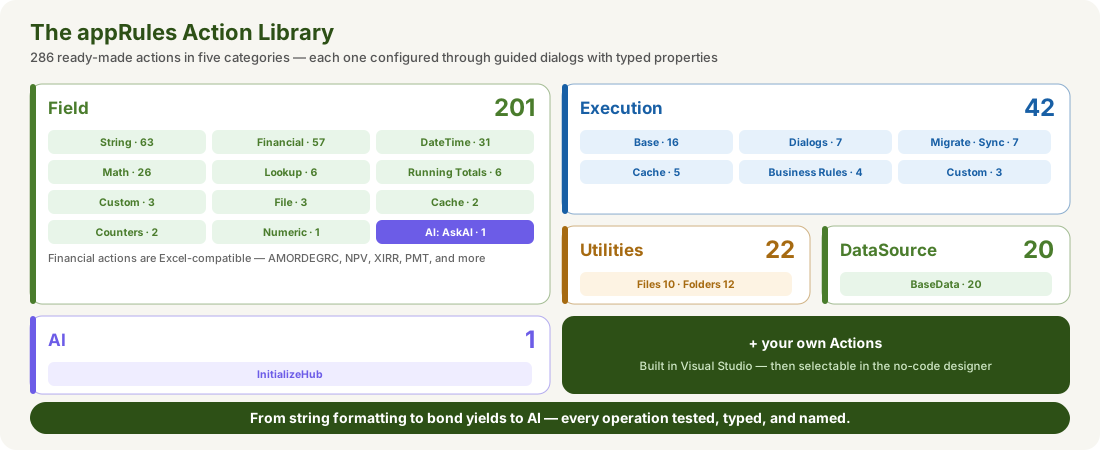
- Field Actions compute and transform values — 63 string operations, 31 date and time operations, 26 math functions, lookups, running totals, counters, and 57 Excel-compatible financial functions such as AMORDEGRC, NPV, XIRR, and PMT.
- Execution Actions do work in the workflow — call web services, send email, set values, write audit and log entries, execute workflows, run business rules, interact with users through dialogs, and run complete migration, replication, and synchronization operations.
- DataSource Actions read and write records — initialize sources and targets, look up, map, and save records, and execute SQL scripts, statements, and stored procedures.
- Utilities Actions manage files and folders — copy, move, zip, transfer by FTP, and manage access control lists.
- Custom Actions — Expression, Function, and Script — cover anything else, including calls into your own .NET code.
- The AskAI action makes AI an operation — governed like every other Action.
And the library isn't closed. Developers can build their own Actions in Visual Studio; once built, no-code builders select them in the designer like any other building block. See appRules + Visual Studio.
4. Actions, Wherever Work Gets Done
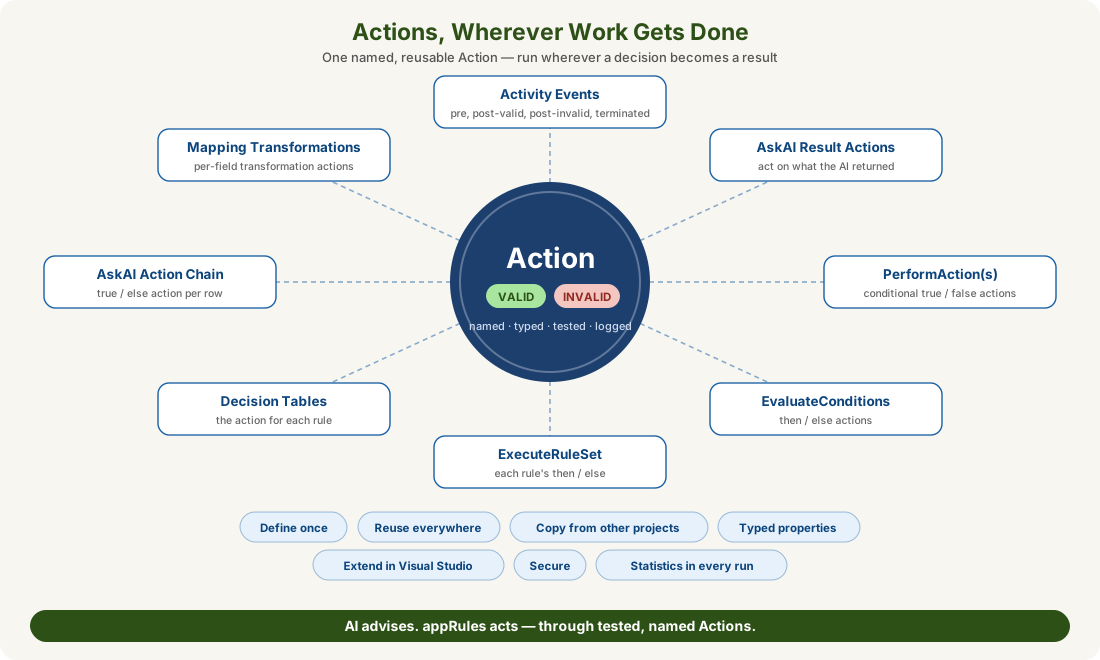
| Where | How Actions Run |
|---|---|
| Activity events | Actions run before an activity executes, after it executes with a valid result, after it executes with an invalid result, or when execution is terminated |
| AskAI Result Actions | An Action — or an extension workflow activity — runs on what an AskAI activity returned, optionally only when a Condition is met |
| PerformAction and PerformActions | A single Action, or a table of Conditions each paired with an Action to run when True and another when False |
| EvaluateConditions | One set of Actions runs if the Conditions evaluate to True, and another (ELSE) if they evaluate to False |
| ExecuteRuleSet | Each named rule runs its Then Actions when its Condition is true, and its Else Actions when it isn't |
| Decision Tables | Each rule's outcome is an Action — such as setting a discount percentage |
| AskAI Action Chain | Every row fires a true Action or an else Action, based on its Post-Condition |
| Mapping field transformations | Each mapped field can run transformation Actions — built-in or user-defined — before it is written |
5. Before, After — and When Things Go Wrong
Every workflow activity can optionally run Actions on its own execution events. That turns governance into something built into each step, rather than bolted on around it:
Pre-Execution
Prepare, check, or record before the activity runs.
Post-Execution: Valid
Act on a successful result — save it, route it, notify someone.
Post-Execution: Invalid
Respond when the result isn't valid — log it, flag it, take a safe default.
Terminated Execution
Clean up and record what happened when a run is stopped.
Because invalid results and terminations have their own Actions, the response to failure is designed in advance — not improvised after something has already gone wrong.
6. Conditions Decide, Actions Act
Actions are at their most powerful when paired with Conditions — together they form the appRules rules engine:
- PerformActions pairs each Condition with an Action to run when it is True and another when it is False.
- EvaluateConditions evaluates a set of Conditions together, then runs one set of Actions if they are True and another if they are False.
- ExecuteRuleSet organizes named rules, each with a Condition and its own Then and Else Actions.
- Decision Tables map combinations of Conditions to the Action each rule should take.
- AskAI Action Chain rows fire a true or else Action based on each Post-Condition.
- AskAI Result Actions can run an Action on an AI result only when a Condition is met.
Every one of these follows the same pattern: a Condition decides, an Action acts — and AI, whether it appears as an AskAI condition or an AskAI action, takes part inside that pattern rather than around it.
7. Define Once, Use Everywhere
One Definition, One Behavior
An Action defined once behaves the same everywhere it's used in the project — on an event, in a rule set, in a decision table, or in a mapping.
Typed Properties
Every Action is configured through typed properties, so each input has a defined type and purpose — and the wrong kind of input can't be supplied.
Copy From Other Projects
Proven Actions can be copied in from another project database and workflow, so operations that work in one application are reused in the next.
Protected Like Everything Else
Actions can be locked with the Secure button, so a tested operation can't be quietly changed.
8. Evidence in Every Run
At the end of every workflow run, the logs record an Action Results entry for each Action used: how many times it was executed, how many results were valid, and how many were invalid. Like the rest of the run statistics, the results can be saved to CSV.
| Action | Total Executed | # Valid | # Invalid |
|---|---|---|---|
| DiscountPercentTemplate | 1 | 1 | 0 |
Alongside the Condition Results from Conditioned by Design, every run produces a complete picture: which decisions were made, and which operations carried them out — and whether they succeeded. Invalid counts surface problems immediately, and Results conditions let workflows respond to them as they run.
9. Business Impact
AI Under Authority
AI recommends; tested Actions carry out the result. No model writes to your systems on its own.
Speed Without Code
286 ready-made operations — including Excel-compatible finance — mean most work is configured, not programmed.
Failure Handled by Design
Invalid results and terminations have their own Actions, decided in advance.
Evidence for Every Operation
Valid and Invalid counts for every Action, in every run, ready for review.
10. Conclusion
Containing AI means deciding who holds the authority to change things. In appRules, that authority belongs to Actions: a library of 286 tested, typed operations, extended with your own, run only where and when the workflow allows, and measured in every run. Conditions decide whether something should happen. Actions make it happen — safely.
AI advises. appRules acts.
Related reading: Conditioned by Design · Contain the Model · GuardRailed Design for AI Workflows