For insights on building truly governed agentic AI — beyond security alone — read our new white paper:  GuardRailing AI →

appRules® AI Automation Engine

Enterprise Agentic Automation for Mission-Critical Workflows

Transform your enterprise operations with intelligent, autonomous AI agents that plan, execute, and adapt workflows in real-time—all within a comprehensive no-code platform.

The Next Evolution in Enterprise Automation

appRules® AI Automation Engine combines cutting-edge agentic AI with comprehensive data management to deliver autonomous, adaptive automation at enterprise scale.

🤖

Autonomous AI Agents

Deploy intelligent agents that understand context, make decisions, and execute complex multi-step workflows without constant human supervision.

Real-Time Adaptability

AI agents dynamically adjust workflows based on changing conditions, real-time data, and business logic—ensuring continuous optimization.

🎯

No-Code Configuration

Compose sophisticated agentic workflows through an intuitive drag-and-drop interface—no programming required.

🛡️

Enterprise-Grade Reliability

Mission-critical security, audit trails, compliance support, and high-performance architecture built for demanding enterprise environments.

📊

Unified Platform

Single platform for agentic automation, data integration, business rules, process automation, and machine learning.

👥

Human-in-the-Loop Governance

Maintain control with configurable approval workflows and oversight mechanisms that ensure AI agents operate within defined business parameters — keeping humans in command of every critical decision.

🔗

Orchestrated Collaboration

Multiple specialized AI agents and workflow activities work together, coordinating their actions to complete end-to-end business processes that span systems, departments, and data sources.

⚖️

GuardRailed Execution

AI intelligence operates within a two-layer framework of security and execution governance — every action validated, every decision auditable, every workflow outcome fully under enterprise control.

Powerful Features for Agentic Automation

AI intelligence. GuardRailed execution. Powerful automation.

Comprehensive Enterprise Data Integration

AI is only as good as the data behind it. appRules.AI is GuardRailed from the ground up—built on a comprehensive enterprise data platform that connects, governs, and prepares your data before it ever reaches an AI model.

Everyone is talking about the importance of clean data for AI—appRules.AI is built to deliver it. With native connectivity spanning 36 data source categories—from CRM and ERP to Databases, Data Warehouses, Cloud Storage, Collaboration tools, Financial systems, and beyond—appRules.AI connects directly to the systems your enterprise already runs on. For most data sources, we provide powerful out-of-the-box CRUD and API connectors, eliminating months of custom integration work and giving your workflows immediate, governed access to the data that matters.

🗂️
36 Data Source Categories

From CRM and ERP to Databases, Cloud Storage, Data Quality, Data Warehouse, Collaboration, and Financial systems, appRules.AI connects to virtually every corner of your enterprise data landscape.

🔌
Out-of-the-Box CRUD & API Connectors

Most connectors ship ready to use, with both Workflow Activity and direct API variants—so you're reading, writing, updating, and deleting records in minutes, not months.

🛡️
GuardRailed Data Foundation

Every connection flows through appRules.AI's governance layer, ensuring the data feeding your AI workflows is accurate, consistent, and trustworthy before a single prompt is ever executed.

🧠
The Foundation AI Depends On

Clean, connected data isn't a nice-to-have for AI—it's the difference between reliable automation and unpredictable results. appRules.AI's data platform is the bedrock every other feature is built on.

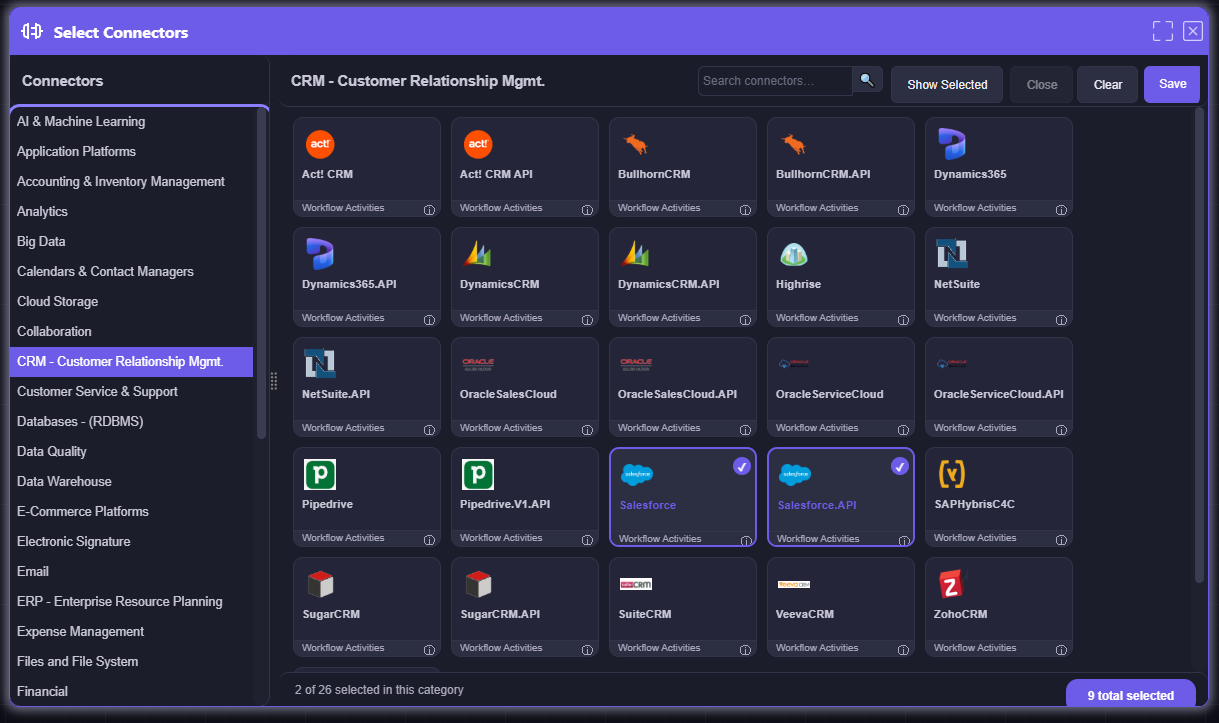
appRules.AI Select Connectors — 36 Enterprise Data Categories

Select Connectors: Browse 36 enterprise data source categories and enable out-of-the-box CRUD and API connectors for the systems your business already runs on

AI Provider Ecosystem

Whether you're deploying a cutting-edge LLM or an efficient SLM for your AI initiatives, appRules.AI provides a comprehensive platform to streamline development, deployment, and management.

In today's rapidly evolving AI landscape, flexibility is paramount. appRules.AI eliminates vendor lock-in by offering native support for all leading AI providers. Switch between models seamlessly, compare results across providers, or deploy hybrid strategies—all within a single, unified platform. From enterprise-grade solutions like Amazon Bedrock, Azure AI, Cohere, and OpenAI, cutting-edge innovations from Anthropic, DeepSeek, and XAI, to efficient, lightweight models like Microsoft Phi, you have the freedom to choose the right AI for each task.

🌐
Provider Flexibility

Effortlessly switch between AI providers or use multiple models simultaneously. No code changes, no integration headaches—just configure and deploy.

Future-Proof Architecture

As new AI providers and models emerge, appRules.AI rapidly integrates them into the platform. Your workflows stay current without rewrites or migrations.

💰
Cost Optimization

Leverage the most cost-effective AI provider for each task. Route simple queries to efficient SLMs and complex analysis to powerful LLMs—automatically balancing performance and budget.

🔬
Model Cross-Validation

Deploy multiple AI providers simultaneously for critical decisions. Compare outputs, validate results, and ensure accuracy across mission-critical workflows.

Supported LLM and SLM AI Providers

Amazon Bedrock
Amazon Bedrock
Anthropic
Anthropic
Azure AI
Azure AI
Cerebras
Cerebras
Cohere
Cohere
DeepSeek
DeepSeek
Falcon AI
Falcon AI
Google AI
Google AI
Groq
Groq
HuggingFace
HuggingFace
🤖
LocalAI
Mistral
Mistral
NVIDIA
NVIDIA
Ollama
Ollama
OpenAI
OpenAI
Microsoft Phi
Microsoft Phi
SambaNova
SambaNova
TogetherAI
TogetherAI
XAI
XAI

...with new providers added regularly based on market innovation and customer demand

Intuitive Visual Workflow Designer

appRules' workflow designer delivers true no-code automation—where enterprise-grade complexity meets remarkable simplicity.

Our powerful and intuitive visual designer transforms complex agentic automation into an intuitive drag-and-drop experience. Build sophisticated multi-agent workflows, orchestrate decision logic, and integrate hundreds of data sources—all without writing a single line of code.

🎯
Drag, Drop, Configure

Simply select workflow activities from the comprehensive toolbox, configure properties, and connect—that's it. No programming required.

🔄
Real-Time Orchestration

Visualize entire process flows at a glance. Control flow logic, parallel processing, and conditional branching with elegant visual controls.

Instant Validation

Built-in validation ensures your workflows are correct before deployment. Test, debug, and refine with comprehensive logging and monitoring.

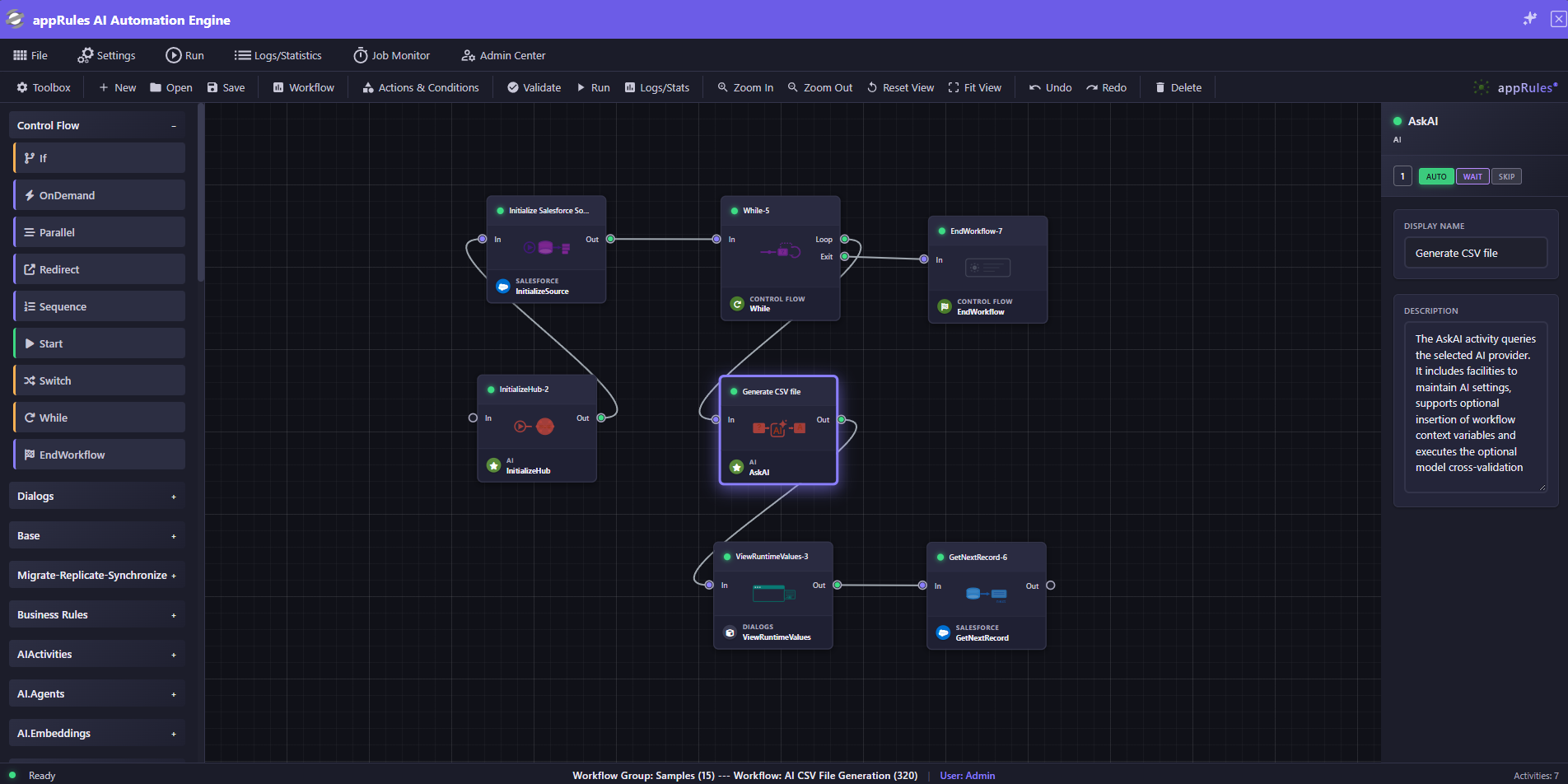
appRules Workflow Designer Interface

The appRules Workflow Designer: Compose enterprise agentic automation with unprecedented ease

appRules.AI SmartPrompt Builder Interface

SmartPrompt Builder: Comprehensive AI model configuration and familiar environment for writing and editing prompts

appRules.AI SmartPrompt Builder Smart Context Picker

Smart Context Picker: Select and configure dynamic context variables without writing code

appRules.AI SmartPrompt Builder Condition Evaluation Engine

SmartPrompt Builder: Condition evaluation engine — AI Providers configured with a deterministic role to output only true or false, delivering clean, unambiguous signals that drive downstream workflow logic

Model Cross-Validation Configuration

Model Cross-Validation: Deploy multiple AI models simultaneously with configurable result selection and deadlock resolution—like having a panel of expert consultants validating every decision

The appRules.AI SmartPrompt Builder

Smart and sophisticated channel for prompting AI and achieving enterprise-grade results.

As the cornerstone of the appRules AskAI workflow activity, SmartPrompt Builder revolutionizes how enterprises interact with AI models offering a comprehensive environment that delivers unmatched precision, control, and reliability.

🎯
Dynamic Real-Time Context Arguments

Thousands of pre-configured context arguments deliver exact workflow data to your AI prompts instantly. No coding—just select, configure, and inject live context from any part of your enterprise workflow.

Powerful Prompt Engines

Deploy powerful prompt engines such as the data formatting and condition evaluation engines to sharpen your AI instructions with precision. The prompt engines give the AI Providers a specific, deterministic role—transforming data with zero noise, evaluating conditions to a clean true/false signal, etc.—so your workflows always get exactly the output they expect.

🔬
Innovative Model Cross-Validation

Deploy multiple AI models simultaneously for mission-critical tasks. Like having a panel of expert consultants, cross-validation ensures accuracy in financial analysis, medical diagnostics, engineering calculations, public sector decision-making, regulatory compliance, and data quality assessments. Configure selection criteria, result validation, and automatic deadlock resolution—all without code.

⚙️
Extension Workflow Activities

Take complete control over AI workflows with programmable pre-execution query enhancement and post-execution result processing. Use custom logic in your preferred language to handle edge cases and implement sophisticated business requirements. Learn more in the dedicated Extension Workflow Activities section below.

🤝
Seamless AI Agents Integration

Out-of-the-box AI Agents leverage SmartPrompt Builder's power automatically, giving your team instant access to enterprise AI capabilities with zero setup.

🔖
Smart Prompt Sharing & Reusability

Build once, deploy everywhere. Save and share proven prompts across your organization, accelerating AI adoption and ensuring consistent, reliable results enterprise-wide.

Configurable Actions & Conditions

Comprehensive battle-tested no-code logic library for enterprise automation.

appRules delivers an extraordinary depth of pre-built, configurable Actions and Conditions that handle virtually any business scenario—from the elegantly simple to the deeply complex—all through intuitive, point-and-click configuration. No scripting. No custom development. Just results.

🎯
Execution & Workflow Orchestration

Call web services, execute sub-workflows, send email, manage state, write audit logs, and invoke AI—all composable operations that chain together into powerful agentic automation sequences.

⚙️
Data Operations

A complete set of source and target lifecycle controls—initialize, read, map, save, delete, commit, and rollback—giving workflows full transactional control over every record across every connected system.

🧮
Financial, Math & Date Intelligence

A full Excel-compatible financial function library, comprehensive math and trigonometric operations, and calendar- and fiscal-aware date functions—enterprise computation built directly into your workflows.

🔤
String, File & System Utilities

Extensive string transformation and validation, complete file and folder management, and infrastructure conditions that bring operational awareness—host availability, service status, disk utilization—directly into workflow logic.

Custom Extensibility

When built-in operations aren't enough, Custom Actions and Conditions—Script, Expression, Function, and Composite—let developers extend the platform without disrupting the no-code experience for everyone else.

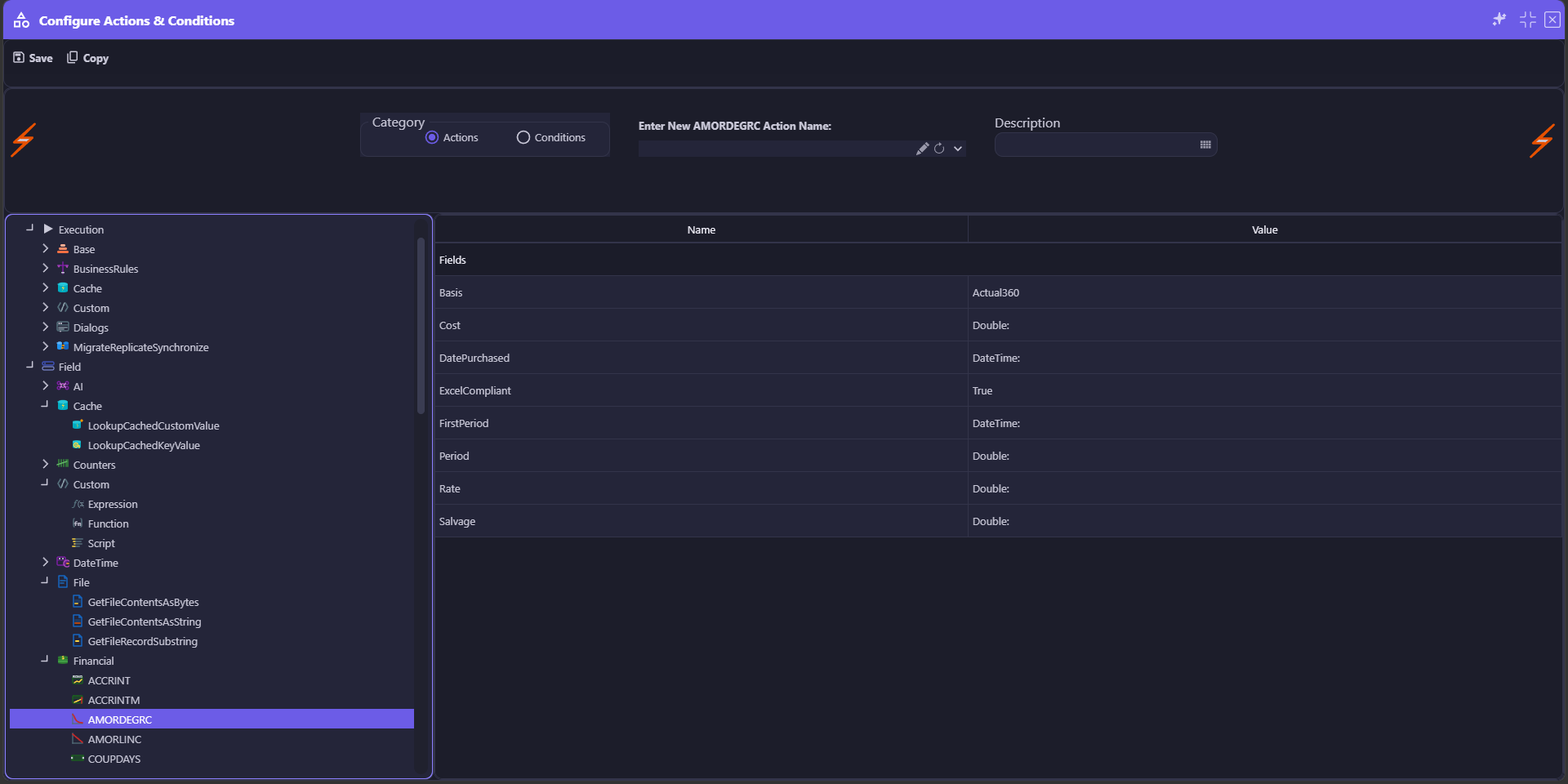
appRules Configure Actions Interface — AMORDEGRC Financial Function

Configure Actions: Select from a rich categorized tree, name your instance, and configure typed properties—here, the AMORDEGRC financial depreciation function with its Basis, Cost, Rate, and Date parameters

appRules Configure Conditions Interface — IsFileExtensionComparisonTrue

Configure Conditions: Point-and-click configuration with structured property groups—here, IsFileExtensionComparisonTrue with operator, case sensitivity, and comparison value, all without writing a line of code

appRules.AI Model Cross-Validation Process

Model Cross-Validation: Multiple AI models reach consensus through intelligent validation—like a panel of expert consultants ensuring every decision is trustworthy

SmartBuilder Model Cross-Validation Configuration

SmartBuilder Model Cross-Validation: Configure multiple AI models, consensus rules, and validation criteria through an intuitive interface

Innovative Model Cross-Validation

Transform AI from experimental to mission-critical with multi-model consensus validation that builds trust through intelligent agreement.

When accuracy matters most—in financial analysis, medical diagnostics, regulatory compliance, or public sector decision-making—a single AI model's opinion isn't enough. appRules.AI Model Cross-Validation simultaneously deploys multiple AI models, analyzes their responses, detects outliers, and builds consensus—delivering results you can trust with enterprise-grade confidence.

The Expert Panel Approach

Just as critical business decisions benefit from multiple expert opinions, Model Cross-Validation leverages diverse AI perspectives to eliminate bias, catch errors, and ensure accuracy—automatically flagging disagreements and outliers before they impact your business.

🎯
Simultaneous Multi-Model Deployment

Deploy 2 to 10+ AI models simultaneously for any task. Configure which models participate, set confidence thresholds, and define consensus criteria—all through an intuitive no-code interface.

🔍
Intelligent Outlier Detection

Advanced algorithms automatically identify when a model's response significantly deviates from consensus. Outliers are flagged, logged, and can trigger custom workflows—ensuring anomalies never go unnoticed.

⚖️
Configurable Consensus Rules

Define exactly what constitutes agreement: majority voting, unanimous consensus, weighted scoring, or custom validation logic. Set confidence thresholds and specify how to handle deadlocks—complete control over your validation strategy.

🛡️
Automatic Deadlock Resolution

When models disagree, intelligent tie-breaking strategies ensure your workflow never stalls. Choose from predefined resolution rules or implement custom logic—keeping mission-critical processes flowing smoothly.

📊
Comprehensive Validation Analytics

Track consensus rates, identify frequently divergent models, analyze agreement patterns, and monitor confidence scores over time. Data-driven insights help refine your AI strategy and optimize model selection.

Zero-Code Enterprise Reliability

All configuration happens through visual tools—no programming required. Drag, drop, configure consensus rules, and deploy. Transform experimental AI into production-grade systems with the reliability your business demands.

Powerful Extension Workflow Activities

Master the complexity of AI with programmable precision—where no-code meets unlimited extensibility.

AI interactions generate diverse outputs across varying formats, creating edge cases that demand sophisticated handling. appRules.AI Extension Workflow Activities deliver complete programmatic control over every phase of your AI workflow, empowering you to implement custom logic in your preferred programming language while leveraging our comprehensive libraries.

Total Workflow Control

Transform standard AI workflow activities into intelligent, adaptive processes that handle real-world complexity with elegance and precision.

🔍
Pre AI Query Execution

Enhance query quality before AI processing. Validate inputs, enrich context, transform data formats, apply business rules, and prepare optimal query parameters—ensuring every AI interaction starts with the highest quality input.

⚙️
Post AI Query Execution

Take full command of AI results. Parse complex outputs, validate responses, transform formats, implement error handling, route results to business systems, and apply post-processing logic—turning raw AI outputs into actionable business intelligence.

🧩
Custom Logic

Implement sophisticated business logic tailored to your unique requirements. Handle custom document chunking strategies for legal documents, source code, system logs, or medical records. Deploy domain-specific rules, format-specific handlers, and specialized processing logic—all through powerful extension workflow activities that understand your exact needs.

🔧
Custom Error Handling & Retry Logic

Build resilient AI workflows with sophisticated error management. Implement intelligent retry strategies, fallback mechanisms, and adaptive error recovery—ensuring your mission-critical processes never fail silently.

🎯
Visual Workflow Integration

Extension activities integrate seamlessly into the Visual Workflow Designer. Drag, drop, and connect custom logic alongside no-code activities—creating sophisticated AI orchestrations that balance simplicity with power.

appRules.AI Extension Workflow Activities

Extension Workflow Activities: Programmatic control over AI query preparation, result processing, custom logic (including document chunking strategies), and other workflow activities

Out-Of-The-Box AI Agents

Hit the ground running with pre-built, self-contained AI Agents — ready to deploy the moment you need them.

Tackle perennially intractable projects like data classification, label generation, email response, data cleansing, deduplication, customer support and other processes using the built-in appRules.AI Agents. These powerful, pre-configured workflow agents combine the sophistication of SmartPrompt Builder with specialized capabilities designed for specific enterprise tasks.

🤖
AI Model Selection

Select the optimal AI model for each task and optionally associate it with a Hub workflow activity for enhanced coordination and orchestration.

📊
Input Query Configuration

Configure queries for the agent's process by simply selecting the data source and related entities to use—no complex programming required.

🎯
Output Configuration

Define exactly where and how results are stored by selecting the related fields for agent outputs—ensuring seamless integration with your existing systems.

⚙️
Actions and Conditions

Support for optional actions and conditions gives you precise control over when and how the agents execute within your workflow.

Pre-Generated AI Prompts

AI agents include expertly-crafted starting prompts for each process. Optionally modify and customize them for your specific use case—start with excellence, refine to perfection.

🏷️
Advanced Classification Capabilities

Deploy sophisticated data classification with single or multi-label assignment, confidence scoring, and flexible output configuration—transforming chaotic data into structured intelligence.

appRules.AI Data Classification Agent

Data Record Classification Agent: Advanced AI-powered data classification with configurable input sources, output fields, and confidence scoring

Multi-Classification Agent

Multi-Classification Agent: Assign multiple classifications to data records simultaneously with full control over output configuration and statistics

Build Your Own AI Agents — No Coding Required

Every enterprise has unique challenges. Go beyond out-of-the-box and build AI Agents tailored precisely to your workflows — without writing a single line of code.

The appRules platform gives you everything you need to design, configure, and deploy custom AI Agents for any use case. Start with the SmartPrompt Builder to craft precision prompts with dynamic variables. Assemble your agent visually in the Workflow Designer. Add intelligence with the extensive library of Actions, Conditions, and Workflow Activities. Deploy with confidence — every agent is GuardRailed by design.

SmartPrompt Builder — Your Agent's Intelligence

Craft precision AI prompts with dynamic variables, conditional logic, and reusable templates. The SmartPrompt Builder is the intelligence layer of every custom agent you build — start with an expert template and tailor it to your exact use case.

🎨
Workflow Designer — Your Agent's Backbone

Assemble your custom AI Agent visually using the drag-and-drop Workflow Designer. Chain AI decisions, data operations, and integrations into a complete end-to-end agent — no programming required.

Actions & Conditions — Your Agent's Muscle

Hundreds of built-in Actions and Conditions give your custom agents the power to interact with data sources, files, APIs, and enterprise systems with precision — all configurable without code.

⚖️
GuardRailed by Design

Every custom agent you build inherits appRules' GuardRailed execution model — AI advises, appRules acts. Your agents are safe, auditable, and fully under enterprise control from day one.

💡 Custom Agent Use Cases

Any workflow that requires AI judgment, classification, or reasoning can become a custom agent. Here are just a few examples:

  • Customer Support Triage — AI classifies incoming support requests by urgency, category, or sentiment and routes to the right team automatically
  • Invoice Approval — AI extracts key fields, validates against business rules, and routes for approval or flags discrepancies for review
  • Product Review Analysis — AI scores sentiment, classifies by product category or issue type, and routes actionable insights to the right team
  • Lead Qualification — AI evaluates incoming leads against your criteria, scores them, and routes high-value prospects for immediate follow-up
  • Data Quality Agent — AI evaluates incoming data records, classifies by quality score, and routes clean vs. flagged data to the appropriate workflow
  • Content Moderation — AI classifies submitted content by type, tone, or compliance status and routes for approval, revision, or rejection

If it involves AI judgment and workflow actions — you can build it in appRules. No coding required.

The Most Versatile AI File Agent

Put AI to work on your most critical document intelligence challenges — analyzing, classifying, and routing every file automatically and without ever touching your filesystem directly. Out-of-the-box and ready to deploy — no coding required.

The appRules AI File Agent delivers AI-powered intelligence to your most critical document workflows — across every industry, every file type, and every use case imaginable. Point it at any folder, configure what to send to the AI — file attributes, file metadata, file contents, or the file itself — and define prompts that deliver intelligent, auditable decisions for any use case. From investment due diligence to clinical trial documents, from engineering drawings to resume screening, your preconfigured workflow activity acts on the AI's decision while the AI never touches your files. Powerful, GuardRailed, and fully auditable.

📂
Folder-Level Automation

Specify any input folder and the agent processes every file within it — one by one, at scale — with no manual intervention required.

🔍
Flexible File Input Modes

Choose what to send to the AI: file attributes for quick triage, file contents for deep reading, or a raw file upload for vision and multimodal analysis.

Customizable AI Prompts

Start with an expertly crafted prompt template and use the SmartPrompt Builder to tailor it to your exact use case. The AI is instructed to return a clean, structured decision — "Delete", "Move", or a classification label — so the appRules workflow always knows exactly what to do.

🎯
AI Advises, appRules Acts

The agent never modifies, moves, or deletes files directly. It returns a decision; the appRules workflow activity executes the action. This separation of concerns keeps every operation safe, traceable, and fully under your control.

🏷️
Classification-Driven Routing

Define your own classification labels and map each one to a folder, action, or workflow. Files are routed to the right destination based on AI judgment — no hardcoded rules required.

🌐
Copy, Move, or Remote Transfer — Per Classification

Each classification carries its own result action. Copy files to a local subfolder while keeping the original in place, move them to a destination folder, or transfer them remotely via FTP or other protocols — configured independently per classification so every file goes exactly where it needs to go.

📝
AI Reasoning Notes

Optionally save the AI's reasoning alongside every processed file. When enabled, the appRules AI File Agent creates a companion .ai.notes.txt file in the destination folder — capturing the AI's classification rationale in plain text. Every decision becomes auditable, every action explainable. Ideal for resume screening, academic paper review, legal document triage, and any workflow where understanding why a file was classified matters as much as the classification itself.

📄
Built for Real-World Use Cases

From resume screening and invoice sorting to legal document triage and support ticket routing — any folder filled with documents that need intelligent classification is a perfect fit for the appRules AI File Agent.

appRules AI File Agent

appRules AI File Agent: AI-powered file triage and routing

appRules AI File Agent — AI Instructions

File Agent: AI Instructions configured as a file classification engine — structured output format enforced with dynamic classification categories injected at runtime via context arguments

appRules AI File Agent — SmartPrompt Builder

File Agent: Rich file context assembled automatically — file attributes, metadata, and full contents delivered to the AI as dynamic parameters alongside customizable classification rules

💼 Common Use Cases

  • Due Diligence Document Review — AI classifies M&A, IPO, and investment due diligence documents by category, risk level, or completeness and routes to the appropriate deal team — with AI reasoning notes flagging gaps, inconsistencies, or areas of concern that require immediate attention
  • Clinical Trial Document Management — AI classifies trial protocols, consent forms, adverse event reports, and regulatory submissions by phase, status, or urgency and routes to the appropriate research or compliance team — with AI reasoning notes providing critical context for every routing decision
  • Resume Screening — AI evaluates each resume against your criteria and routes it to Qualified, Review, or Reject folders — with AI reasoning notes explaining every decision
  • Academic Paper Review — AI evaluates each paper against your academic rubric, classifies it using your defined categories, and saves AI reasoning notes supporting the classification — ideal for peer review workflows, grant applications, and research triage
  • Invoice Processing — Classify invoices by vendor, amount range, or approval status and route to the right workflow
  • Contract Review — AI evaluates contracts by type, jurisdiction, risk level, or expiration status and routes to the appropriate legal team — with AI reasoning notes flagging specific clauses of concern
  • Legal Document Triage — Identify document type, jurisdiction, or urgency and route to the appropriate team folder
  • Medical Record Classification — AI evaluates patient documents by type, urgency, or department and routes to the appropriate care team — with reasoning notes for clinical review
  • Support Ticket Sorting — Evaluate submitted files, classify by issue type, and dispatch to the right department automatically
  • Digital Asset Management — AI evaluates images, audio, and video files by content type, project, rights status, or quality and routes to the correct archive or production folder
  • File Archiving — AI evaluates each file by age, type, project, status, or classification and appRules routes it to the appropriate archive location — automatically, no coding required
  • Engineering & Architectural Drawings — AI classifies SOLIDWORKS and AutoCAD drawings by type, discipline, revision, or project code and appRules routes them to the correct project folder, review queue, or archive — no manual sorting required

📋 Harness File Metadata to Assist in AI Decision Making

If your file type includes rich metadata, the appRules AI File Agent will automatically extract it and send it to the AI for analysis — giving the AI far more context than file attributes. Simply set the Metadata option to Auto-Detect and appRules handles the rest. For power users, each provider can be selected explicitly. Supported file types include:

📁 Microsoft Office

Word (.docx, .doc), Excel (.xlsx, .xls), PowerPoint (.pptx, .ppt), Visio (.vsdx) — title, author, company, manager, category, keywords, revision, dates, and custom properties

📄 PDF Documents

(.pdf) — title, author, subject, keywords, creator application, producer, creation and modification dates, page count, PDF version, and XMP metadata

✉️ Email Files

Outlook (.msg) and MIME (.eml) — subject, sender, recipients, CC, BCC, sent date, importance, message class, attachment count and names, and categories

🔧 SOLIDWORKS

Parts (.sldprt), Assemblies (.sldasm), Drawings (.slddrw) — part number, revision, description, material, mass, project code, approval status, configuration names, and all custom properties

🖼️ Images, Audio & Video

JPEG, PNG, TIFF, HEIC, RAW camera formats, MP3, FLAC, WAV, MP4, MOV and more — EXIF (camera, GPS, exposure), IPTC (caption, copyright, location), ID3 (artist, album, genre), and video duration and codec

📐 AutoCAD Drawings

DXF (.dxf) and DWG (.dwg) — title, subject, author, keywords, comments, last saved by, creation and modification dates, AutoCAD version, drawing units, measurement system, layer names, block definitions, and entity count

🗜️ ZIP Archives

(.zip) — entry count, complete file list, top-level folder structure, file type breakdown, total compressed and uncompressed size, and archive comment

🗄️ Embedded Databases

SQLite (.db, .sqlite, .sqlite3) and Microsoft Access (.accdb, .mdb) — table names, row counts, schema version, index information, and database structure — giving the AI a clear picture of what the database contains and its purpose

Auto-Detect selects the correct provider automatically — no configuration required. Additional formats are on the roadmap — contact us if you have a special requirement.

⚙️

Transform Your Trusted Filesystem Into an AI-Powered Intelligence Engine

Your filesystem already holds the answers — patient records that need urgent routing, contracts awaiting legal review, engineering drawings requiring approval, investment documents demanding due diligence. The appRules AI File Agent transforms that static repository into a living, intelligent operation. Deploy it across any folder structure, configure AI prompts tailored to your specific workflows, and let appRules classify, reason, and route every document — automatically, accurately, and with full AI reasoning notes explaining every decision. Powered by appRules' extensive library of GuardRailed Workflow Activities, Actions and Conditions. No coding required. No limits on complexity.

AI Folder Agent — Document Package Intelligence at Scale

When your use case involves collections of files rather than individual files, the appRules AI Folder Agent delivers document package intelligence at scale — classifying and routing entire subfolders as a single intelligent unit. Out-of-the-box and ready to deploy — no coding required.

Most real-world document intelligence challenges don't involve isolated files — they involve packages. A job application is a resume plus a cover letter plus a portfolio. A legal matter is a contract plus amendments plus correspondence. A patient record is an intake form plus lab results plus imaging reports. The appRules AI Folder Agent processes each subfolder as a complete unit — aggregating all file content, metadata, and attributes before sending them to AI for a single, authoritative classification decision.

📂
Subfolder-Level Intelligence

Specify a parent folder and the AI Folder Agent processes every subfolder within it — treating each as a complete document package. The AI sees the full picture before making its classification decision.

🔍
Aggregate File Analysis

File attributes, metadata, and contents from all files within each subfolder are aggregated and sent to the AI together — enabling richer, more accurate classification decisions than any single file could provide.

🎯
One Decision. The Whole Package.

The AI returns a single classification for the entire subfolder. appRules then copies, moves, or deletes the complete package — keeping every related file together throughout the workflow.

📝
AI Reasoning Notes

Optionally save the AI's reasoning alongside every processed subfolder as a companion .ai.notes.txt file — capturing the classification rationale for the entire package in plain text. Every decision auditable, every action explainable.

⚖️
GuardRailed Execution

The AI advises, appRules acts. The AI Folder Agent never directly modifies, moves, or deletes folders. It returns a classification; the appRules workflow activity executes the action — safe, traceable, and fully under enterprise control.

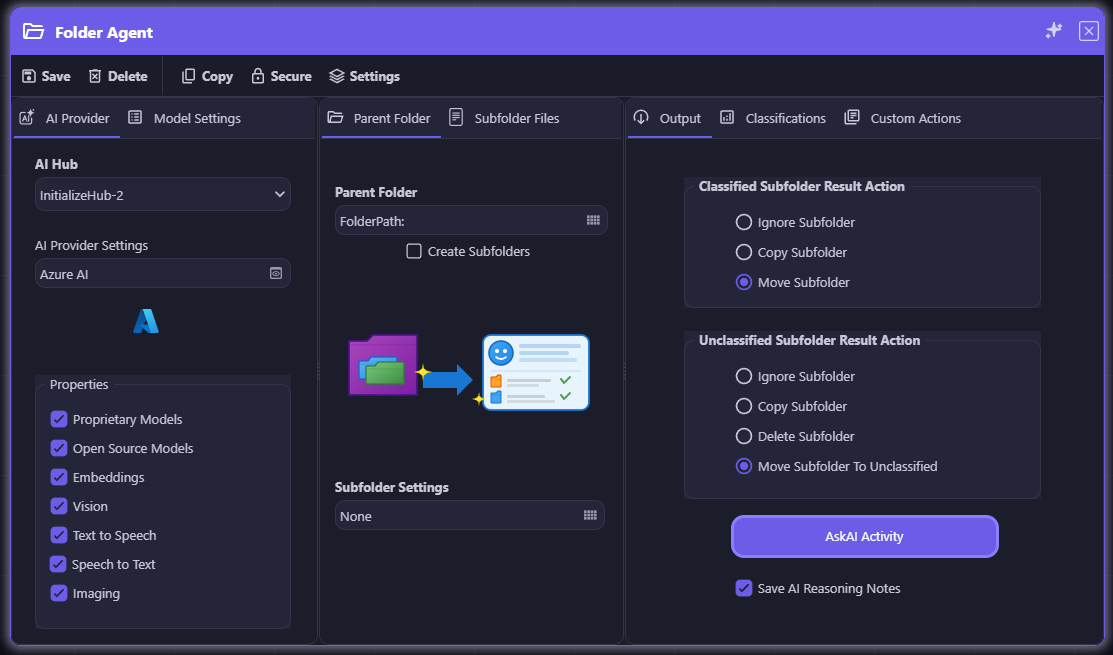
appRules AI Folder Agent

appRules AI Folder Agent: AI-powered subfolder classification and routing — configure the parent folder, subfolder filters, AI prompts, and classified/unclassified result actions in one unified interface

💼 Common Use Cases

  • Job Application Packages — Each candidate subfolder contains a resume, cover letter, and portfolio. AI evaluates the complete package and routes to Qualified, Review, or Reject
  • Legal Matter Files — Each matter subfolder contains contracts, amendments, and correspondence. AI classifies by type, risk, or status and routes to the appropriate legal team
  • Patient Record Packages — Each patient subfolder contains intake forms, lab results, and imaging reports. AI evaluates completeness, urgency, and department routing
  • Due Diligence Packages — Each deal subfolder contains financials, legal documents, and reports. AI classifies by risk level, completeness, or approval status and routes to the deal team
  • Research Submission Packages — Each submission subfolder contains a paper, supporting data, and declarations. AI evaluates against your rubric and routes for peer review, revision, or rejection
  • Project Document Packages — Each project subfolder contains drawings, specifications, and approvals. AI classifies by status, discipline, or revision stage and routes to the correct team or archive
⚖️

The Complete Document Intelligence Platform

Together, the appRules AI File Agent and AI Folder Agent deliver complete document intelligence — individual files and complete packages, simple workflows and complex multi-folder operations. Deploy them side by side in the same workflow, each GuardRailed and fully auditable, to build a sophisticated document intelligence operation at any scale. No coding required. No limits on complexity.

AskAI Action Chain — Automated Multi-Step AI Orchestration

Replace dozens of workflow activities with a single, table-driven AI execution chain — where every row gates, evaluates, and acts with full enterprise guardrails.

The appRules AskAI Action Chain is a breakthrough workflow activity that collapses what would otherwise require 20 or more individual orchestration activities into a single, readable configuration table. Each row defines a complete AI-driven pipeline: a Pre-Condition gates entry, an AskAI Prompt reasons over your data, a Post-Condition evaluates the AI result, and Actions fire on the true or false outcome — all in sequence, all no-code, all fully auditable. Chain any number of rows together to build sophisticated, multi-turn AI reasoning workflows that would previously have required weeks of development. Powered by appRules' extensive library of GuardRailed Conditions and Actions.

⛓️
One Composite Activity. Unlimited Intelligence.

What once required 20+ orchestration activities — branching conditions, AI calls, result evaluations, action executions — now lives in a single, governable workflow activity. Configure in minutes. Maintain in seconds.

🧠
Automated Multi-Turn AI Dialog

Each row in the chain builds on the last. The AI result from row 1 becomes context for row 2's prompt, which feeds row 3 — creating a true automated dialog between your workflow and AI. This is agentic reasoning without the complexity of building an agent from scratch.

🔀
Pre-Condition + Post-Condition Gating

Every row is double-gated. The Pre-Condition ensures the AI is only invoked when relevant — protecting tokens and performance. The Post-Condition evaluates the AI's response before any action fires, ensuring every decision meets your criteria before it touches your data.

True and Else Action Paths

Every row handles both outcomes. When the Post-Condition is true, the configured action fires. When false, the else action fires — or the row skips and the chain continues. No unhandled cases, no silent failures. Every path is explicit and auditable.

📋
Human-Readable Configuration

A non-technical stakeholder can read an AskAI Action Chain table and immediately understand what the workflow does. Business analysts, compliance officers, and auditors can review, verify, and sign off on AI-driven logic without touching a single line of code or deciphering a branching diagram.

🎯
Powered by Saved Prompts, Conditions & Actions

Every element of the chain draws from your existing appRules library. Saved SmartPrompt Builder prompts, saved Conditions, and saved Actions plug directly into each row — so the investment you've made in your appRules configuration compounds with every chain you build.

🏢
Built for Enterprise Governance

One activity. One configuration record. One version history. One audit trail. The AskAI Action Chain makes complex AI orchestration as governable as a simple database query — critical for financial services, healthcare, insurance, legal, and any environment where AI decisions must be explainable and compliant.

🔒
AI Advises — appRules Acts

The AI never directly modifies your data, triggers your systems, or makes unilateral decisions. Every AskAI result is evaluated by a Post-Condition before any Action fires. The separation of AI reasoning from action execution keeps every operation safe, traceable, and fully under enterprise control.

AskAI Action Chain — row execution pipeline diagram

Each chain row runs a complete four-stage pipeline: Pre-Condition → AskAI Prompt → Post-Condition → Action

Traditional workflow — 20+ activities required

Traditional approach: 20+ individual activities, branching diagrams, hard to read and maintain

AskAI Action Chain — one composite activity

AskAI Action Chain: the same logic in one composite activity — readable, governable, maintainable

appRules AskAI Action Chain — Applicant Evaluation Pipeline

AskAI Action Chain: Applicant Evaluation Pipeline — 4 rows orchestrating completeness check, skills evaluation, interview question generation and final scoring

appRules AskAI Action Chain — Customer Record Data Quality Pipeline

AskAI Action Chain: Customer Record Data Quality Pipeline — 5 rows orchestrating record validation, field checks, duplicate detection, quality scoring and certification

🚀 AskAI Action Chain Use Cases — Across Every Industry

Any workflow that requires sequential AI reasoning, conditional evaluation, and action execution is a perfect fit for the AskAI Action Chain. A few examples across industries:

🗄️ Data Quality

Verify record existence and completeness → detect missing, malformed or inconsistent field values → identify duplicate or near-duplicate records → score overall data quality and generate remediation recommendations → automatically certify clean records or trigger a targeted remediation workflow.

👤 Job Applicant Evaluation

Verify application completeness → evaluate skills against role requirements → generate tailored interview questions → score responses and recommend a hiring decision — automatically, end to end.

🏥 Medical Pre-Authorization

Confirm record completeness → assess clinical criteria against payer guidelines → draft an authorization justification letter → submit automatically or route to a clinician for review.

📋 Insurance Claims Triage

Pre-screen claim type → assess damage description for fraud indicators → auto-approve low-risk claims or escalate → generate a plain-language AI summary for the adjuster.

📝 Contract Review & Routing

Identify contract type and key obligations → flag non-standard clauses → assess specific legal risks → route to legal with an AI-generated risk summary or auto-approve standard agreements.

📞 Customer Escalation Routing

Classify ticket sentiment and urgency → identify account tier and revenue risk → route high-value customers to senior support with an AI briefing or place in standard queue.

🏭 Supplier Onboarding

Score financial stability from submitted documents → check for compliance and sanctions red flags → trigger full onboarding workflow for qualified suppliers or send disqualification notice.

📊 Regulatory Filing Review

Check filing completeness against a regulatory checklist → identify gaps and non-compliant sections → generate a specific deficiency notice → send automatically to the filer.

🎓 Student Academic Intervention

Detect grade drops → analyze performance patterns across subjects → identify specific learning gaps → automatically enroll in targeted resources or flag for counselor intervention.

⚙️

Turn Complex AI Orchestration Into a Single, Readable Table

Your enterprise workflows already contain the intelligence — patient records that need clinical evaluation, applicants awaiting skills assessment, contracts requiring legal review, claims demanding fraud analysis. The appRules AskAI Action Chain transforms that complexity into a single, governed, no-code table where AI reasoning, conditional logic, and action execution work in concert. Replace sprawling workflow diagrams with a configuration any stakeholder can read and any developer can maintain. No coding required. No limits on complexity. Full GuardRailed enterprise control at every step.

Comprehensive Enterprise Logging & Statistics

360° visibility into every workflow run. Nothing is a black box — every AI call, data operation, condition, and action is captured, timestamped, and ready to review.

As your workflow runs, appRules logs every interaction with AI Providers, Data Sources, Actions, Conditions, Arguments, Variables and the Runtime engine itself. The Workflow Run Logs & Statistics viewer surfaces the complete history for every instance in one place: browse every run with its start and end time, elapsed time, current state, and completion status, then drill into seven dedicated statistics tabs for a forensic-level view of exactly what happened. Every table exports straight to CSV, so operations teams, auditors, and developers all work from the same governed source of truth.

🗂️
Complete Instance History

Every workflow run is captured as an instance record — start time, end time, elapsed time, current state, completion status, who ran it and when, and whether generated files still exist. Reload any historical run and drill straight into its statistics.

📊
AI Model Statistics

Track every AI provider call by activity — total calls, input and output token consumption, the model settings used, and the finish reason for each response. See exactly how much of your AI budget each activity is consuming, model by model.

📈
Activity Statistics

Execution counts for every workflow activity: how many times it ran, how many executions were valid versus invalid, how many were skipped or skipped on condition, how many threw exceptions, and elapsed time totals for performance tuning.

🗄️
Data Source Statistics

Every read, insert, update, delete, and skip against every connected data source is counted per activity, alongside any errors encountered — a complete audit trail of exactly how your workflow touched enterprise data.

🔀
Condition Results

Every condition evaluated during the run is logged with total executions and a breakdown of how many evaluated true versus false — turning your business logic into measurable, auditable statistics instead of a black box.

Action Results

Every action execution is tracked with total executed counts and a valid versus invalid breakdown, so you can immediately identify actions that are failing validation before they become a production issue.

🧮
Arguments & Variables

Follow every workflow variable from its starting value through to its current value at the moment of logging — essential for debugging complex data transformations and multi-step AI reasoning chains.

📜
Runtime Logs

Detailed, timestamped runtime log entries — by activity, entry type, and message ID — capture the raw execution narrative of the workflow, the definitive source of truth when you need to know precisely what happened.

appRules Workflow Run Logs & Statistics — Instances and AI Model Statistics

Workflow Run Logs & Statistics: instance history alongside AI Model Statistics — total calls, input/output tokens and finish reason for every AI activity

One workflow run instance branches into seven statistics views: AI Model Statistics, Activity Statistics, Data Source Statistics, Condition Results, Action Results, Arguments & Variables, and Runtime Logs, all exportable to CSV
🔍

If It Ran In appRules, You Can See It

From AI token consumption to the last runtime log entry, appRules gives you a governed, exportable, 360° record of every workflow execution — the observability enterprises need to trust, troubleshoot, and continuously improve their automation.

AI Powered Decision Tables

AI Powered Decision Tables: Next-Generation decision logic that combines traditional rule-based precision with generative AI intelligence

AI Powered Decision Tables

The future of enterprise decision automation—where deterministic business rules meet the dynamic intelligence of generative AI.

appRules.AI introduces a powerful capability that empowers enterprise decisioning: AI Powered Decision Tables. This innovative feature seamlessly integrates generative AI directly into traditional decision table logic, enabling your business rules to transcend rigid if-then structures and embrace intelligent, context-aware decision making.

🧠
Hybrid Intelligence Architecture

Combine the precision and auditability of traditional decision tables with the nuanced understanding and adaptability of generative AI—getting the best of both worlds in a single, unified decision framework.

Context-Aware Decision Making

Enable decision tables to understand natural language conditions, interpret complex scenarios, and make intelligent determinations that would be impossible or impractical to code with traditional rule logic alone.

🎯
Unprecedented Flexibility

Handle edge cases, ambiguous situations, and evolving business conditions without constantly rewriting rules. Let AI intelligently interpret conditions while maintaining full control over outcomes and actions.

🔍
Seamless Integration

AI-powered logic integrates naturally into your existing decision table workflows—use it for specific conditions that benefit from intelligent interpretation while keeping deterministic rules where needed.

📊
Enhanced Business Agility

Dramatically reduce the maintenance burden of complex decision logic. As business conditions evolve, AI-powered tables adapt intelligently without requiring extensive rule rewrites or version updates.

appRules MCP Server

Connect any MCP-compatible AI client directly to your appRules workflows — no code, no middleware, no manual steps.

appRules now exposes its powerful workflow execution engine as a native Model Context Protocol (MCP) Server. This means AI assistants like Claude Desktop, Cursor, Windsurf, and any other MCP-compatible client can discover, invoke, and receive results from your appRules workflows through natural language — automatically and in real time.

🔌
Universal AI Client Compatibility

Works out of the box with any MCP-compatible AI client. Claude Desktop, Cursor, Windsurf, and future clients connect with a single configuration entry — no custom integration required per tool.

Natural Language Workflow Invocation

Ask your AI assistant to run an appRules workflow in plain English. The MCP server translates the intent into a precise API call to your appRules Web API — instantly, without writing code.

🔐
Secure Pass-Through Authentication

Credentials stay in your environment variables — never exposed in prompts or tool calls. appRules handles all authentication, so your security posture is unchanged.

🎯
Two Flexible Execution Modes

Run workflows by Job ID for quick named executions, or pass full project credentials with runtime arguments for dynamic, parameterised workflow runs — matching exactly how your teams already work.

🔧
Zero Changes to Existing Workflows

The MCP Server calls the same appRules Web API already used by your CLI tools. Every existing workflow, rule, and integration works immediately — nothing needs to be rebuilt or reconfigured.

How It Works

🤖
MCP Client
Claude Desktop · Cursor · Windsurf
↕ stdio
⚙️
appRules MCP Server
Tool discovery · Execution · Results
↕ HTTP
🏢
appRules Web API
Workflows · Rules · Integrations
Compatible Clients
Claude Desktop  ·  Cursor  ·  Windsurf  ·  Any MCP-compatible client

Enterprise Knowledge Intelligence Platform

Power your AI applications with a powerful and comprehensive knowledge discovery and retrieval infrastructure—supporting every major vector database, embedding service, and search platform.

Transform unstructured data into actionable intelligence with appRules' end-to-end knowledge platform. Generate embeddings with leading AI providers, store vectors across 14+ specialized databases, enhance relevance with advanced reranking, and extend reach with integrated web search. Whether building RAG systems, semantic search, or intelligent document processing, you have complete flexibility to architect the optimal solution for your enterprise needs.

🎯
Comprehensive Vector Database Support

Connect to 14+ vector databases including Azure AI Search, Pinecone, Weaviate, Qdrant, Milvus, and more. Switch providers instantly or implement hybrid strategies without code changes.

🔧
Flexible Embedding Generation

Generate high-quality embeddings using any AI provider or specialized services like HuggingFace. Optimize for accuracy, speed, or cost based on your specific use case.

Advanced Reranking Intelligence

Dramatically improve search precision with AI-powered reranking services. Combine with metadata filters for hybrid retrieval that outperforms pure semantic search.

🌐
Integrated Web Search

Extend knowledge discovery beyond your documents with Bing, Brave, and Google web search integration. Ground AI responses in current information and external sources.

Supported Knowledge Platforms

Azure AI Search
Azure AI Search
Chroma
Chroma
Elasticsearch
Elasticsearch
📁
FileSystem
Garnet
Microsoft Garnet
HVS
Hybrid Vector SQL
Memory
Memory
Milvus
Milvus
Pinecone
Pinecone
PostgreSQL
PostgreSQL
Redis
Redis
Qdrant
Qdrant
SQL Server
SQL Server 2025
Weaviate
Weaviate
🤖
AI Provider Embeddings
HuggingFace
HuggingFace
🎯
AI Provider Reranking
🖥️
LocalAI
Bing
Bing
Brave
Brave
Google
Google

Complete knowledge infrastructure for enterprise AI applications

Intelligent Document Chunking

The foundation of high-quality RAG systems starts with smart text chunking—and appRules.AI makes it effortless.

Proper document chunking is critical for RAG performance. Chunks that are too large dilute semantic meaning and waste context windows. Chunks that are too small lose critical context and fragment information. appRules.AI eliminates the complexity with sophisticated chunking strategies—all configurable through an intuitive no-code interface.

Three Steps to Perfect Chunking

1.
Select Your Source

Choose from files, folders, AI query results, database columns, and more—no coding required

2.
Pick Your Strategy

Choose from proven chunking methods tailored to different content types and use cases

3.
Configure & Execute

Set parameters like chunk size, overlap, and delimiters—or accept intelligent defaults

📄
Universal Format Support

Process DOCX, DOC, PDF, HTML, RTF, ODT, and TXT files seamlessly—including complex documents with tables, images, and formatting

🎯
Chunking Strategies

Simple, Fixed Size, By Paragraphs, By Sentences, Semantic Sections, By Token Count, Recursive, Custom and Embedded Extract—each optimized for specific scenarios

⚙️
Precision Control

Fine-tune max/min chunk sizes, overlap percentages, paragraph separators, and sentence delimiters for optimal results

🚀
Zero-Code Implementation

No programming, no iterations, no complexity—just select, configure, and execute through our visual interface

appRules.AI Document Chunking Configuration

Document Chunking: Configure sophisticated text chunking strategies without writing a single line of code

Supported Document Formats

.DOCX

Microsoft Word 2007+

.DOC

Microsoft Word 97-2003

.PDF

Portable Document Format

.HTML / .HTM

Web Pages

.RTF

Rich Text Format

.ODT

OpenDocument Text

.TXT

Plain Text Files

Intelligent Chunking Strategies

Simple

Basic character-based splitting for straightforward text processing

Split By Fixed Size

Uniform chunks of specified size—ideal for consistent processing requirements

Split By Paragraphs

Preserve natural document structure by splitting on paragraph boundaries

Split By Sentences

Maintain complete thoughts by respecting sentence boundaries

Split By Semantic Sections

Intelligently identify and preserve topically coherent sections

Split By Token Count

Optimize for AI Provider token limits with precise token-aware chunking

Recursive

Hierarchical splitting for complex documents—the most sophisticated approach

Custom

Deploy appRules.AI Extension Workflow Activities to implement custom logic to handle your edge cases:
• Domain-specific chunking (legal documents, code, logs, etc.)
• Business-specific rules
• Format-specific handling

Embedded Extract

Extracts text chunks from instances of embedded documents in the workflow

Smart Embedded Document Metadata Boosts RAG Performance

Supercharge your RAG system with intelligent metadata management

Document metadata isn't just helpful—it's essential for high-performance AI retrieval. Our Smart Knowledge Discovery Platform leverages advanced metadata capabilities to deliver superior results.

Configure Rich Document Metadata

Our intuitive configuration interface makes it easy to define and manage document metadata fields. Set up custom metadata schemas that match your document types and business needs—from simple categorization to complex hierarchical structures with conditional fields and validation rules.

Configure Document Metadata Interface

Define custom metadata fields with flexible data types, validation rules, and conditional visibility to capture exactly the information your RAG system needs.

Smart Metadata-Enhanced RAG Architecture

Why Metadata Transforms RAG Quality

⚡ Precision Filtering

Pre-filter by date, category, permissions, or custom attributes before semantic search for faster, more relevant results

🚀 Hybrid Retrieval Power

Combine metadata filters with vector search to dramatically outperform pure semantic approaches

🎯 Enhanced Context

Provide your LLM with source, date, author, and document type information for better interpretation and more accurate responses

🔍 Complete Provenance

Track information sources for transparency, trust, and easy debugging

Flexible Metadata Architecture

Our conditional field system adapts to your unique needs:

Dynamic schemas for different document types—research papers, customer tickets, code files, and more

Query-time flexibility with powerful filtering like status='active' AND department='engineering'

Role-based access control through intelligent metadata conditions

Multi-tenant support with clean data segregation

Zero-migration evolution as your requirements grow

The Result: Production-grade RAG that scales with your organization's complexity while maintaining lightning-fast performance and rock-solid accuracy.

Agentic Workflow Orchestration

  • Visual workflow designer with AI agent activities
  • Multi-agent collaboration and coordination
  • Dynamic task routing and load balancing
  • Conditional logic and decision trees
  • Real-time workflow monitoring

Business Rules & Decision Support

  • Evaluate Decision Table workflow activities
  • Execute RuleSet workflow activities
  • Conditions matrix for complex logic
  • Actions matrix for process execution
  • Next-generation decision support systems

AI & Machine Learning Integration

  • AI embedding storage services support
  • AI embedding generation services
  • AI reranking services integration
  • AI web search services
  • Model training and prediction activities

Data Integration & Quality

  • Flow-based data migration
  • Real-time data synchronization
  • Integrated data quality checks
  • Metadata management
  • Data transformation and mapping

Enterprise Connectors Suite

  • 450+ pre-built enterprise connectors
  • CRM, ERP, Database, SaaS platforms
  • Full-featured subsystems, not just APIs
  • Certified connectivity libraries
  • Custom connector development support

Process Automation

  • Round-robin assignments
  • Lead distribution automation
  • Territory realignment workflows
  • Automated compliance processes
  • Exception handling and escalation

Job Scheduling & Execution

  • Flexible job scheduler
  • Real-time job monitoring
  • Web API for external execution
  • Parallel processing support
  • Multi-threaded execution

Audit, Compliance & Security

  • Comprehensive audit logs
  • Detailed execution statistics
  • Role-based access control
  • Check-in/check-out version control
  • Compliance reporting capabilities

Why appRules® AI Automation Engine?

What sets us apart in the enterprise automation landscape

🏆

All-In-One Platform

Unlike competitors requiring multiple products, appRules provides agentic automation, data integration, business rules, and ML capabilities in a single unified platform.

⚙️

Most Configurable System

Thousands of configurable options ensure that no matter your requirement, there's a configuration for it—without custom coding.

🔌

Superior Connectors

Full-featured connector subsystems with native functionality, not simple API wrappers. Built with certified CData libraries for enterprise-grade reliability.

🚀

Fastest Time to Value

Fastest to setup, fastest to configure, fastest to ROI. Deploy mission-critical solutions in weeks, not months.

📐

True No-Code Environment

Compose—don't program. Drag-and-drop workflow activities with intuitive editors make sophisticated automation accessible to business users.

🎯

Proven at Scale

Battle-tested in financial services, healthcare, insurance, public sector, and manufacturing—handling millions of transactions with enterprise-grade performance.

Enterprise Use Cases

Real-world applications of agentic automation across industries

🏦 Financial Services

Automate complex financial information extraction, compliance validation, verification checks, and risk analysis with AI agents that understand regulatory requirements.

🏥 Healthcare

Streamline patient data integration, claims processing, appointment scheduling, and compliance reporting across disparate healthcare systems.

🛡️ Insurance

Deploy intelligent agents for policy administration, claims adjudication, fraud detection, and underwriting processes with dynamic decision-making.

🏛️ Public Sector

Modernize government operations with automated citizen service requests, inter-agency data sharing, and compliance workflow management.

📊 Customer Support

Intelligent ticket routing, automated response generation, escalation management, and knowledge base integration with context-aware AI agents.

📦 Supply Chain

Real-time supply chain optimization with agents that analyze conditions, predict disruptions, and autonomously reroute resources to maintain efficiency.

💼 Sales & CRM

Automate lead assignment, territory management, opportunity scoring, and pipeline progression with intelligent agents that understand sales processes.

🔄 Data Integration

Orchestrate complex data flows between CRM, ERP, data warehouses, and cloud platforms with automatic error handling and data quality validation.

Business Benefits

Transform your operations with measurable results

⏱️ Accelerated Time-to-Market

Deploy complex automation solutions in weeks instead of months with no-code configuration and pre-built connectors.

💰 Reduced Operational Costs

Automate repetitive, high-volume processes and free your team to focus on strategic, high-value activities.

✅ Improved Accuracy

Eliminate manual errors with consistent, rule-driven execution and comprehensive audit trails for compliance.

📈 Enhanced Scalability

Handle growing transaction volumes without proportional increases in staff through parallel processing and cloud deployment options.

🔄 Greater Agility

Respond rapidly to changing business requirements by reconfiguring workflows without lengthy development cycles.

🎓 Lower Technical Debt

Reduce dependency on custom code with a configuration-first approach that's easier to maintain and upgrade.

👥 Better Resource Utilization

Empower business users to compose and modify workflows, reducing bottlenecks on IT resources.

Comprehensive Enterprise Connectors

Connect to your entire technology ecosystem with 450+ pre-built connectors

💼

Accounting & Inventory

🤖

AI & Machine Learning

📊

Analytics

🔗

APIs & Protocols

⚙️

Application Platforms

📈

Big Data

📅

Calendars & Contacts

☁️

Cloud Storage

👥

Collaboration

🎯

CRM Systems

🗄️

Databases

🏢

Data Warehouses

📄

Document Management

🛒

eCommerce

📧

Email Systems

🏭

ERP Systems

💵

Financial Services

🔐

Identity & Access

📣

Marketing Automation

🗃️

NoSQL Databases

💳

Payment Processing

📋

Project Management

🔍

Search Engines

📱

Social Media

Major Platforms Supported

Microsoft Azure Azure
Amazon AWS AWS
Google Cloud Google Cloud
Microsoft Dynamics 365 Dynamics 365
Salesforce Salesforce
SAP SAP
Oracle Oracle
Workday Workday
Snowflake Snowflake
Databricks Databricks

...and hundreds more enterprise platforms and data sources

Flexible Deployment Options

Deploy where your business needs it

☁️ Cloud Deployment

Deploy on Amazon AWS, Microsoft Azure, or Google Cloud with full scalability and redundancy. Leverage cloud-native features for global availability.

🏢 On-Premise

Install on your local servers for complete control over data security, compliance, and integration with legacy systems.

🖥️ Virtual Machines

Run on virtual infrastructure for flexible resource allocation and easy migration between environments.

🔒 Hybrid Architecture

Combine cloud and on-premise deployments to meet specific data residency, performance, and security requirements.

Product Editions

Scalable solutions for organizations of all sizes

appRules Express

Entry-level web server edition for small teams and pilot projects. Includes support for 1 admin/developer user and 1 production/test user.

appRules Team

Full-featured edition for rapid development and deployment of projects. Supports up to 5 users with all key platform capabilities.

appRules Enterprise

Unlimited users, advanced features, and enterprise support. Designed for large-scale deployments with mission-critical requirements.

Note: The appRules® AI Automation Engine can be purchased standalone or as part of appRules Enterprise 360 subscription, which includes the entire appRules product suite.

Ready to Transform Your Enterprise Automation?

Deploy intelligent, autonomous workflows that deliver results

Schedule a Demo