 Design & Build
Design workflows visually, build prompts from real context, and orchestrate AI step by step — in no code, low code, or source code.
Design & BuildDesign workflows visually, build prompts from real context, and orchestrate AI step by step — in no code, low code, or source code.
appRules gives you multiple options for composing enterprise AI agentic solutions. Choose the option that works best for your organization and for the project at hand.
 No Code
Instantly deploy thousands of ready-made workflow activities — CRUD operations, API connectors, and hundreds more — to compose your workflows. Point, click, and go.
InitializeSource — shown below — is just one of hundreds of no-code workflow activities appRules provides out of the box. It's a common starting point: pick a connector, initialize the source, and configure exactly what you need — which columns to select, how to filter records, how to sort and group — all through guided, point-and-click screens. That same no-code experience carries through appRules' entire activity library, well beyond data sources: reading, writing, and updating records, calling APIs, running conditions, and orchestrating logic. No query language to learn, no code to write, no matter which activity you're configuring.

InitializeSource, shown here, is one of hundreds of pre-built workflow activities — connectors, CRUD operations, and more — each configured the same visual way: no setup code required.

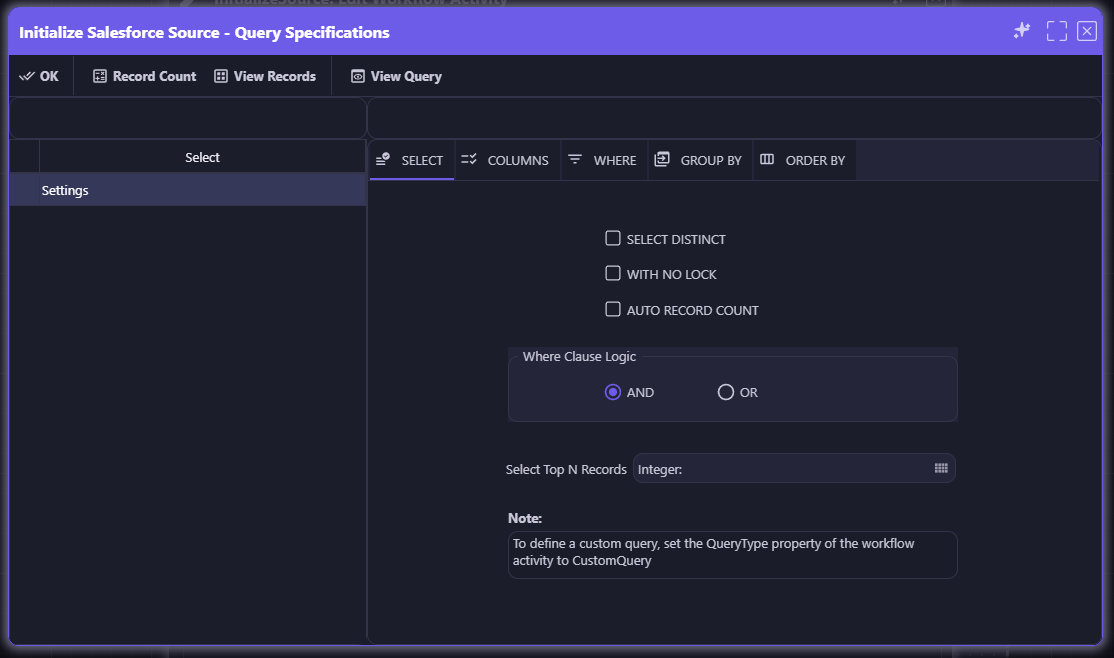
Select Distinct, With No Lock, Auto Record Count, Top N Records, and Where Clause logic — every query option is a guided setting, not a line of SQL.

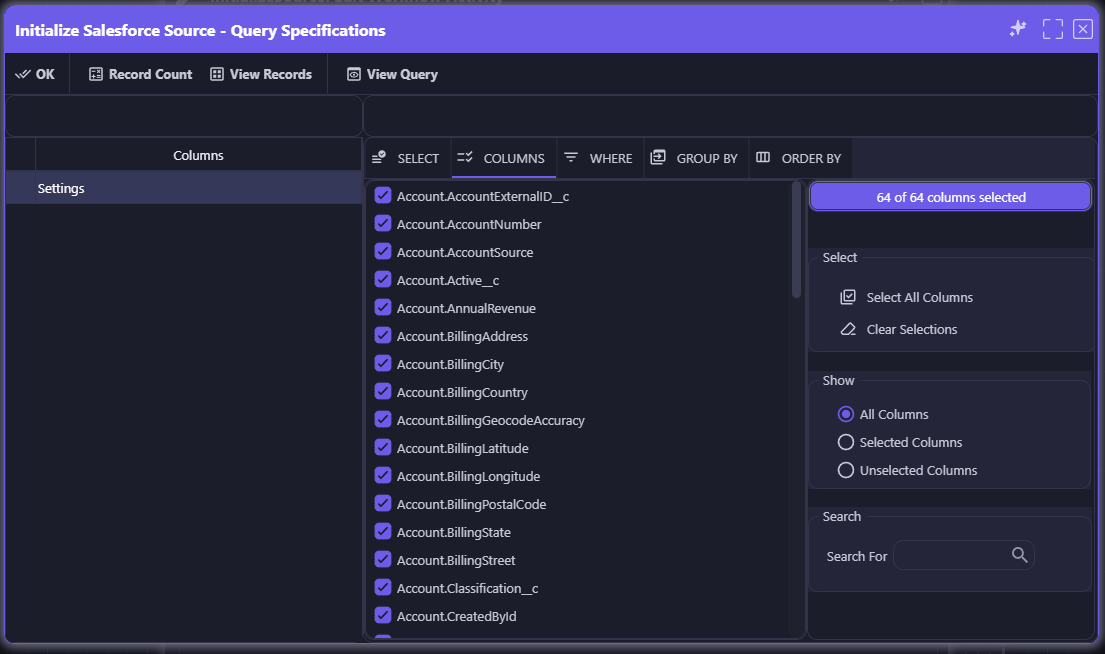
Browse every available column, select all or just what you need, and search to find fields fast — 64 of 64 columns selected with a click, not a schema lookup.

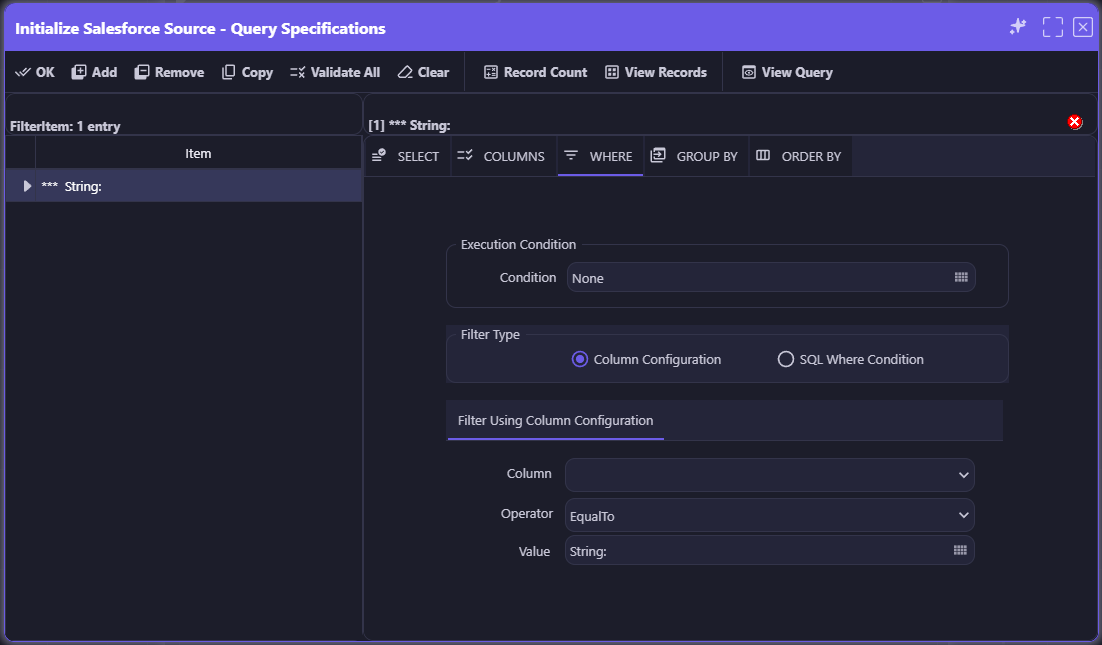
Build filters through Column Configuration — pick a column, an operator, and a value — or drop into a SQL Where Condition when you need it. Either way, no code to write.
Initialize Data Source
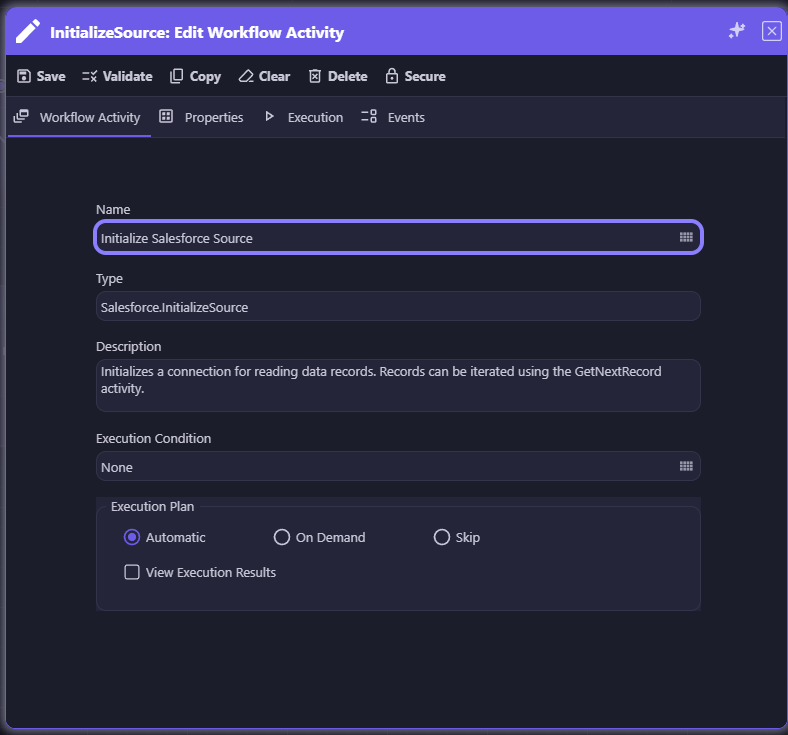
Query Specifications: Select
Query Specifications: Columns
Query Specifications: Where
 Low Code
When your logic needs more precision, deploy appRules' highly configurable Actions and Conditions — with Expressions, Scripts, and Functions to add low-code power exactly where you need it.
Beyond the No Code building blocks, appRules gives you a rich library of configurable Actions and Conditions that can be extended with light logic — inline Expressions for quick calculations, a full Script Editor with method discovery for more involved logic, and Functions that call directly into your own .NET assemblies. It's the flexibility of code, scoped to exactly the places your workflow needs it.

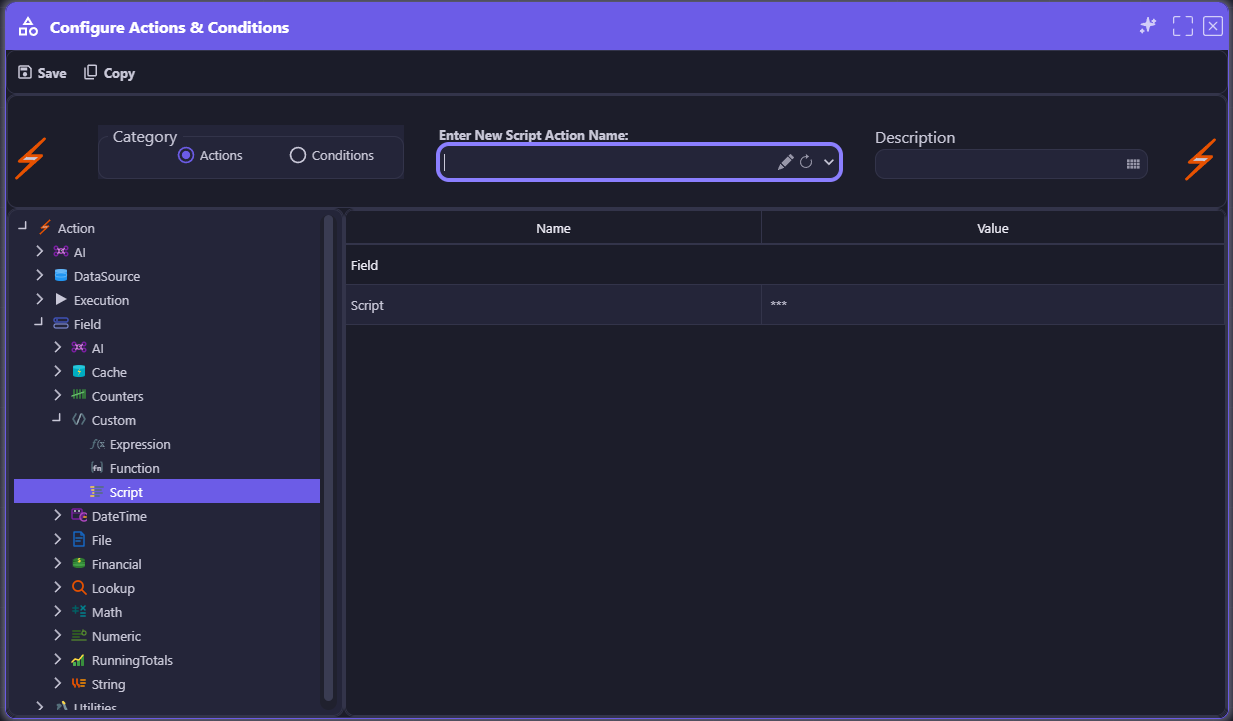
Browse a categorized library of Actions and Conditions — AI, DataSource, Execution, Field, and more — and add Script, Expression, or Function logic exactly where your workflow needs it.

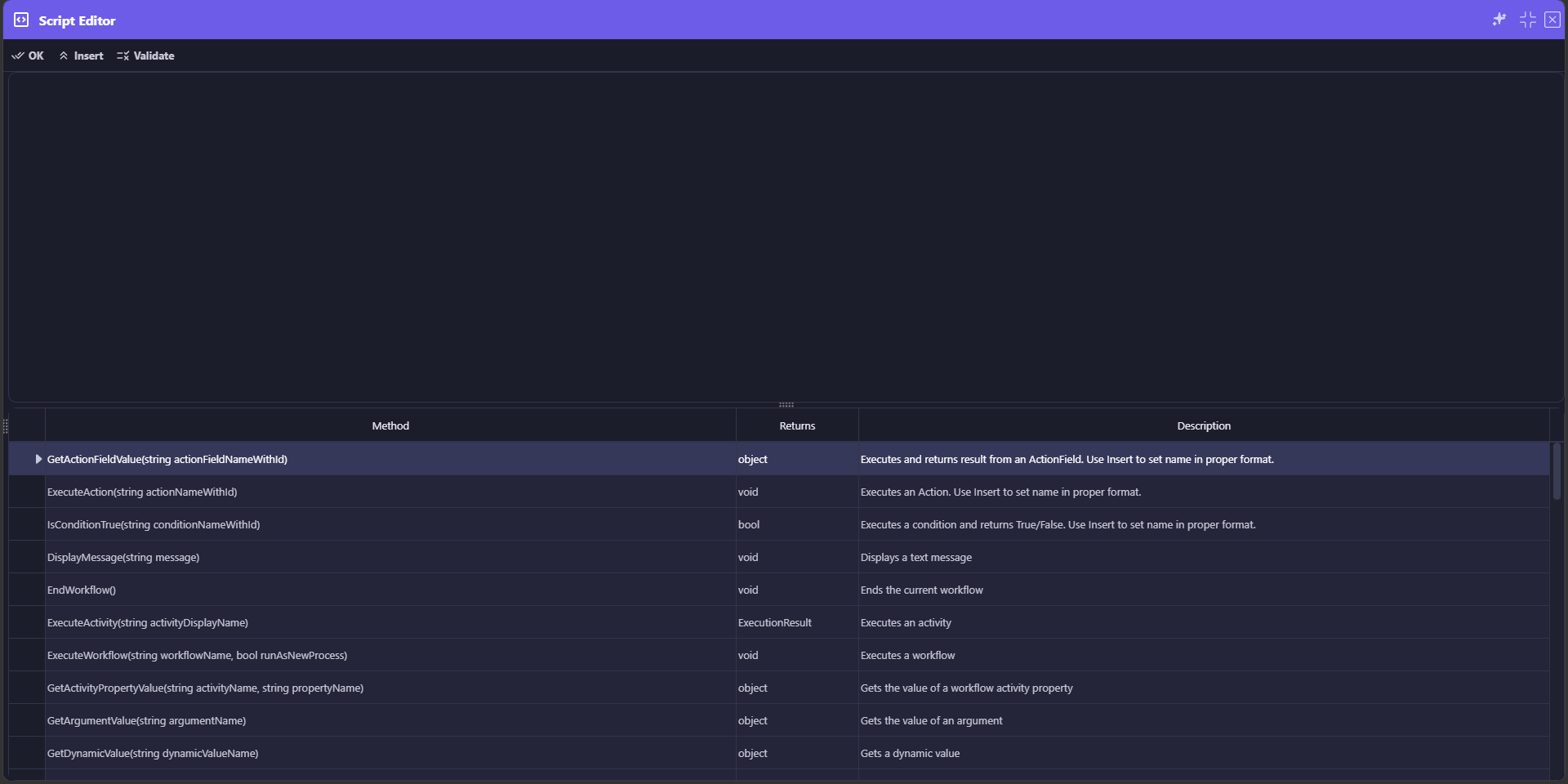
Write multi-line logic in a dedicated Script Editor, with a live reference of callable methods — ExecuteAction, IsConditionTrue, GetArgumentValue, and more — right below the editor.

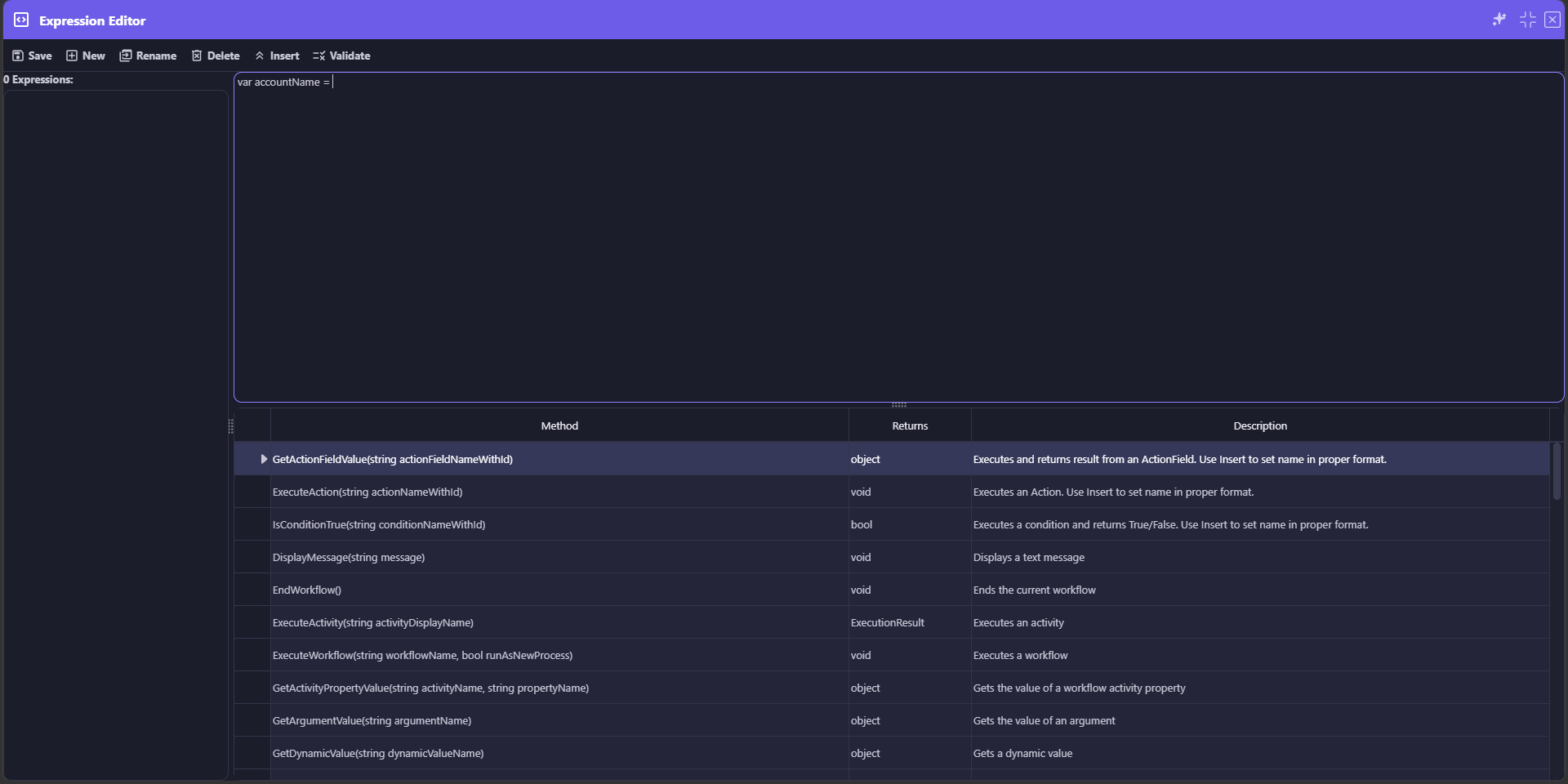
For single-line calculations and lookups, the Expression Editor gives you the same method reference in a lighter-weight, inline format — no full script required.

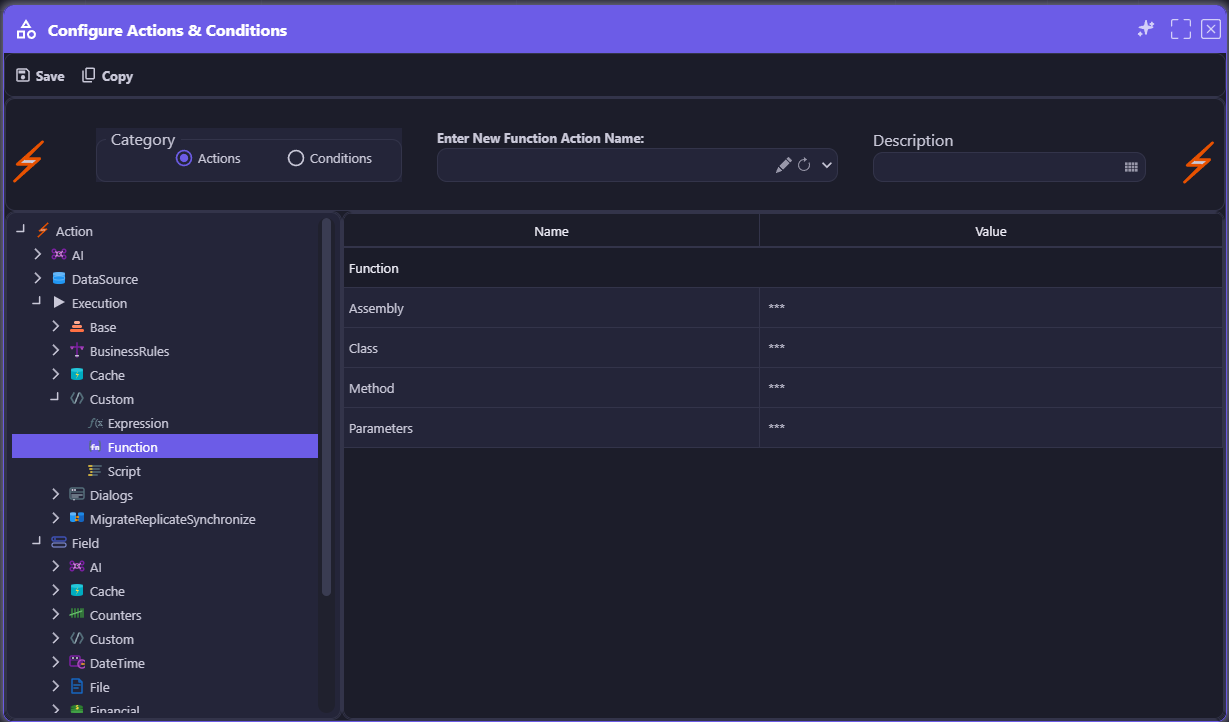
Configure a Function action by Assembly, Class, Method, and Parameters to call directly into existing .NET code — bridging low-code workflows with your team's own libraries.
Add a Script Action
Script Editor
Expression Editor
Function Action
 Source Code
For teams that need full control, appRules Developer is the add-on product that gives you complete source code access to your appRules environment.
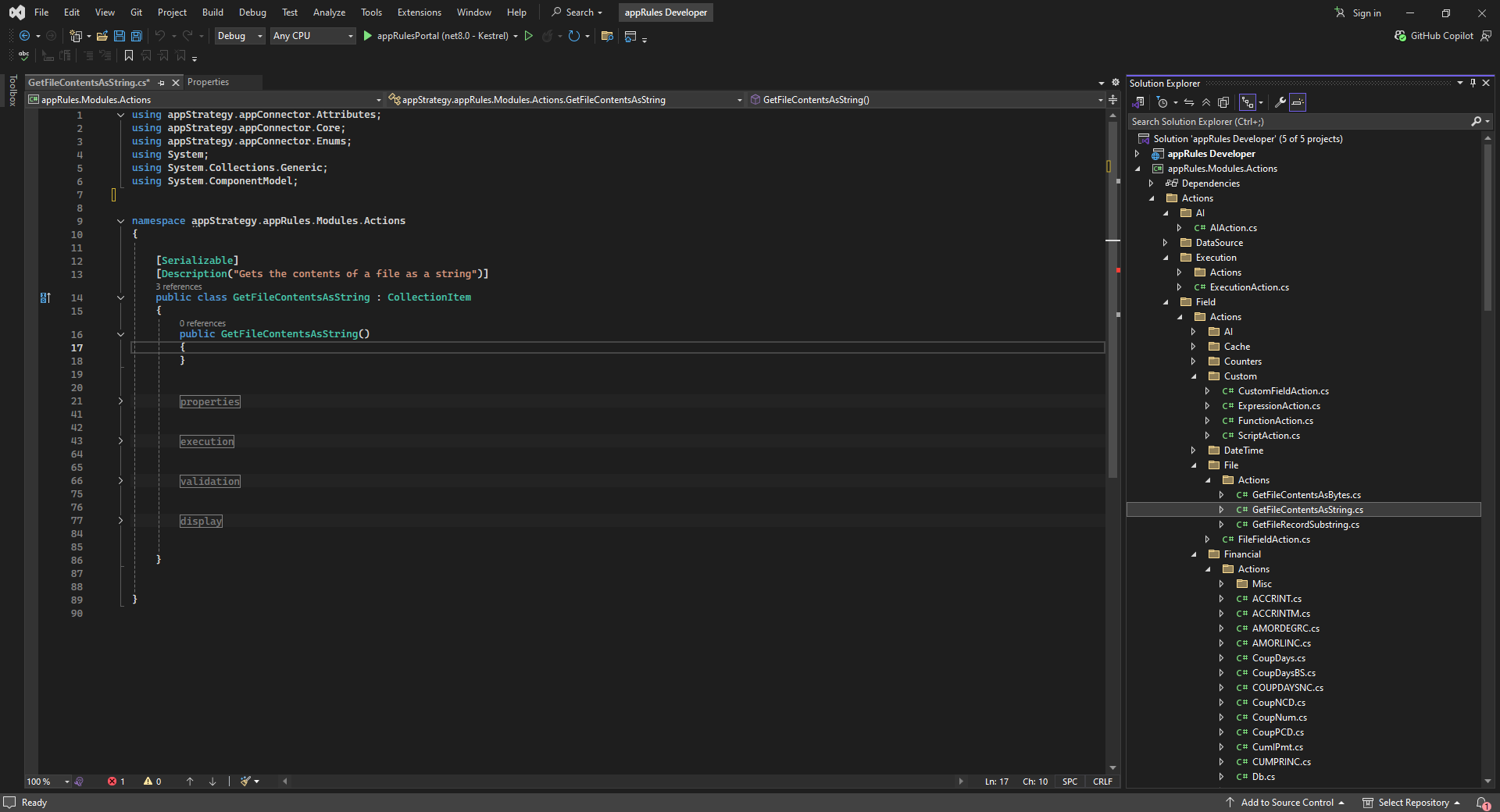
In addition to every No Code and Low Code capability, appRules Developer lets you create your own connectors, develop custom Extension Workflow Activities, add new Actions and Conditions, and extend the appRules platform itself — all inside a familiar Visual Studio development environment, with full access to the underlying appRules Modules source tree.
Learn more: appRules + Visual Studio →
appRules Developer is a real Visual Studio solution — Solution Explorer, IntelliSense, Git integration, and the full appRules Modules source tree, organized by Actions, Conditions, DataSource, Execution, Field, and Financial categories.

Create new connectors, develop custom Extension Workflow Activities, add new Actions and Conditions, and extend appRules itself — no black box, full control when you need it.
appRules Developer in Visual Studio

Not an Either/Or Choice
No Code, Low Code, and Source Code aren't separate products — they're capabilities of the same platform, freely mixed within a single workflow. Start with connectors and point-and-click configuration, drop into a Script or Expression exactly where you need precision, and reach for appRules Developer only when a project truly calls for it.
appRules' workflow designer delivers true no-code automation as your starting point—where enterprise-grade complexity meets remarkable simplicity, with low-code and source code always available when you need more.
Our powerful and intuitive visual designer transforms complex agentic automation into an intuitive drag-and-drop experience. Build sophisticated multi-agent workflow pipelines, orchestrate decision logic, and integrate hundreds of data sources—all without writing a single line of code.
Simply select workflow activities from the comprehensive toolbox, configure properties, and connect—that's it. No programming required.

Visualize your entire workflow pipeline at a glance. Control flow logic, parallel processing, and conditional branching with elegant visual controls.

Built-in validation ensures your workflows are correct before deployment. Test, debug, and refine with comprehensive logging and monitoring.
Take complete control over AI workflows with programmable pre-execution query enhancement and post-execution result processing. Use custom logic in your preferred language to handle edge cases and implement sophisticated business requirements. Learn more in the dedicated Extension Workflow Activities section below.

The appRules Workflow Designer: Compose enterprise agentic automation with unprecedented ease
The Visual Workflow Designer toolbox isn't a handful of generic nodes. It's a library of purpose-built workflow activities, organized by category — each one a complete operation you drag onto the canvas and configure through guided dialogs.
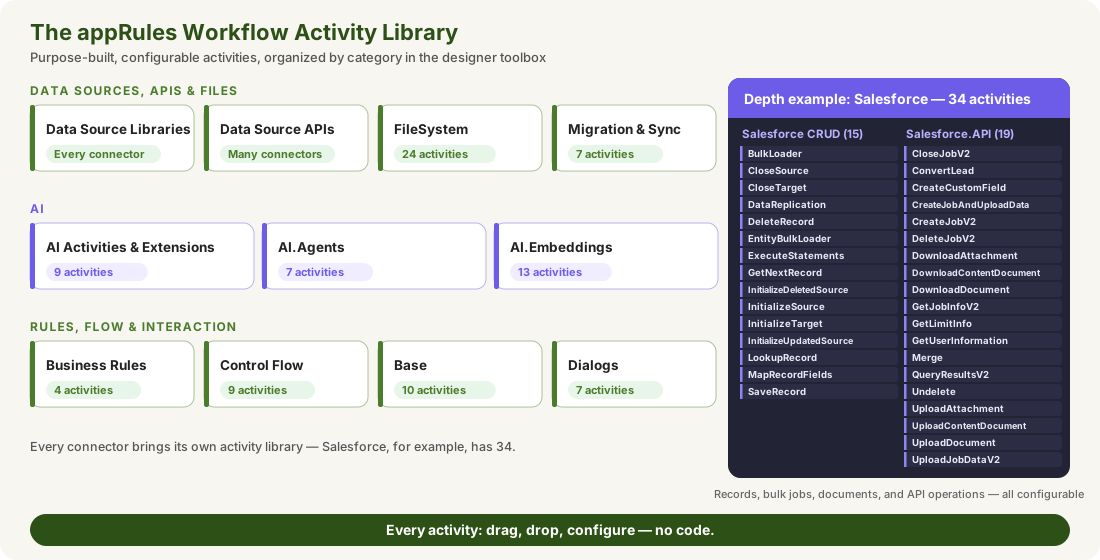
Every connector brings its own activities. Salesforce CRUD, for example, has 15 (see the depth example above), plus a separate Salesforce.API library.
Many connectors also include a separate API library for API-level operations. Salesforce.API, for example, has 19 (see the depth example above).
Everyday building blocks — CallWebService, SendEmail, SetValues, Delay, ExecuteWorkflow, audit and log entries — plus interactive dialogs to edit records, prompt for values, and view runtime results.
24 activities for directories, files, and access control lists — create, copy, move, delete, zip and unzip, FTP upload and download, and directory iteration.
Seven complete data movement activities, including BasicDataMigration, DataReplication, BidirectionalSynch, and OneToManyMigration.
AskAI, AskAIActionChain, EvaluateAICondition, PerformAIAction, ExecuteAIWorkflow and InitializeHub — plus AI.Extensions: AskAIPreProcess, AskAIPostProcess, and CustomDocumentChunking.
Ready-made agents for data record classification and multi-classification, dynamic classification, and Email, File, and Folder agents.
13 activities for the full RAG pipeline — ingest files, embed text, store, query, rerank, retrieve, and calculate similarity.
EvaluateConditions, EvaluateDecisionTable, ExecuteRuleSet, and PerformActions — the rules engine as drag-and-drop activities.
If, Switch, While, Sequence, Parallel, OnDemand, Redirect, Start, and EndWorkflow.
Every activity is configurable. Typed properties, an optional Execution Condition, and validation as you configure — the same guided experience across the entire library.
And the designer is secure. Workflows, workflow activities, and other design artifacts can be locked with the Secure button, so only authorized people can view or change them.

SmartPrompt Builder: Comprehensive AI model configuration and familiar environment for writing and editing prompts. Use Context Picker to select and configure dynamic context variables without writing code

SmartPrompt Builder: Condition evaluation engine — AI Providers configured with a deterministic role to output only true or false, delivering clean, unambiguous signals that drive downstream workflow logic

Model Cross-Validation: Deploy multiple AI models simultaneously with configurable result selection and deadlock resolution—like having a panel of expert consultants validating every decision
Smart and sophisticated channel for prompting AI and achieving enterprise-grade results.
As the cornerstone of the appRules AskAI workflow activity, SmartPrompt Builder revolutionizes how enterprises interact with AI models offering a comprehensive environment that delivers unmatched precision, control, and reliability.
Hundreds of pre-configured context arguments, variables and result sets deliver exact workflow data to your AI prompts instantly. No coding—just select, configure, and inject live context from any part of your enterprise workflow. (See details below)
Deploy powerful prompt and context engines such as the data formatting and condition evaluation engines to sharpen your AI instructions with precision. These engines give the AI Providers a specific, deterministic role—transforming data with zero noise, evaluating conditions to a clean true/false signal, etc.—so your workflows always get exactly the output they expect.

Deploy multiple AI models simultaneously for mission-critical tasks. Like having a panel of expert consultants, cross-validation ensures accuracy in financial analysis, medical diagnostics, engineering calculations, public sector decision-making, regulatory compliance, and data quality assessments. Configure selection criteria, result validation, and automatic deadlock resolution—all without code.

Out-of-the-box AI Agents leverage SmartPrompt Builder's power automatically, giving your team instant access to enterprise AI capabilities with zero setup.

Build once, deploy everywhere. Save and share proven prompts across your organization, accelerating AI adoption and ensuring consistent, reliable results enterprise-wide.
The hardest part of enterprise AI isn't the model — it's getting exactly the right data into the prompt, accurately and securely. The Context Picker makes it point-and-click: choose from 36 context types, and every variable maps to a real source.
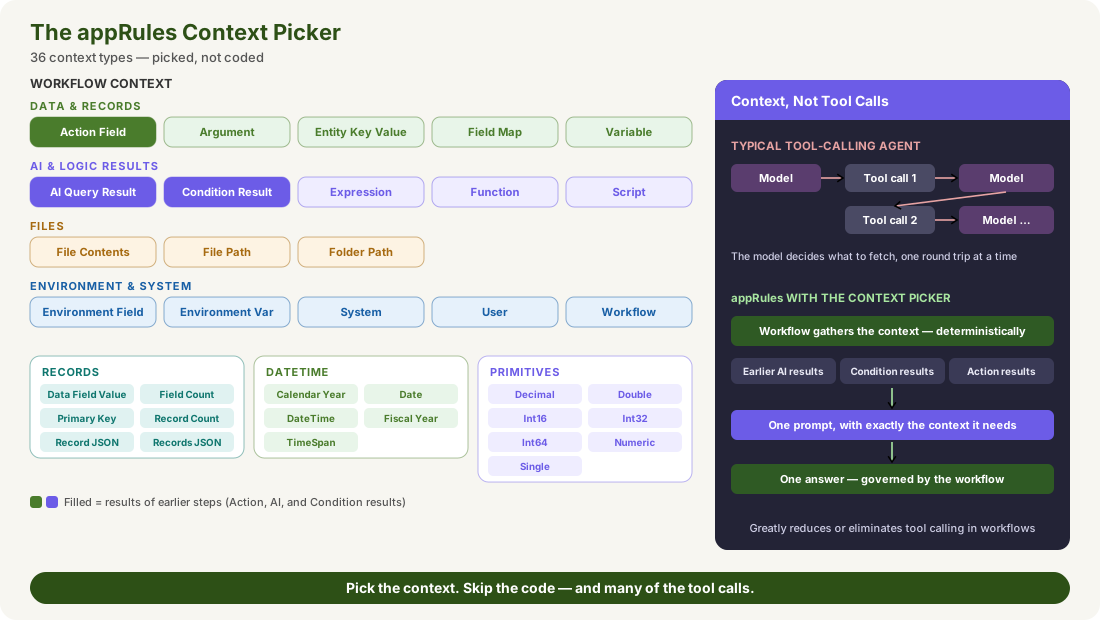
Every context variable points to a real source — a record, a field, a file, an environment value — so the AI answers from your data, not from guesses.
An AI Query Result lets one prompt use the answer of an earlier AskAI activity, and the results of Conditions and Actions can feed a prompt too — so multi-step reasoning builds on itself.
Because the workflow assembles the context deterministically before the AI is called, the model doesn't need to call tools to go and fetch it. In many workflows, that greatly reduces or eliminates tool calling.
The model sees exactly the context you pick, and nothing more — never open-ended access to enterprise data.
Partial Preview shows the fully merged prompt and context with the AI never called, so mapping errors are caught at zero cost.
Select, configure, and insert context through a guided dialog instead of writing code to stuff data into prompts.
The Records tab passes a single field value, a primary key, record and field counts, or an entire record — or set of records — as JSON, so the AI sees complete, structured data.
Each type opens a dedicated editor. The DateTime editor alone offers more than 20 ready-made relative dates — DateThisMonthStart, DateLastMonthEnd, DateTimeWorkflowStart, and more — plus TimeSpan arithmetic such as DateTimeNow+00:00:00:00.
The Primitives tab supplies precisely typed numbers — Decimal, Double, Int16, Int32, Int64, Numeric, and Single — and the DateTime tab includes calendar and fiscal years, so values reach the prompt in exactly the form a decision needs.
Context, not tool calls. Tool-calling agents let the model decide what to fetch, one round trip at a time. appRules gathers the context first — deterministically, inside the governed workflow — so the AI gets one complete prompt and the workflow keeps control.
Explore further: GuardRailed Design · Contain the Model · Beyond the Demo
Prompt engineering shouldn't mean guesswork and rerun cycles. appRules gives you full, real-time visibility into every prompt, every context variable, and every AI response — and lets you tweak and re-execute on the spot, without restarting the workflow.
Prompt engineering is iterative by nature — write an instruction, see how the AI responds, adjust, try again. But in most systems, that loop means rerunning an entire workflow from the top just to test one tweak, turning careful prompt engineering into expensive guesswork. appRules integrates prompt engineering directly into the workflow itself. Configure your SmartPrompts, including their context variables, in the SmartPrompt Builder. Set the AskAI Execution Settings of your SmartPrompt to Partial Preview to inspect merged prompts and context variables without calling the AI at all, or Full Preview to see the prompts, the merged context, and the AI's actual response. Run the workflow, and execution pauses at each AskAI activity — review the AI Provider, Model Settings, AI Instructions Source, AI Instructions, Ask AI Source, Ask AI, and AI Response tabs, then Continue, Stop Viewing, End Workflow — or Re-execute with Modified Prompt to test a new instruction, a different phrasing, or an adjusted context variable and see the result immediately, without ever leaving the session or rerunning the workflow from the beginning.

Unlike systems that force a full workflow rerun for every tweak, appRules lets you modify instructions, prompts, or context variables and re-execute right where you paused — turning prompt engineering into a tight, iterative loop instead of a wait-and-see cycle.

Normal for production runs. Partial Preview to inspect merged prompts and context variables with zero AI calls and zero cost. Full Preview to see the prompts, the context, and the AI's real response — choose the visibility the moment calls for.
AI Instructions Source, AI Instructions, Ask AI Source, Ask AI, and AI Response tabs show exactly what was configured, what was actually sent, and what came back — no guessing where a prompt went wrong.

Execution pauses at each AskAI activity. Continue to the next step, Stop Viewing, or End Workflow entirely — step through multi-activity workflows one AI call at a time instead of watching them run blind.
Partial Preview merges your real context variables into the prompt template with the AI never called — catching mapping errors and malformed context early, at no AI cost.
No separate prompt engineering tool, export step, or sandbox environment required. Prompt engineering is a native execution mode of the same workflow you'll run in production.
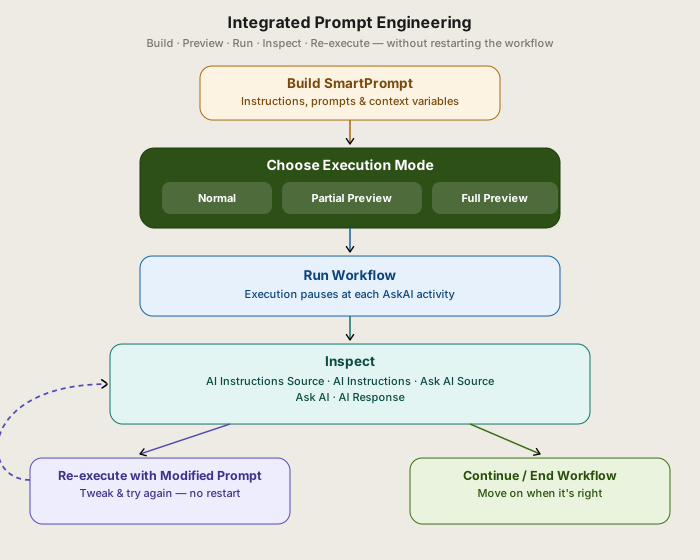
Build, preview, run, inspect, and re-execute — all in one loop, with no need to restart the workflow to try again.
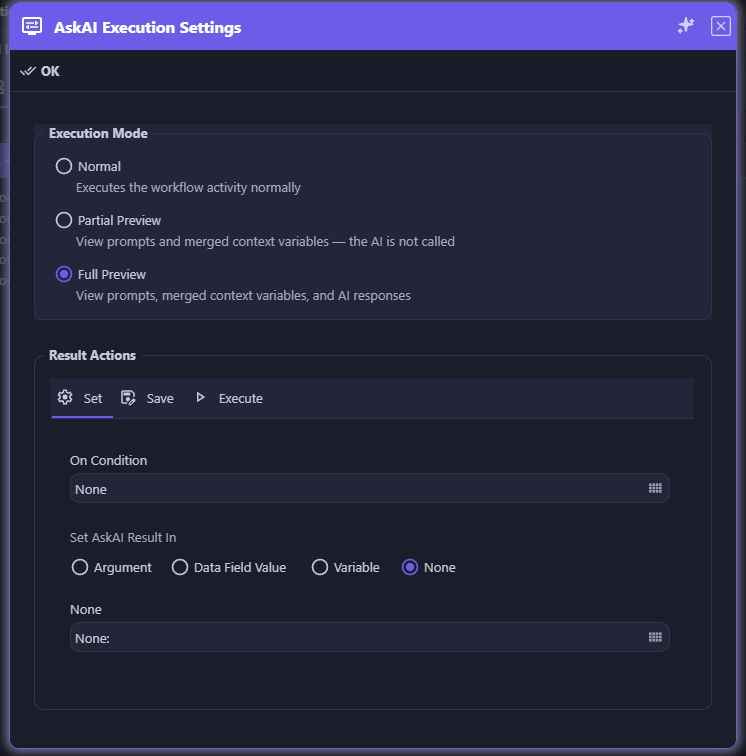
Choose Normal for production, Partial Preview to check merged prompts and context for free, or Full Preview to see the AI's actual response before committing.
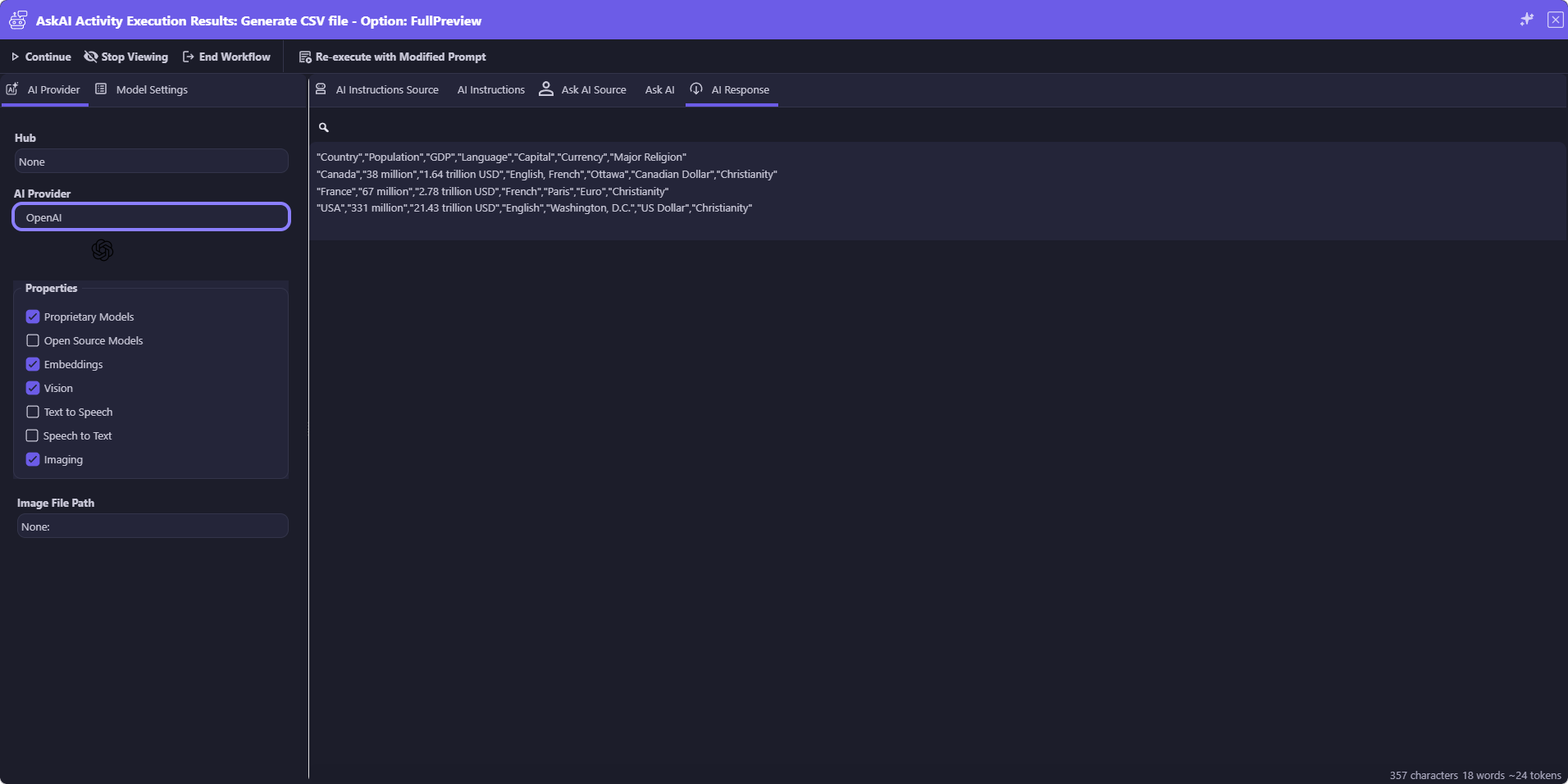
Execution pauses at each AskAI activity — inspect every tab, then Continue, Stop Viewing, End Workflow, or Re-execute with Modified Prompt to tweak and try again instantly.
Replace dozens of workflow activities with a single, table-driven AI execution chain — where every row gates, evaluates, and acts with full enterprise guardrails.
 The Orchestration Sprawl
Multi-step AI reasoning has traditionally meant wiring together 20 or more individual orchestration activities — branching conditions, AI calls, result evaluations, and action executions.
 One Chain, One Readable Table
The AskAI Action Chain collapses all of it into a single workflow activity. Each row of its configuration table is a complete AI-driven pipeline:


Chain any number of rows to build sophisticated, multi-turn AI reasoning — all in sequence, all no-code, all fully auditable.
What once required 20+ orchestration activities — branching conditions, AI calls, result evaluations, action executions — now lives in a single, governable workflow activity. Configure in minutes. Maintain in seconds.

Each row in the chain builds on the last. The AI result from row 1 becomes context for row 2's prompt, which feeds row 3 — creating a true automated dialog between your workflow and AI. This is agentic reasoning without the complexity of building an agent from scratch.

Every row is double-gated. The Pre-Condition ensures the AI is only invoked when relevant — protecting tokens and performance. The Post-Condition evaluates the AI's response before any action fires, ensuring every decision meets your criteria before it touches your data.
Every row handles both outcomes. When the Post-Condition is true, the configured action fires. When false, the else action fires — or the row skips and the chain continues. No unhandled cases, no silent failures. Every path is explicit and auditable.

A non-technical stakeholder can read an AskAI Action Chain table and immediately understand what the workflow does. Business analysts, compliance officers, and auditors can review, verify, and sign off on AI-driven logic without touching a single line of code or deciphering a branching diagram.
Every element of the chain draws from your existing appRules library. Saved SmartPrompt Builder prompts, saved Conditions, and saved Actions plug directly into each row — so the investment you've made in your appRules configuration compounds with every chain you build.

One activity. One configuration record. One version history. One audit trail. The AskAI Action Chain makes complex AI orchestration as governable as a simple database query — critical for financial services, healthcare, insurance, legal, and any environment where AI decisions must be explainable and compliant.

The AI never directly modifies your data, triggers your systems, or makes unilateral decisions. Every AskAI result is evaluated by a Post-Condition before any Action fires. The separation of AI reasoning from action execution keeps every operation safe, traceable, and fully under enterprise control.

Each chain row runs a complete four-stage pipeline: Pre-Condition → AskAI Prompt → Post-Condition → Action

Traditional approach: 20+ individual activities, branching diagrams, hard to read and maintain

AskAI Action Chain: the same kind of logic in one composite activity — here, a five-row Customer Record Data Quality Pipeline — readable, governable, maintainable

AskAI Action Chain: Customer Record Data Quality Pipeline — 5 rows orchestrating record validation, field checks, duplicate detection, quality scoring and certification
AskAI Action Chain Use Cases — Across Every Industry
Any workflow that requires sequential AI reasoning, conditional evaluation, and action execution is a perfect fit for the AskAI Action Chain. A few examples across industries:
 Data Quality
Verify record existence and completeness → detect missing, malformed or inconsistent field values → identify duplicate or near-duplicate records → score overall data quality and generate remediation recommendations → automatically certify clean records or trigger a targeted remediation workflow.
 Job Applicant Evaluation
Verify application completeness → evaluate skills against role requirements → generate tailored interview questions → score responses and recommend a hiring decision — automatically, end to end.
 Medical Pre-Authorization
Confirm record completeness → assess clinical criteria against payer guidelines → draft an authorization justification letter → submit automatically or route to a clinician for review.
Insurance Claims Triage
Pre-screen claim type → assess damage description for fraud indicators → auto-approve low-risk claims or escalate → generate a plain-language AI summary for the adjuster.
Contract Review & Routing
Identify contract type and key obligations → flag non-standard clauses → assess specific legal risks → route to legal with an AI-generated risk summary or auto-approve standard agreements.
 Customer Escalation Routing
Classify ticket sentiment and urgency → identify account tier and revenue risk → route high-value customers to senior support with an AI briefing or place in standard queue.
 Supplier Onboarding
Score financial stability from submitted documents → check for compliance and sanctions red flags → trigger full onboarding workflow for qualified suppliers or send disqualification notice.
 Regulatory Filing Review
Check filing completeness against a regulatory checklist → identify gaps and non-compliant sections → generate a specific deficiency notice → send automatically to the filer.
 Student Academic Intervention
Detect grade drops → analyze performance patterns across subjects → identify specific learning gaps → automatically enroll in targeted resources or flag for counselor intervention.
Turn Complex AI Orchestration Into a Single, Readable Table
Your enterprise workflows already contain the intelligence — patient records that need clinical evaluation, applicants awaiting skills assessment, contracts requiring legal review, claims demanding fraud analysis. The appRules AskAI Action Chain transforms that complexity into a single, governed, no-code table where AI reasoning, conditional logic, and action execution work in concert. Replace sprawling workflow diagrams with a configuration any stakeholder can read and any developer can maintain. No coding required. No limits on complexity. Full GuardRailed enterprise control at every step.
Run several AskAI activities at the same time, and only the ones each record actually needs — so your workflow finishes as fast as its slowest analysis and skips the AI calls it doesn't have to make.
The Multi-Question DilemmaProduction AI workflows rarely ask a single question. Reviewing a loan application package means verifying income, checking identity documents, analyzing cash flow, reviewing the property, and — for self-employed applicants — assessing self-employment income. None of those questions depends on another's answer.
The Parallel Execution SolutionappRules solves both problems with two building blocks:
Put them together and a single Parallel block fans out to several analyses at once, skips the ones a given record doesn't need, and hands every result to the next activity — through workflow variables, or directly from each activity's ExecutionResults.
And because every thread is a complete AskAI activity, each analysis can run on the model best suited to it — so one Parallel block can put several specialized models to work on the same record at once.
A Parallel activity fans out to multiple AskAI analyses
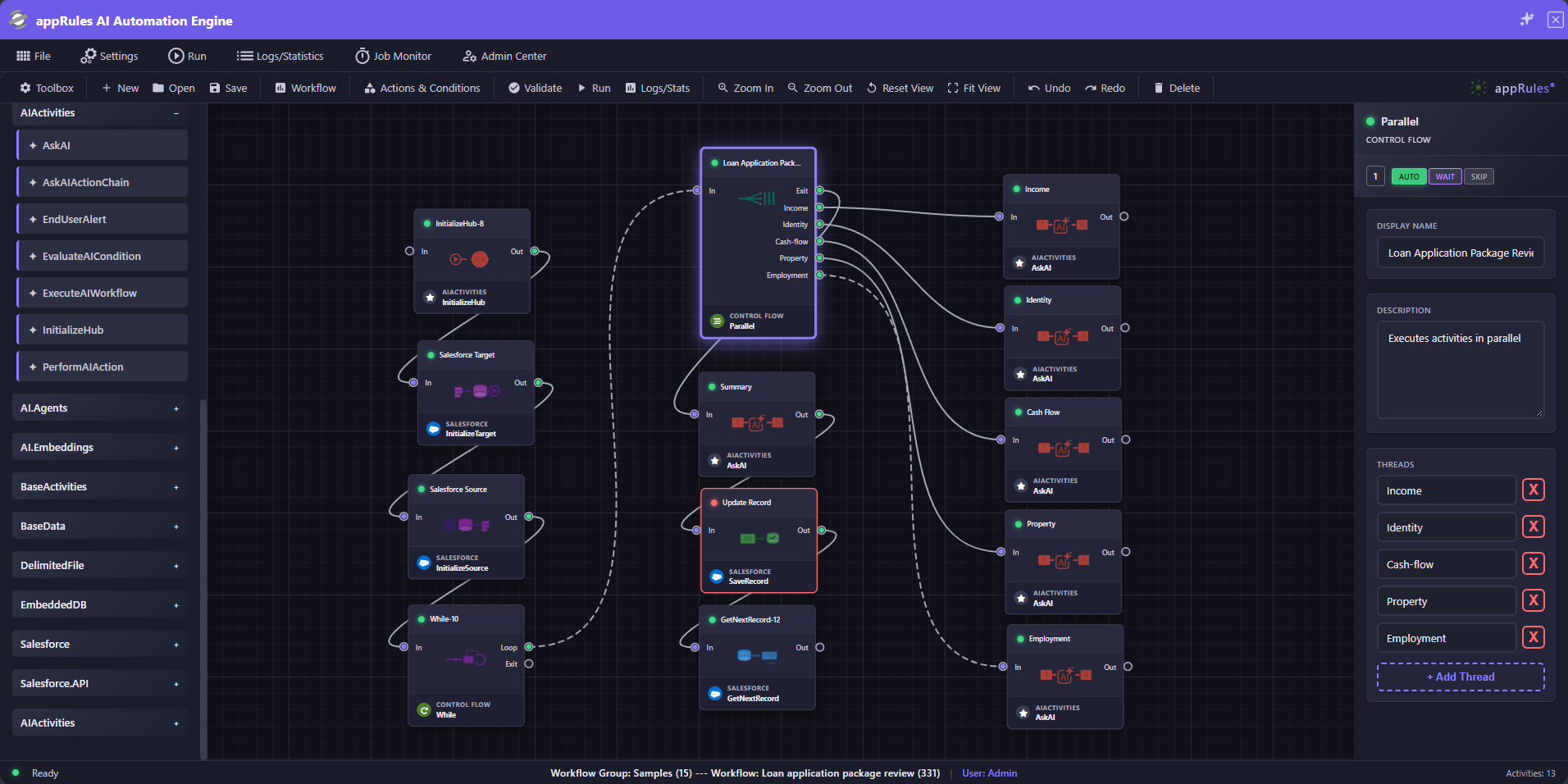
Loan Application Package Review: one Parallel activity, five named threads, and five AskAI analyses — Income, Identity, Cash Flow, Property, and Employment — followed by a Summary AskAI activity and a Salesforce SaveRecord step. Click to enlarge.
A Parallel activity launches all of its threads at once, then waits for every one of them to finish before the workflow moves on. The block takes as long as its slowest analysis — not the sum of them all.
Each AskAI activity chooses its own AI Provider and model. In the loan review, the identity check can use a vision-capable model to read ID documents, the cash-flow analysis a strong reasoning model, and routine income verification a fast, low-cost model — while a thread that handles sensitive personal data can run on a local model that never leaves your network. Match capability, cost, and data residency to each requirement instead of forcing one model to do everything.

Each thread connects to a complete AskAI activity, configured independently — its own SmartPrompt, its own settings, and optional Model Cross-Validation on the analyses where accuracy matters most. An income review and a document-consistency check never have to share a prompt.
Every AskAI activity has an optional Execution Condition. When it isn't met, the activity doesn't run — no AI call, no tokens, no waiting. In the loan review, the self-employment analysis runs only for applicants who are self-employed. Each activity can re-evaluate its condition or reuse the existing result, and ticking Negate runs it when the condition is false instead — no second condition required.
The Select Condition dialog draws from the same reusable, named conditions used across appRules — your own, like a self-employed-applicant check, alongside built-ins such as DefaultTrue, DefaultFalse, LastResultTrue, and LastResultFalse. Define a condition once, reuse it on any activity, and open Actions & Conditions straight from the dialog.

When the join completes, the next activity can read every analysis from workflow variables or directly from each activity's ExecutionResults. In the loan review example, a Summary AskAI activity consolidates the findings, and a Salesforce SaveRecord activity updates the loan application record.
AskAI Execution Condition
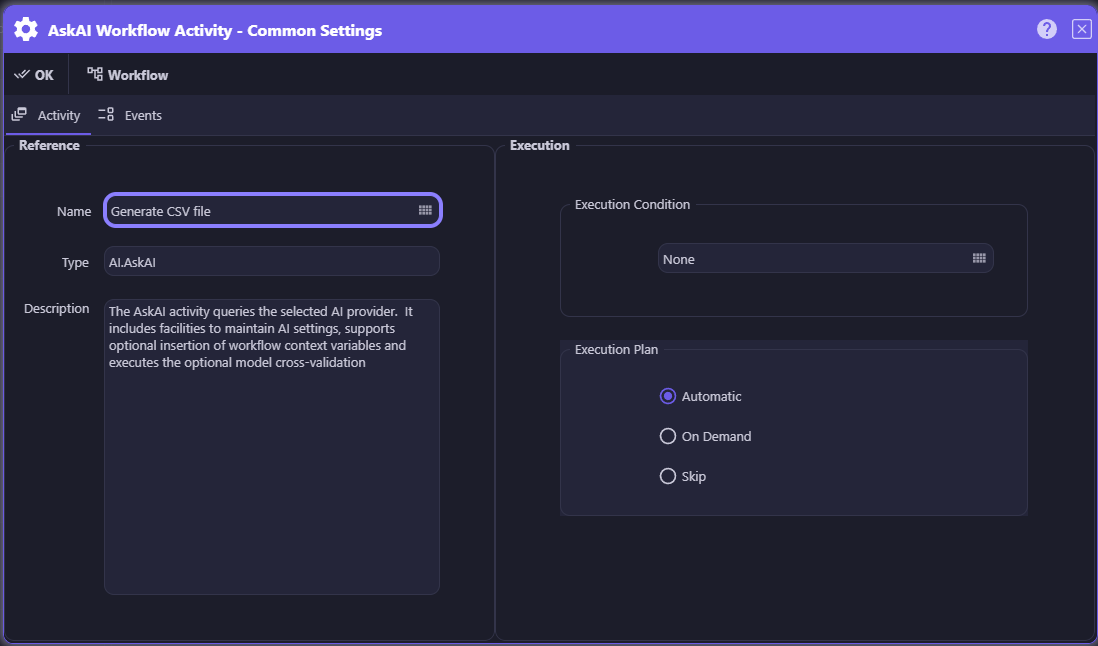
Select Condition
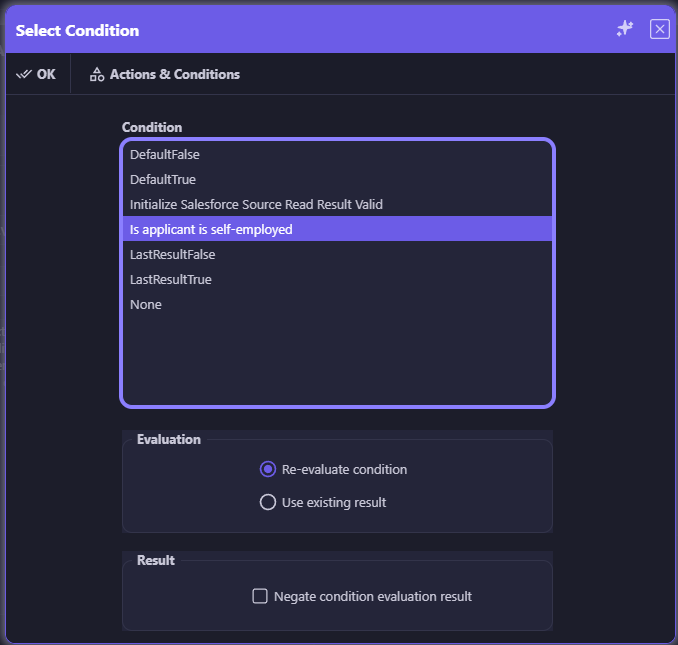
Every AskAI activity has an optional Execution Condition. The Select Condition dialog offers the same reusable Conditions Matrix used across appRules, with options to re-evaluate the condition or use its existing result, and to negate the outcome. Click either screen to enlarge.

Three Different Questions, Three Different Tools
Parallel AskAI, the AskAI Action Chain, and Model Cross-Validation solve different problems. The Action Chain runs a table of rows in order, each one a complete pre-condition → prompt → post-condition → action pipeline. Model Cross-Validation asks one question of several models to build trust in the answer. Parallel AskAI asks several different questions at once — each only when it's needed — to save time and cost. And where Large Scale & Long-Running Jobs spreads many workflow runs across job servers, Parallel works inside a single run.

AI Powered Decision Tables: Next-Generation decision logic that combines traditional rule-based precision with generative AI intelligence
The future of enterprise decision automation—where deterministic business rules meet the dynamic intelligence of generative AI.
appRules.AI introduces a powerful capability that empowers enterprise decisioning: AI Powered Decision Tables. This innovative feature seamlessly integrates generative AI directly into traditional decision table logic, enabling your business rules to transcend rigid if-then structures and embrace intelligent, context-aware decision making.
Combine the precision and auditability of traditional decision tables with the nuanced understanding and adaptability of generative AI—getting the best of both worlds in a single, unified decision framework.
Enable decision tables to understand natural language conditions, interpret complex scenarios, and make intelligent determinations that would be impossible or impractical to code with traditional rule logic alone.
Handle edge cases, ambiguous situations, and evolving business conditions without constantly rewriting rules. Let AI intelligently interpret conditions while maintaining full control over outcomes and actions.
AI-powered logic integrates naturally into your existing decision table workflows—use it for specific conditions that benefit from intelligent interpretation while keeping deterministic rules where needed.
Dramatically reduce the maintenance burden of complex decision logic. As business conditions evolve, AI-powered tables adapt intelligently without requiring extensive rule rewrites or version updates.
Master the complexity of AI with programmable precision—where no-code meets unlimited extensibility.
AI interactions generate diverse outputs across varying formats, creating edge cases that demand sophisticated handling. appRules.AI Extension Workflow Activities deliver complete programmatic control over every phase of your AI workflow, empowering you to implement custom logic in your preferred programming language while leveraging our comprehensive libraries.
Transform standard AI workflow activities into intelligent, adaptive processes that handle real-world complexity with elegance and precision.
Enhance query quality before AI processing. Validate inputs, enrich context, transform data formats, apply business rules, and prepare optimal query parameters—ensuring every AI interaction starts with the highest quality input.
Take full command of AI results. Parse complex outputs, validate responses, transform formats, implement error handling, route results to business systems, and apply post-processing logic—turning raw AI outputs into actionable business intelligence.
Implement sophisticated business logic tailored to your unique requirements. Handle custom document chunking strategies for legal documents, source code, system logs, or medical records. Deploy domain-specific rules, format-specific handlers, and specialized processing logic—all through powerful extension workflow activities that understand your exact needs.

Build resilient AI workflows with sophisticated error management. Implement intelligent retry strategies, fallback mechanisms, and adaptive error recovery—ensuring your mission-critical processes never fail silently.
Extension activities integrate seamlessly into the Visual Workflow Designer. Drag, drop, and connect custom logic alongside no-code activities—creating sophisticated AI orchestrations that balance simplicity with power.

Extension Workflow Activities: Programmatic control over AI query preparation, result processing, custom logic (including document chunking strategies), and other workflow activities

Named Conditions, tested Actions, verified AI answers, protected secrets — and a tamper-proof record of everything that happened.
Explore Governance →
Every leading AI provider, ready-made and custom agents, enterprise knowledge, and governed access for AI assistants.
Explore AI & Agents →
Every system, every data source — with full read/write connectors driven by one metadata model.
Explore Connectivity & Integration →Run at enterprise scale, with full control over every job, every project, and every deployment.
Explore System Operations →Deploy intelligent, autonomous workflows that deliver results