 System Operations
Run at enterprise scale, with full control over every job, every project, and every deployment.
System OperationsRun at enterprise scale, with full control over every job, every project, and every deployment.
appRules AI Automation Engine isn't a new, unproven layer bolted onto something else — it's the same enterprise-grade platform already running production data integration, migration, and replication workloads today, now extended with agentic AI.
appRules AI Automation Engine is one of several engines built on the same appRules Platform — the same Connectors, Conditions Matrix, Actions Matrix, CRUD & API Workflow Activities, Job Monitor, Logging & Statistics, On-Premise & Cloud deployment options and other features you've seen throughout this page. That shared foundation already powers appRules Integration & Automation Engine, appRules Data Migration Engine, and appRules Data Replication & Synchronization Engine in production today — and appRules Enterprise 360 brings all four engines together in one unified platform, with appRules Developer providing full source code access across the family.

Integration & Automation, Data Migration, Data Replication & Synchronization, and AI Automation all share the same underlying appRules Platform — the same Connectors, Conditions Matrix, Actions Matrix, CRUD and API Workflow Activities, and Job Monitor you've seen throughout this page.

The capabilities that make this AI Automation Engine trustworthy — GuardRailed execution, enterprise-scale job handling, full audit logs — are the same ones already running mission-critical data workloads for existing appRules customers.
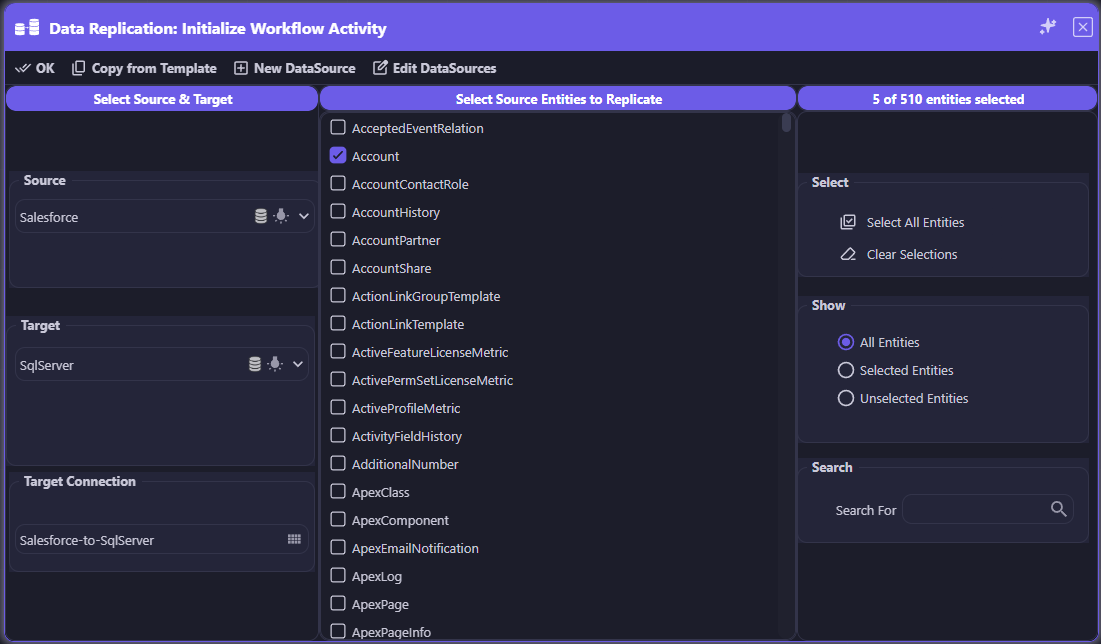
The same appRules platform, doing data replication — Salesforce to SQL Server, entity by entity, with the same Connectors and Conditions Matrix used for AI automation.
The appRules Product Family
Agentic AI workflows, guardrailed and enterprise-ready.
Full-featured, no-code connectors for hundreds of enterprise data sources.
appRules Data Migration EngineEnd-to-end, enterprise-scale migration for billions of records.
appRules Data Replication & Synchronization EngineBidirectional replication, kept current automatically.
appRules Integration & Automation EngineProcess automation, decision tables, and business rules.
appRules Enterprise 360appStrategy's flagship product — all four engines, unified.
Every workflow is routed to the right job server — automatically or by direct assignment — with shared job groups for parallel execution, integrated load balancing, and intelligent caching that keep throughput high and every job under control, no matter its scale or duration.
Most enterprise AI initiatives are designed and demoed against a handful of sample records — then they collapse the moment they meet real production volume. One of the most common reasons enterprise AI projects fail is a lack of intelligent caching and orchestration at scale. appRules solves this at the architecture level. appRules supports multiple job servers, and each workflow can be automatically or directly selected at runtime to run on the job server best suited to its scope, or assigned to shared job groups for parallel execution across large or long-running datasets. Work across those job servers is coordinated by integrated load balancing, so demand is spread evenly instead of piling up behind a single bottleneck, and by a caching layer built on Redis, Microsoft Garnet, and appRules' own purpose-built engine, so shared context is never recomputed. Whether it's a handful of quick workflows or a job running for days or months against hundreds of millions of records pulled from a variety of data sources, appRules keeps every workflow routed, balanced, cached, and visible from start to finish.

appRules supports multiple job servers. Each workflow can be automatically or directly selected at runtime to run on the job server that best matches its scope — from lightweight, quick-turnaround work to large, long-running jobs. Workflows can also be assigned to shared job groups for parallel execution across large or long-running datasets, scaling throughput on demand.

Work is balanced across the available job servers in real time, so no single server becomes a bottleneck while heavy, long-running workflows are underway.

Built on Redis, Microsoft Garnet, and appRules' own caching engine, every workflow shares a common, high-speed context layer — so results already resolved by one job server are instantly available to every other job server.

Some jobs don't finish in seconds or minutes — they run for days or months, processing hundreds of millions of records pulled from a wide variety of data sources. appRules is architected to sustain that scale reliably.

Add job servers to the pool to increase throughput whenever volume spikes, then scale back down when it subsides — matching compute to workload instead of over-provisioning for the worst case.

No black-box batch runs. Every workflow on every job server is tracked from start to finish, with full status, progress, and control — so massive, long-running work stays every bit as governable as a single small workflow.

Build first, configure second: drag and drop workflow activities onto the designer canvas to compose your workflow — no code required.
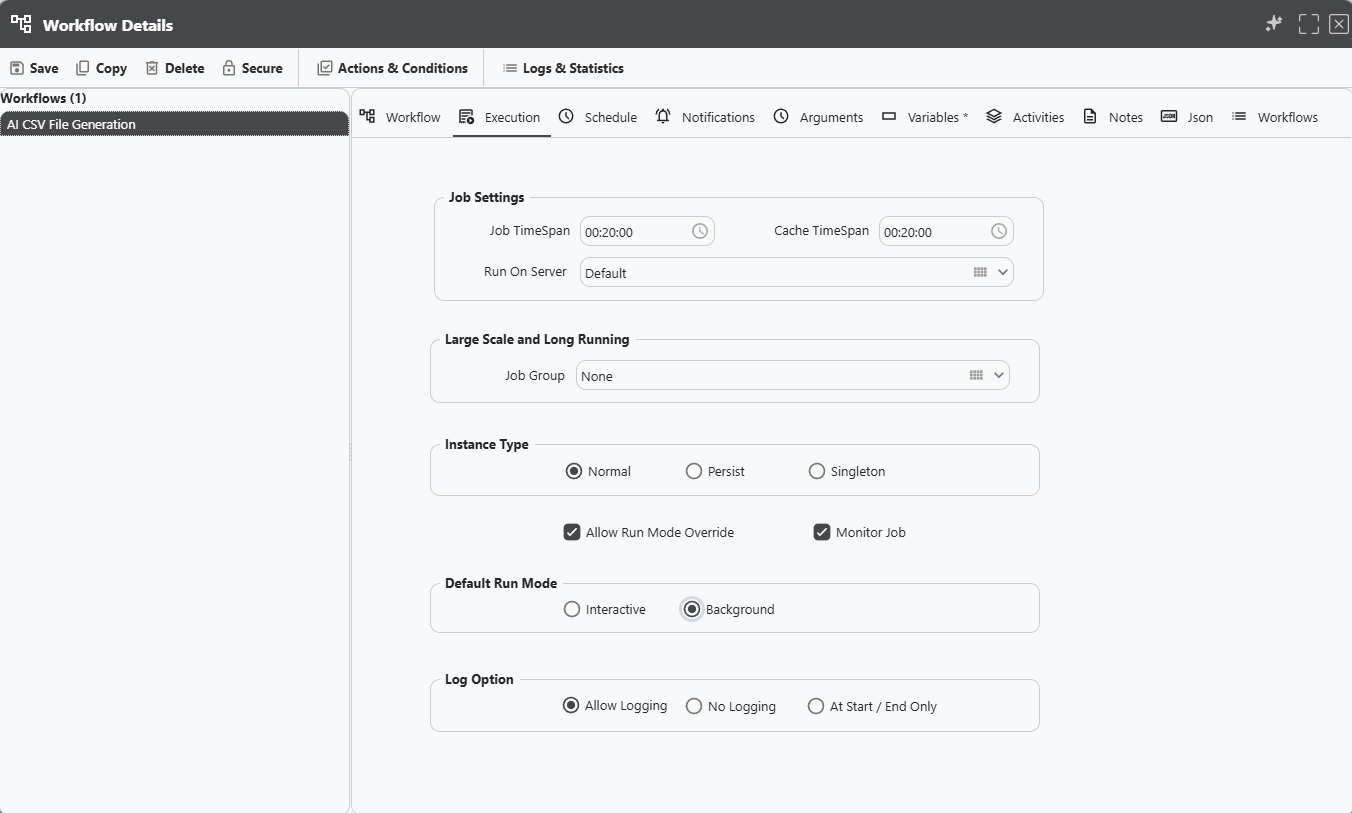
Then dial in exactly how it runs: assign the job server, set job and cache timespans, join a shared job group for large-scale parallel execution, choose the instance type, and control logging — all from one Execution settings panel. Other panels round out full workflow governance — Actions & Conditions, Logs & Statistics, Schedule, Notifications, Arguments, Variables, and Activities, plus Notes, Json, and workflow-management housekeeping.
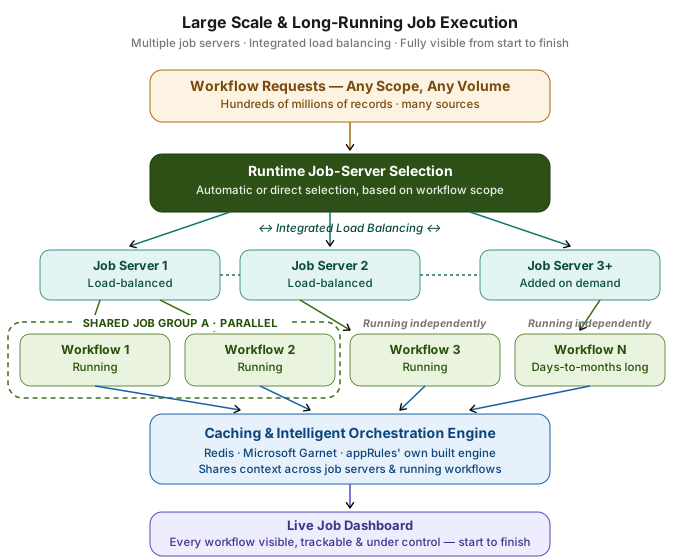
Workflows are automatically or directly routed to job servers selected by scope, balanced by integrated load balancing. Some workflows share a job group for parallel execution while others run independently, all coordinated by a Redis / Microsoft Garnet / appRules caching and orchestration layer, with every workflow tracked on a live dashboard.
Scale Without Losing Control
Where many enterprise AI projects stall at production volume, appRules is engineered for it — multiple job servers, integrated load balancing, and intelligent caching mean throughput scales on demand while every workflow, however large or long-running, stays fully visible and fully governed.
Every environment, every user, every workflow — appRules organizes them into project databases, and appRules Admin Center gives you one console to create, monitor, and operate every one of them.
A project database is a complete, self-contained appRules environment — its own Environments, Users, Connections, Data Sources, Job Groups, Workflows, and Actions & Conditions, all bundled together. Most organizations don't run just one: a typical installation juggles a development sandbox, a staging copy, a client-specific instance, and a production system, each with its own data and its own risk profile. appRules Admin Center is where a system administrator oversees all of them from a single screen — the Project Database Directory lists every project database side by side, regardless of whether it runs on an embedded database or SQL Server, each independently securable and independently schedulable. Need a new one? Create New Project Database can build it from scratch, or copy it — schema and data — from any existing project database, even across database engines: spin up a production Azure SQL instance from a lightweight embedded test database, and every table for workflows, data sources, environments, and users is created and populated automatically. Once it's running, Job Monitor shows live CPU, memory, and network utilization alongside every active task — the Scheduler Service, the WebAPI Service, and any running workflow instance — and drilling into any one of them opens Workflow Instance Job Details, where you can pause, cancel, or inspect a running job in real time, not just watch it.

See every project database your installation runs — embedded or SQL Server, development or production — in one list, each with its own connection string, credentials, and scheduler participation.

Create a new project database from scratch, or copy one from an existing project database — including across database types. Promote an embedded test database straight into Azure SQL, with every table and row created automatically.
Set the active project database and active workflow, then reach Environments, Users, Connections, Data Sources, Job Groups, Workflows, and Actions & Conditions — the complete configuration surface of that project database, in one menu.

CPU, memory, and network utilization gauges sit right alongside a live task list — the Scheduler Service, the WebAPI Service, and every running workflow instance — so you see server health and workload together, not in separate tools.

Drill into any running instance for full detail — reference, user, elapsed time, state — and Pause, Cancel, or Set Workflow Value while it's still running, without waiting for it to finish or fail.

WebAPI Server Definitions and Command Prompt Job Definitions define how and where workflows actually get served and executed — configured once, for every project database that needs them.

Master Admin Users, Site Settings, Project Database Master Settings, License Manager, and Password Reset Email Templates — the housekeeping that spans the whole installation, not just one project database.
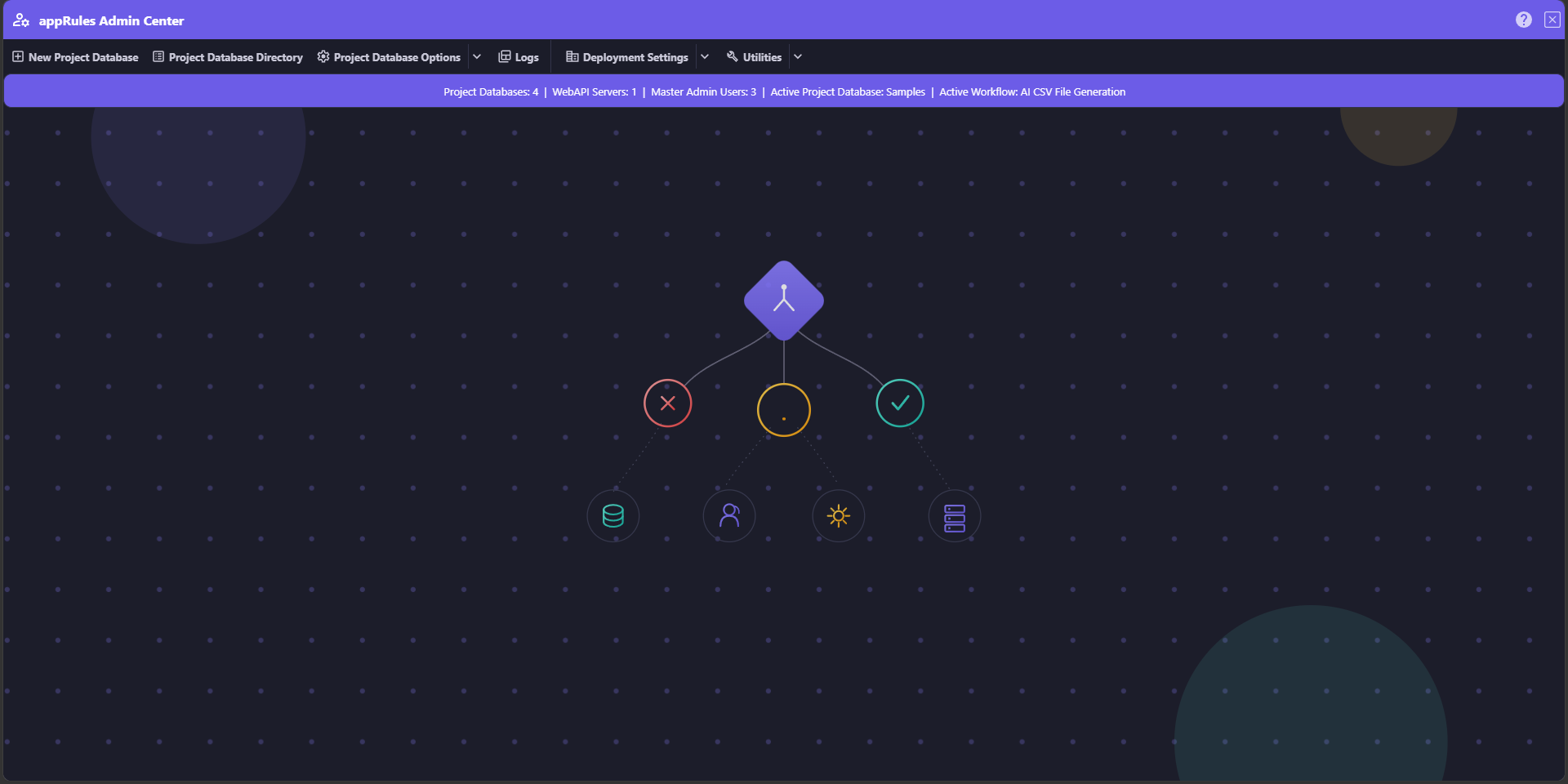
The appRules Admin Center dashboard: project database counts, WebAPI servers, master admin users, and the active project database and workflow, all visible at a glance.
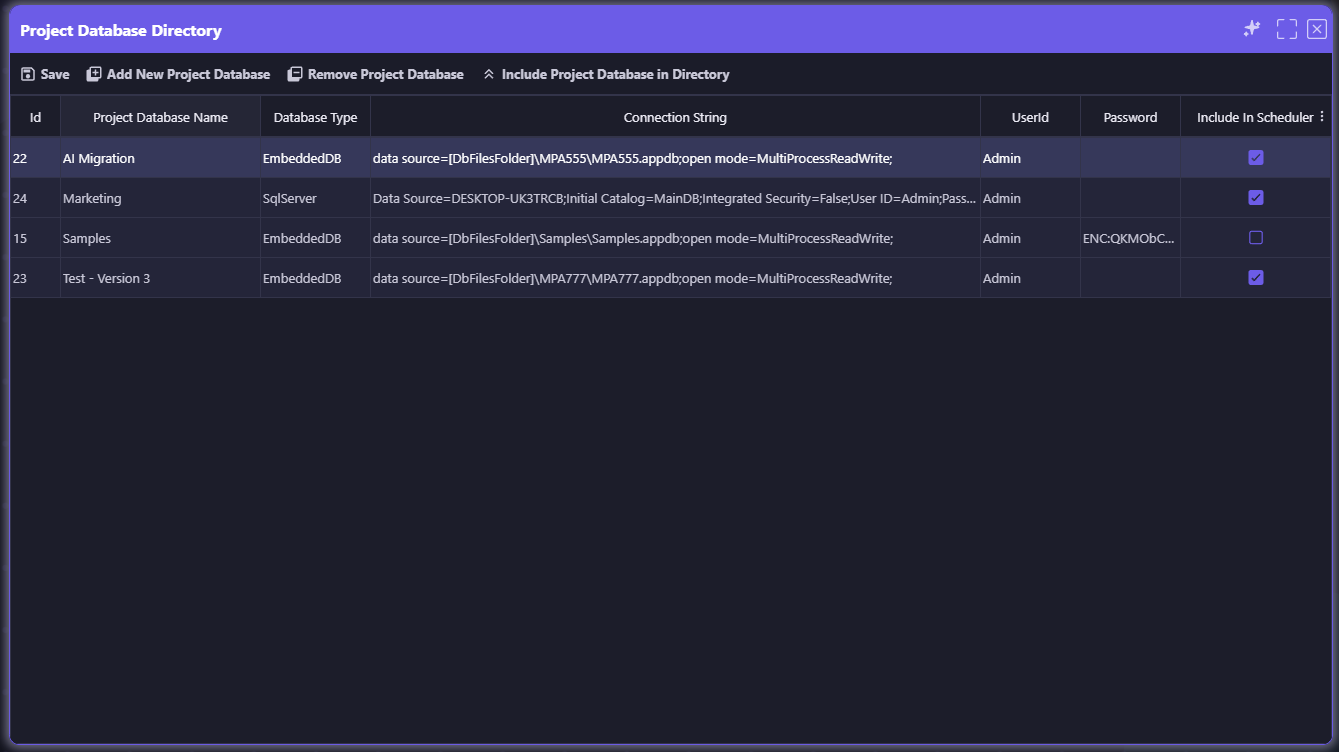
Project Database Directory: every project database side by side — embedded or SQL Server — each with its own credentials and scheduler participation.
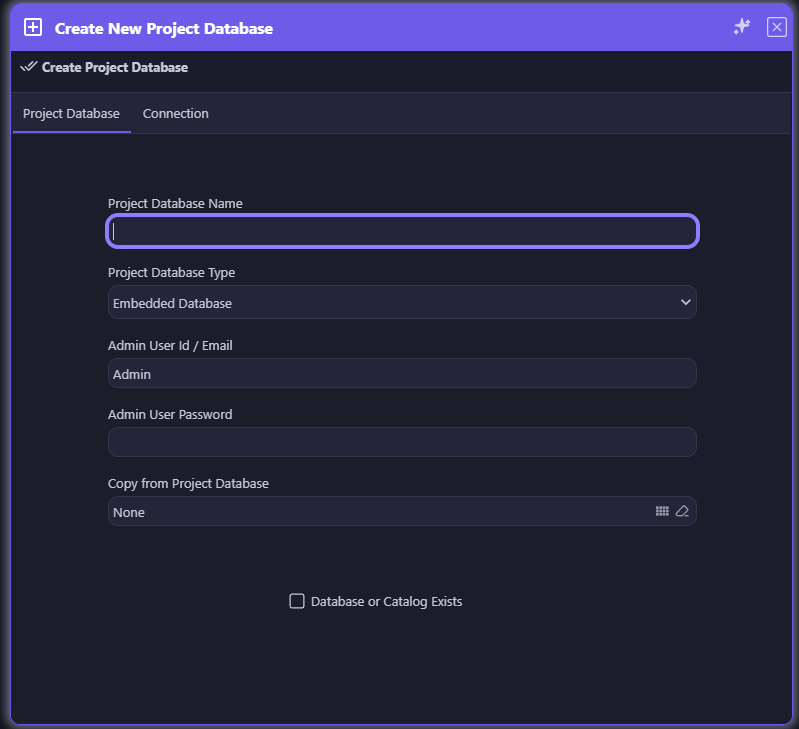
Create New Project Database: build one from scratch, or copy an existing project database — schema and data — into a new database type entirely.
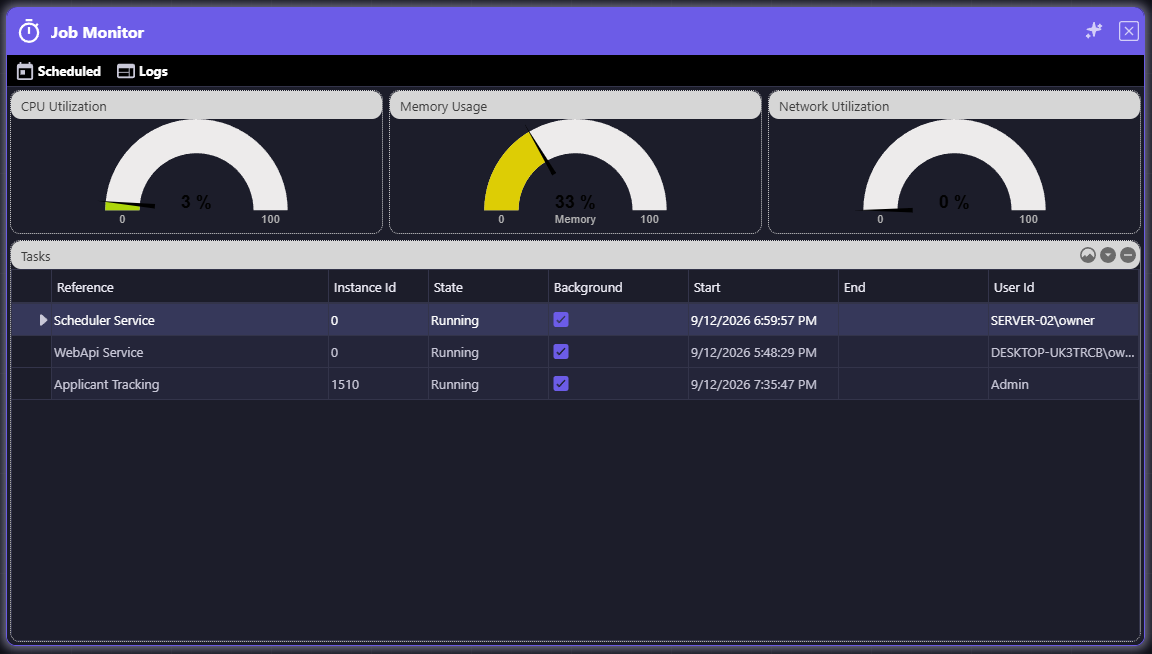
Job Monitor: live CPU, memory, and network utilization alongside every active task — the Scheduler Service, the WebAPI Service, and running workflow instances.
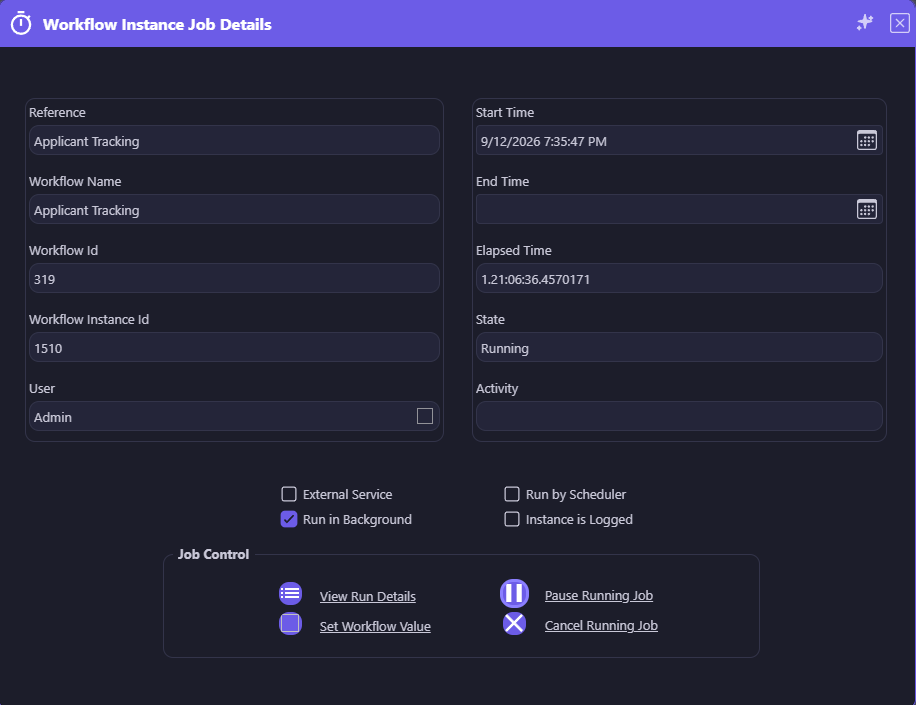
Workflow Instance Job Details: drill into any running job for full detail, then Pause, Cancel, or Set Workflow Value in real time.

Administered Centrally, Secured the Same Way
Admin Center doesn't bypass appRules' security model — Master Admin Users, connections, and project database credentials all carry the same Secure protection used everywhere else in appRules. One console to operate the platform; the same lock on everything sensitive inside it.

Named Conditions, tested Actions, verified AI answers, protected secrets — and a tamper-proof record of everything that happened.
Explore Governance →Design workflows visually, build prompts from real context, and orchestrate AI step by step — in no code, low code, or source code.
Explore Design & Build →
Every leading AI provider, ready-made and custom agents, enterprise knowledge, and governed access for AI assistants.
Explore AI & Agents →
Every system, every data source — with full read/write connectors driven by one metadata model.
Explore Connectivity & Integration →Deploy intelligent, autonomous workflows that deliver results