 Connectivity & Integration
Every system, every data source — with full read/write connectors driven by one metadata model.
Connectivity & IntegrationEvery system, every data source — with full read/write connectors driven by one metadata model.
AI is only as good as the data behind it. appRules.AI is GuardRailed from the ground up—built on a comprehensive enterprise data platform that connects, governs, and prepares your data before it ever reaches an AI model.
Everyone is talking about the importance of clean data for AI—appRules.AI is built to deliver it. With native connectivity spanning 36 data source categories and hundreds of connectors—from CRM and ERP to Databases, Data Warehouses, Cloud Storage, Collaboration tools, Financial systems, and beyond—appRules.AI connects directly to the systems your enterprise already runs on. For most data sources, we provide powerful out-of-the-box CRUD and API connectors, eliminating months of custom integration work and giving your workflows immediate, governed access to the data that matters.

From CRM and ERP to Databases, Cloud Storage, Data Quality, Data Warehouse, Collaboration, and Financial systems, appRules.AI connects to virtually every corner of your enterprise data landscape.

Most connectors ship ready to use, with both Workflow Activity and direct API variants—so you're reading, writing, updating, and deleting records in minutes, not months.

Every connection flows through appRules.AI's governance layer, ensuring the data feeding your AI workflows is accurate, consistent, and trustworthy before a single prompt is ever executed.

Clean, connected data isn't a nice-to-have for AI—it's the difference between reliable automation and unpredictable results. appRules.AI's data platform is the bedrock every other feature is built on.

Select Connectors: Browse 36 enterprise data source categories and enable out-of-the-box CRUD and API connectors for the systems your business already runs on
Built by a team that has engineered on Microsoft technology for more than 20 years, appRules connects to the Microsoft stack end to end — business applications, Microsoft 365, the data platform, AI services, identity, and the developer tools your teams already use. And it brings the same depth to every other ecosystem you run.

Dynamics 365, Dynamics CRM, Dynamics 365 Business Central, Dynamics NAV, and Dynamics GP — with full read/write, metadata-driven connectors.

SharePoint, Excel, Excel Online, SharePoint Excel Services, Teams, Exchange, Office 365, OneDrive, OneNote, Microsoft Project, and Access — plus Microsoft Planner through MCP.

SQL Server (including SQL Server 2025), Azure SQL, Microsoft Dataverse, Azure Synapse, Azure Cosmos DB, ADLS Gen1 and Gen2, Azure Table Storage, and Azure Analysis Services — plus Power BI XMLA and Azure Data Catalog through MCP.

Azure AI as an AI provider, Microsoft Phi models, Azure AI Search as a vector store, Bing web search, and Microsoft Garnet caching. The appRules MCP Server connects over MCP, the open standard supported by clients such as Microsoft Copilot Studio.

AI File and Folder Agents read Word, Excel, PowerPoint, Visio, and Outlook (.msg) files, and an Excel-compatible financial function library brings familiar formulas into every workflow.

appRules Developer is a real Visual Studio solution — Solution Explorer, IntelliSense, and Git integration — and Function actions call directly into your own .NET assemblies. Azure DevOps and GitHub are available through MCP.

Sign in with Microsoft through OpenID Connect. Connect to Active Directory and Azure AD. Run appRules on Windows desktop, Windows Server with IIS, or Azure.
The same depth extends to Salesforce, SAP, Oracle, Workday, Google, AWS, Snowflake, and hundreds more — see the Integration Connector Directory and the MCP Connector Directory.
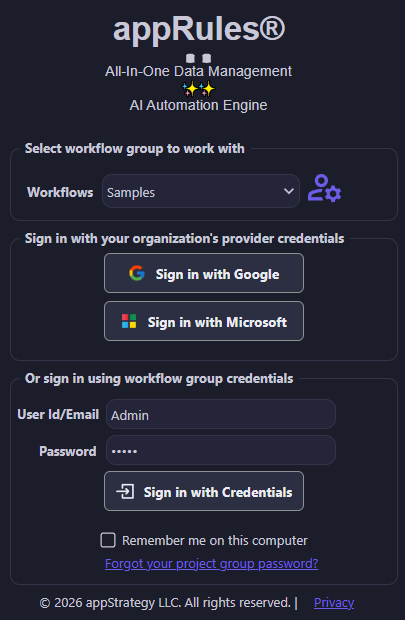
appRules supports sign-in with your organization's provider credentials through OpenID Connect — including Sign in with Microsoft — alongside Sign in with Google and workflow group credentials.
Your people use the identities they already have, and appRules fits into the way your organization manages access.
Microsoft's CEO says to assume every AI model is compromised. Read our take: Contain the Model →
appRules connects to a vast and ever-growing library of data source types — and for every one of them, it captures and manages rich, living metadata: entities, columns, foreign keys, connections, picklists and API calls. That same metadata drives both the design-time experience and the runtime engine.
Most platforms treat metadata as a one-time setup step — you map a schema once, and from then on your workflows and prompts are on their own. appRules treats metadata as a living asset. Every connected data source, from Salesforce and Dynamics 365 to SQL Server, PostgreSQL, Snowflake, SharePoint, HubSpot, ServiceNow, Google Drive, and hundreds of others, is fully inventoried: every entity, every column, every foreign key, every primary key, every picklist and its valid entries. Click Refresh Metadata and appRules re-syncs against the live source, so the model never drifts out of date. That single metadata model is then reused everywhere — by the workflow designer to power field pickers, queries, and validation, by conditions and actions to know what's valid and select the right data records before a workflow ever runs, and by appRules.AI itself to ground prompts, decision tables, and AI agents in your actual data shape instead of a guess.
Salesforce, Dynamics 365, Dataverse, SQL Server, PostgreSQL, MySQL, Oracle, Snowflake, SharePoint, HubSpot, ServiceNow, Google Drive, OneDrive, Excel, Zoho CRM, and hundreds upon hundreds more — every one captured in the same metadata model.
Every entity's columns, foreign keys, and primary key are discovered and cataloged automatically — a single connected source can surface hundreds of entities, fully mapped, without hand-built documentation.
One data source definition, many connections. Default, Development, Production, and Test environments can each point to a different underlying connection — without touching a single workflow.

Every picklist and its valid entries are captured per culture, so conditions, validations, and AI reasoning all work from the real set of allowed values — never a hard-coded, out-of-date list.

The same metadata that powers field pickers, queries and validation in the designer also drives runtime: condition evaluation, action execution, data record selection, and AI grounding all read from the same live catalog.

Schemas evolve. A single Refresh Metadata action re-syncs entities, columns, foreign keys, picklists, and API calls against the live source, so your metadata model never falls behind reality.

Data Sources, AI Providers, Embedding Generation Services, Embedding Storage Services, Web Search Services, and Tools are all defined and stored as metadata — so development proceeds against those definitions without ever requiring a live connection. Credentials and connectivity are only needed when a workflow reaches Test or Production.
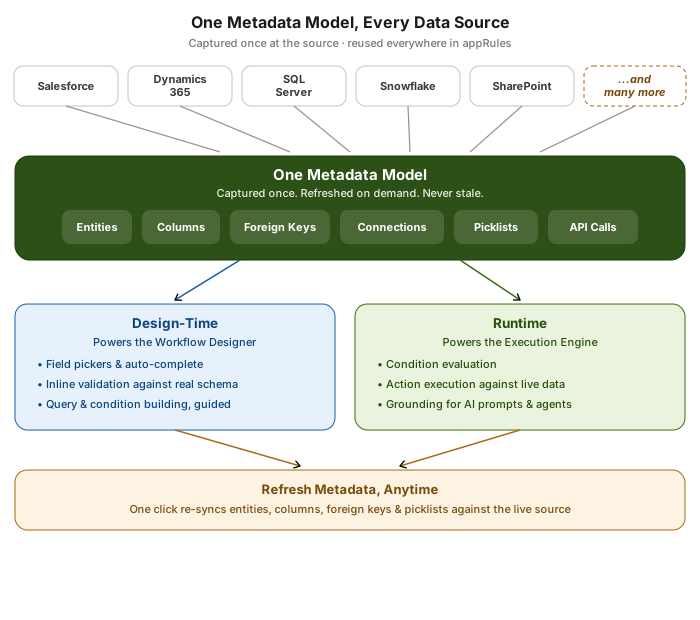
A vast library of data source types all feed the same metadata model — entities, columns, foreign keys, connections, picklists, and API calls — captured once and reused by both the workflow designer and the runtime engine.
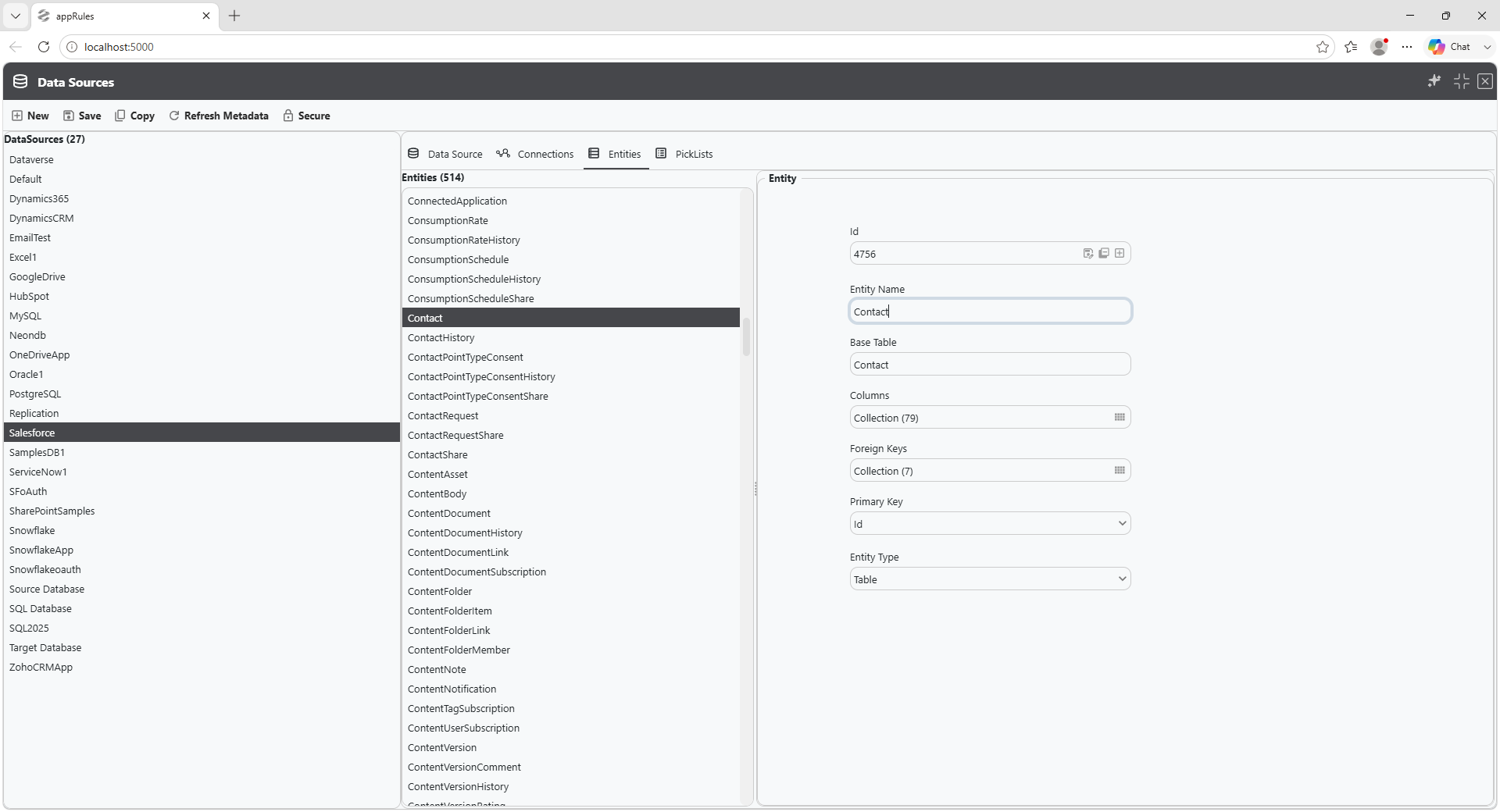
Every entity discovered on a connected data source — here, 510 of them — comes with its full column list, foreign keys, and primary key already mapped and ready to use.
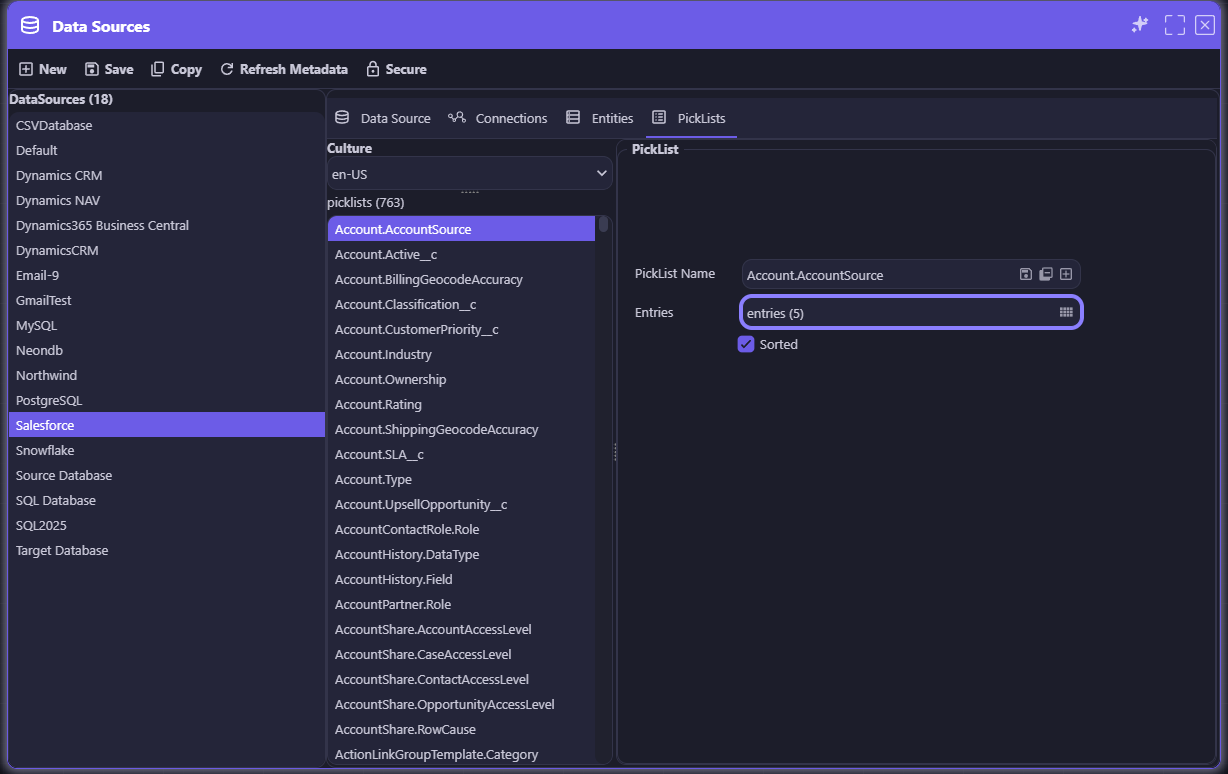
Picklists are captured right alongside entities — here, 763 of them for Salesforce — each with its allowed entries and sort order already resolved, ready to populate a dropdown without a single manual lookup.
Authentication, OAuth, certificates, firewall rules, logging, and proxy settings for every data source your enterprise runs on — defined once, secured centrally, and reused anywhere in a workflow.
Most platforms make you re-enter connection details every time a new workflow needs a data source, scattering credentials across scripts and configuration files. appRules centralizes it instead. Connections is a single console: pick a Connector, name the connection, assign it to an Environment, and configure its Connection Properties — organized into categories like Authentication, OAuth, Cert Authentication, Bulk, Connection, Firewall, Logging, and Proxy. Built-in Test Connection validates it on the spot, and Secure locks down credentials so they never live in workflow logic. Once defined, connections can be used anywhere in the workflow — referenced by name, not re-configured from scratch.
Define a connection once — Dynamics CRM, Salesforce, SQL Server, Snowflake, and more — and reference it by name across every workflow that needs it. No re-entering credentials, no duplicated setup.
Authentication, Bulk, Cert Authentication, Connection, Firewall, Logging, OAuth, and Proxy settings are organized into clear categories, with Expand Categories, Set, and Clear controls for fast, guided configuration.

oAuth and Setup actions walk you through provider-specific authentication flows directly in the console — no external tooling or manual token handling required.

Validate credentials and connectivity with a single click before a workflow ever depends on it — catching configuration issues at setup time, not at runtime.
Every connection can be scoped to a specific environment — Default, Development, Production, Test — and locked down with Secure, keeping credentials out of workflow logic entirely.
Workflows reference Connections by name, not by hard-coded credentials. Pointing a workflow at a new environment or a different instance of the same system is a configuration change, not a redevelopment effort.
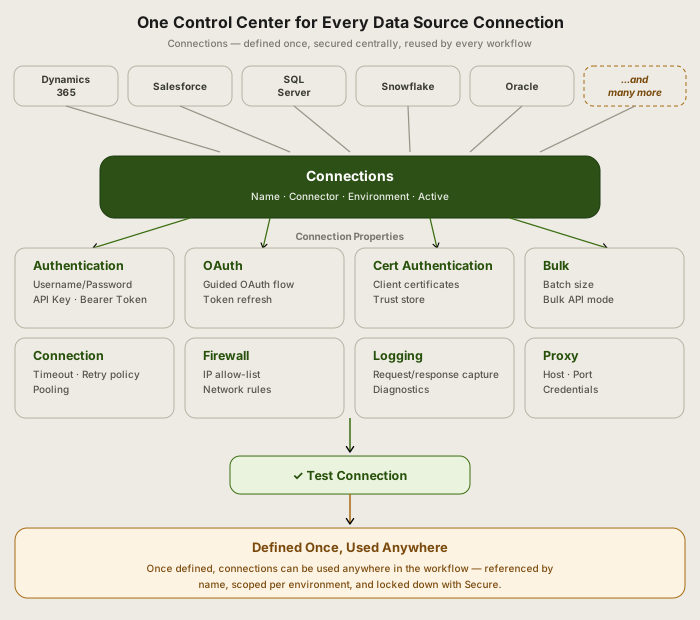
Eight property categories, one console: every Authentication, OAuth, Cert Authentication, Bulk, Connection, Firewall, Logging, and Proxy setting is centralized, tested, and secured — then reused anywhere in the workflow.
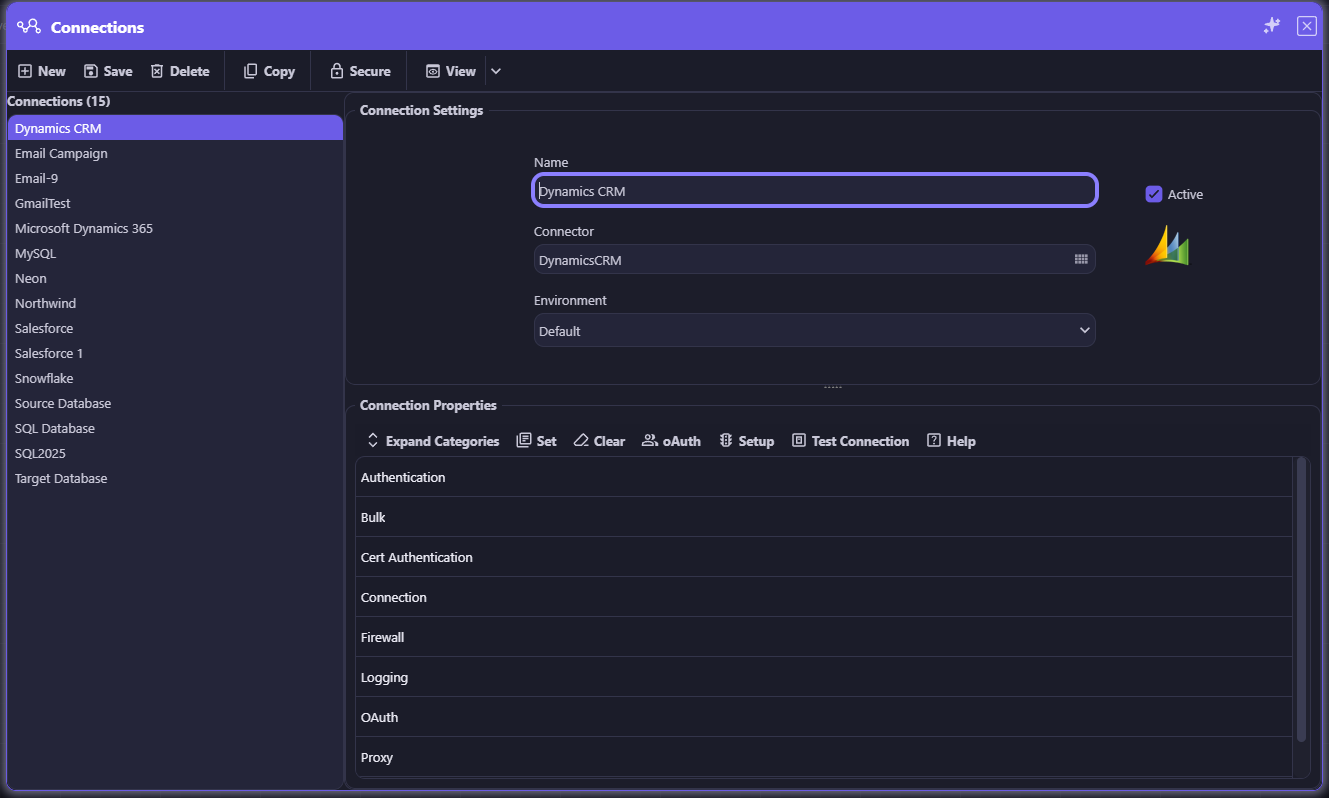
Connections: define a data source connection once — name, connector, environment, and categorized properties — then reuse it anywhere in the workflow.
Model providers, embeddings, vector storage, reranking, web search, and callable tools — every AI dependency your workflows rely on is defined, configured, and secured in one place: appRules AI Settings.
AI-powered platforms usually scatter their AI configuration across code, environment variables, and individual integrations — so switching providers means a redeployment, not a setting change. appRules centralizes it instead. AI Settings is a single console with six categories: AI Provider (20+ providers, from OpenAI, Azure AI, and Anthropic to Amazon Bedrock, Mistral, Google AI, Ollama, and more), Embedding Generation Service, Embedding Storage Service (a dozen-plus vector stores, including Pinecone, Redis, Chroma, Qdrant, and Weaviate), Reranking Service, Web Search Service (Bing, Brave, Google), and Tool — Actions, Conditions, Functions, REST APIs, Scripts, Workflows, and Workflow Activities that AI agents can call directly. Every setting can be scoped per environment and locked down with Secure, and because workflows reference AI Settings by name rather than hard-coding a provider, swapping — or A/B testing — an AI dependency is a configuration change, not a redevelopment effort.
OpenAI, Azure AI, Anthropic, Amazon Bedrock, Mistral, Google AI, Ollama, GroqCloud, HuggingFace, LocalAI, and more — plus specialized variants for image generation, real-time, TTS, and Whisper — all configured the same way.

Pick an embedding generation service, then pair it with any of a dozen-plus vector stores — Pinecone, Redis, Chroma, Qdrant, Weaviate, Milvus, Azure AI Search, PostgreSQL, SQL Server, and more.

Reranking services and web search providers — Bing, Brave, Google — are configured exactly like everything else: pick, configure, secure, done.
Actions, Conditions, Functions, REST APIs, Scripts, Workflows, and Workflow Activities can all be registered as tools that AI agents call directly — no separate integration layer required.
Every AI setting can be scoped to a specific environment — Default, Development, Production, Test — and locked down with Secure, keeping credentials and configuration out of workflow logic entirely.
Workflows reference AI Settings by name, not by provider. Moving from OpenAI to Azure AI, adding a fallback, or trying a new reranker is a configuration change — never a redevelopment effort.
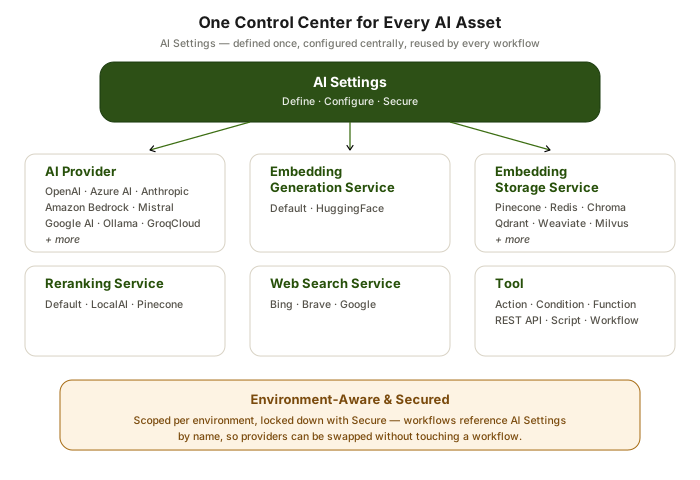
Six categories, one console: every AI Provider, Embedding Generation, Embedding Storage, Reranking, Web Search, and Tool setting is centralized, environment-aware, and secured.
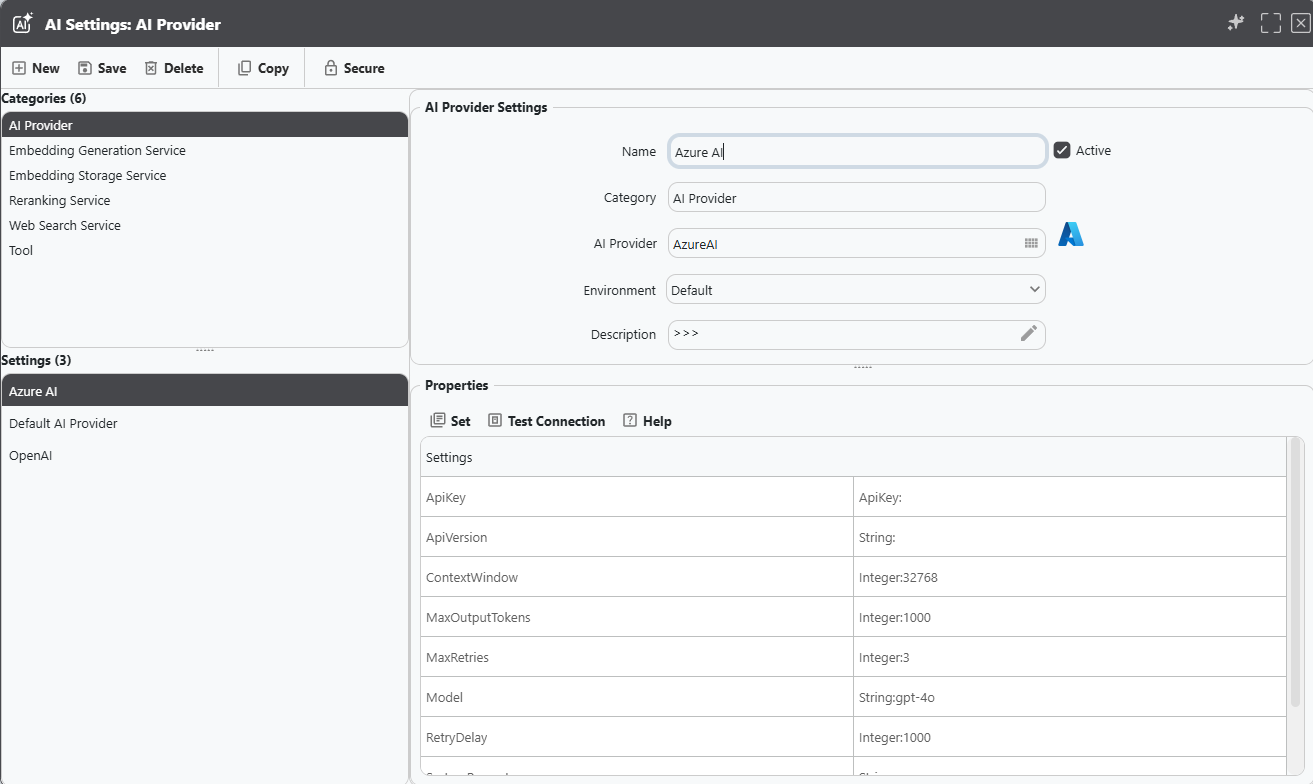
Configure any AI asset — in this case, Azure AI — with its name, environment, and provider/service, then switch to the Properties tab to set model, context window, retry behavior, and API key.
Connect to your entire technology ecosystem with hundreds of pre-built connectors:


 Microsoft Azure
 AWS
AWS
 Google Cloud
 Microsoft Dynamics 365
 Microsoft Dynamics CRM
 Microsoft SQL Server
 Salesforce
 SAP
SAP
 Oracle
 Workday
 Snowflake
 Databricks
...and hundreds more enterprise platforms and data sources
Running on Microsoft? See Comprehensive Microsoft Integration →
Metadata-driven connectors with full read/write support, built into every appRules workflow. Browse every category and see the specific systems, databases, and services appRules.AI connects to out of the box.


Live, governed access for AskAI activities and agents to hundreds of sources through an embedded managed MCP platform.
Contact us if your data source is not in our Integration Connector Directory or MCP Connector Directory. We are constantly updating our connector directories.
Contact UsNamed Conditions, tested Actions, verified AI answers, protected secrets — and a tamper-proof record of everything that happened.
Explore Governance →Design workflows visually, build prompts from real context, and orchestrate AI step by step — in no code, low code, or source code.
Explore Design & Build →Every leading AI provider, ready-made and custom agents, enterprise knowledge, and governed access for AI assistants.
Explore AI & Agents →Run at enterprise scale, with full control over every job, every project, and every deployment.
Explore System Operations →Deploy intelligent, autonomous workflows that deliver results